Vælg en organisation
Load Salesforce Related List Objects of More Than 50 Items if LWC is Enabled With the SFS Mobile App
Udgivelsesdato: Feb 12, 2026
Beskrivelse
For the Lightning Web Component (LWC), the Salesforce Field Service (SFS) mobile app doesn’t support pagination. As a result, the user will be able to load only 50 items in the related list of any object in the SFS mobile app.
Løsning
With Lightning Web Component (LWC) enabled, to be able to load more than 50 items in the related list of any object in the SFS mobile app, the below workaround is available.
The workaround is to install the latest version of the SFS app and in the connected app settings for Android and iOS, add an attribute called RELATED_LIST_LIMIT_OVERRIDES with the API name of the relationship between the parent and child object.
The API name can be found on the child object > relationship field (lookup to parent) > Child Relationship Name.
Users must log out and log in again to test the update.
For example, if you’re trying to load a work step-related list of more than 50 items, you must apply the attribute as configured and demonstrated in the following screenshot which represents the example above.
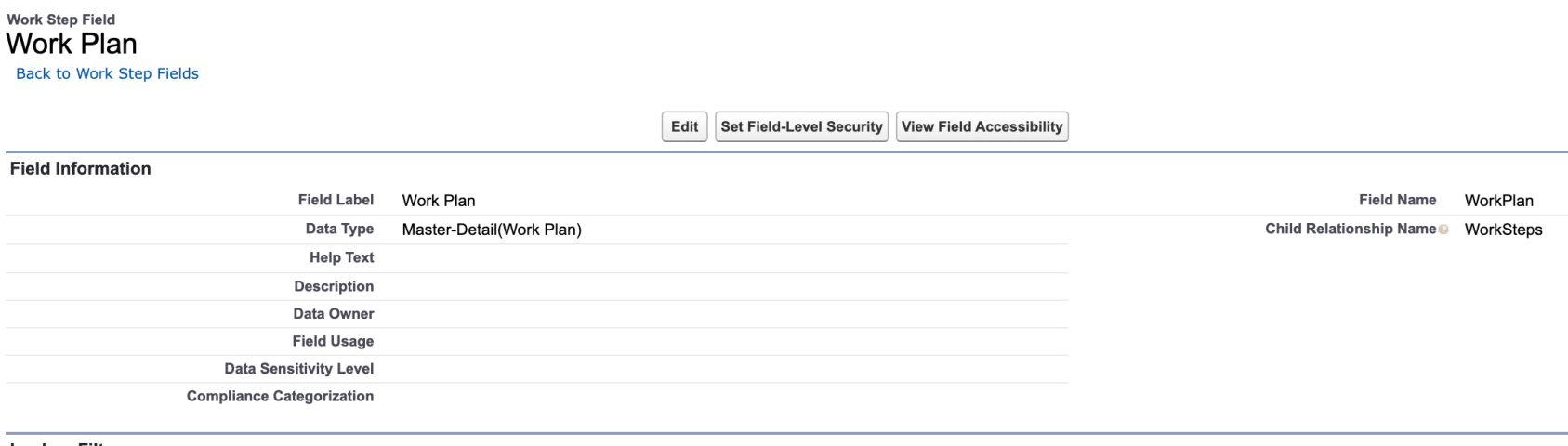
Attribute key: RELATED_LIST_LIMIT_OVERRIDES
Attribute value: WorkSteps
Here the Attribute value is the API name of the Related List object.
Note: If more than one object needs to be added, the values can be comma-separated.
Example: "WorkSteps,WorkOrderLineItems"
Additional Steps for Custom Objects:
For custom objects, the same configuration applies, but you must include '__r' in the relationship name used as the attribute value.
The relationship name can be found in the related list URL.
Example URL:
Vidensartikelnummer
000396090
Løste denne artikel dit problem?
Giv os besked, så vi kan forbedre os!
