組織を選択
ユーザー自身で多要素認証 (MFA) 検証手段を切断
公開日: Jun 11, 2026
説明
多要素認証(MFA)認証アプリケーションをインストールしたスマートフォンの入れ替えなどで、個人設定画面から MFA の検証手段の切断が必要になることがあります。本ナレッジでは、ユーザー自身で検証手段を切断する方法をご案内します。
ユーザー自身で MFA の検証手段の切断が可能な例として、次の状況があげられます。
例)
・MFA の検証手段を変更したい (既存の検証手段を用いてログインが可能な場合)
・機種変更に伴い認証アプリケーションを新しい端末に変更したい (旧端末を用いてログインが可能な場合)
※ Salesforce にログインできず個人設定画面が参照できない場合は、組織のシステム管理者へ検証手段の切断 を依頼してください。
解決策
Lightning Experience を利用している場合:
1. Salesforce にログインし、画面右上のプロファイルアイコンをクリックして [設定] をクリックします
2. [クイック検索] ボックスに「高度なユーザーの詳細」と入力し、[高度なユーザーの詳細] を選択します
Classic を利用している場合:
1. Salesforce にログインし、画面右上のユーザー名の右の [▼] をクリックして [私の設定] をクリックします
2. [クイック検索] ボックスに「高度なユーザーの詳細」と入力し、[高度なユーザーの詳細] を選択します
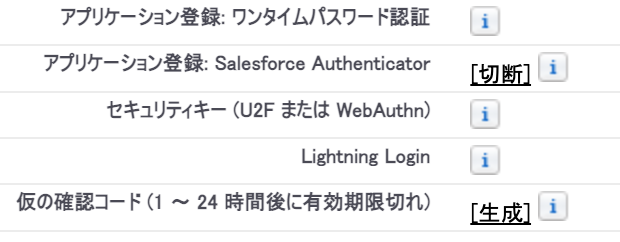
3. 画面左側に MFA の接続状況が表示されます。
以下のサンプルでは、Salesforce Authenticator が接続済みのため、[切断] をクリックすることで MFA が解除されます
※ その他の MFA 要素が登録されている場合は、必要に応じて [切断] または [削除] します。
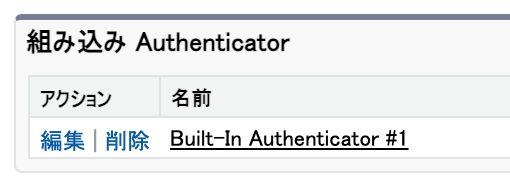
組み込み Authenticator を利用している場合は、[高度なユーザーの詳細] 画面下部の「組み込み Authenticator」セクションに登録状況が記載されているので、[削除] をクリックすることで MFA が解除されます。
4. 対象ユーザーが Salesforce へログインすると、以下のような MFA の登録画面が表示されますので、再登録をします
※ いずれの登録画面が表示されるかは組織によって異なります。


検証手段の設定方法の詳細については Salesforce Authenticator (バージョン 4.4.0 以降) の設定方法 や多要素認証 (MFA) が有効な組織における MFA 検証手段の設定方法 を参照してください
その他のリソース
ナレッジ記事番号
000396207
この記事で問題は解決されましたか?
ご意見をお待ちしております。
