Выбрать организацию
Splitting transactions to enable the use of Enhanced Scheduling and Optimization in Salesforce Field Service
Дата публикации: Sep 5, 2023
Описание
'You have uncommitted work pending. Please commit or rollback before calling out'
The exception typically means that DML operations have not been committed at the time of the callout. This exception does not occur when using the standard Global Actions or the Dispatcher Console, as the FSL Managed Package components manage the transactions in such a way that the callout can be made. However, when implementing custom logic utilizing the FSL Managed Package Apex methods it is possible the exception is thrown.
The issue typically occurs when, as part of the Apex REST API logic, data is created and/or updated as part of the same transaction during which the FSL Managed Package Apex methods are used to get available candidates (FSL.GradeSlotsService.getGradedMatrix), retrieve available time slots (FSL.AppointmentBooking.getSlots) or schedule (FSL.ScheduleService.schedule) an appointment. The following diagram shows when the exception is thrown.
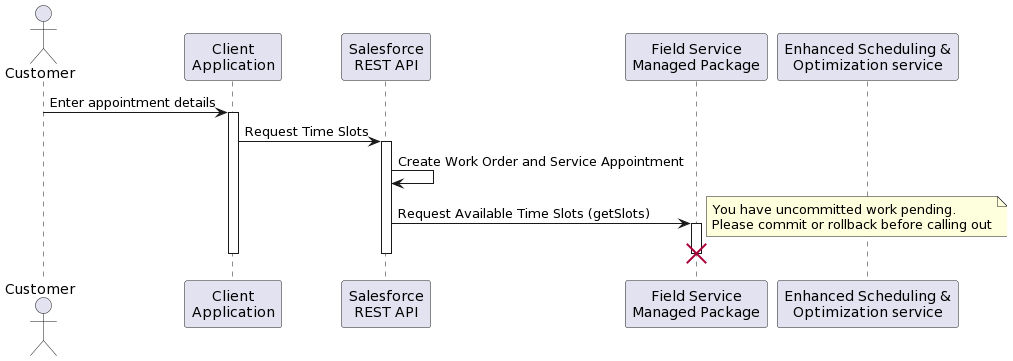
As mentioned in the Limits and Limitations for Enhanced Scheduling and Optimization help document, the DML transaction needs to be separated from the callout. This document describes a pattern whereby the transaction of creating and/or updating data is separated from the transaction that performs the callout. The example used is the scenario in which the ability to get available time slots and schedule an appointment is exposed via custom Apex REST API endpoints.
Решение
Separate DML Transactions
The preferred way of separating the DML transaction is to have a middleware platform orchestrate the process, which involves using the standard Salesforce REST API or a custom Apex REST API to create and/or update data, and calling custom Apex REST APIs which expose the Field Service Managed Package methods. Alternatively, the process can be orchestrated from within Salesforce by calling the Salesforce REST API from the custom Apex REST API as shown in the following diagram for booking an appointment from getting available time slots to scheduling the appointment.
Considerations
- To be able to call the Salesforce REST API from Apex it is recommended to set up a Connected App, an Authorization Provider and Name Credentials using a named principle.
- Calling the Salesforce REST API from Apex counts towards the “Total API Request Allocations” governor limit.
- As the transactions are separated consider implementing the correct error handling and transaction control.
Номер статьи базы знаний
000396257
Эта статья решила вашу проблему?
Оставьте свой отзыв, чтобы мы могли стать лучше!
