Organisation auswählen
Customer Success Score: Signals
Veröffentlichungsdatum: Feb 23, 2026
Beschreibung

Visit the Customer Success Score: Overview article for more information about the Customer Success Score and how to use it. Check out the Customer Success Score: FAQs article for answers to frequently asked questions. Score Details Categories and Scores The Customer Success Score is made up of three categories: • Product Adoption: Measures feature usage across Salesforce products. Helps you identify patterns and behaviors that predict long-term value. • Customer Expertise: Measures engagement with learning resources and your team's Salesforce skills. Helps you increase your team’s skills and capabilities by using our expertise and services. • Technical Health: Measures the health of your Salesforce implementation across key areas including efficiency, operational excellence, customization, observability, and security. Helps you understand risks and how to optimize your Salesforce platform for sustained performance. Please note Technical Health is not currently available for Commerce Cloud, Marketing Cloud (Engagement or Personalization), MuleSoft, or Tableau. All scores are on a scale from 0 to 100: • Excellent (61-100) • Good (31-60) • Fair (0-30) Your overall Customer Success Score is calculated based on a 5 to 2 to 3 ratio. • Product Adoption: 5 • Customer Expertise: 2 • Technical Health: 3 Because Technical Health is not currently available for Commerce Cloud, Marketing Cloud (Engagement or Personalization), MuleSoft, or Tableau, the Customer Success Score is calculated based on a 5 to 2 ratio between Product Adoption and Customer Expertise.
Signals and Thresholds Signals are individual measures and dimensions. They each have a score, and an associated Score Trend, which combines to produce the Category Score, which is used to calculate the overall Customer Success Score.
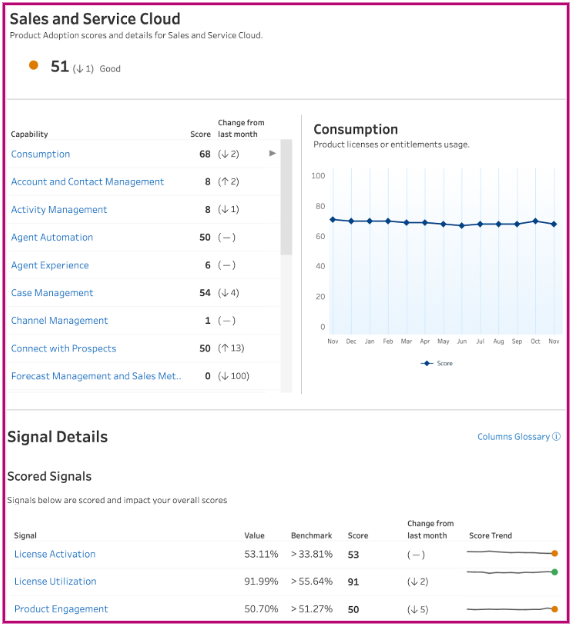 We use an absolute scoring model which generates signal scores based solely on your interactions with Salesforce products, services, and resources. This allows you to track detailed trends in underlying metrics and your own year-over-year performance, showing the true impact you are having on your Customer Success Score.
Signal Calculations For some signals (e.g. License Utilization or Product Engagement) we apply a ratio to calculate the signal score when we have a numerator and a denominator. For example, License Activation - If a customer has activated 67% of their purchases licenses, then that signal has a score of 67. Other signals (e.g. Trailhead Rangers or Opportunities Growth), where we don’t have a denominator for a calculation, we create one by considering growth over time. For example, Trailhead Rangers in User Expertise within Customer Expertise. If a customer had 10 Trailhead Rangers 12 months ago, and has 15 Trailhead Rangers at the end of the last full month, the growth score is based on 15 (Trailhead Rangers total in the last month) divided by 10 (Rangers from 12 months ago) = 1.5. time by 50, giving us a score of 75 For some signals (e.g. Case Sharing Rules or Annual Technical Health Review) we are measuring if they have been enabled and used with a binary indicator. We do not expect you to frequently use some features, or they are available to you to take advantage of on an annual basis. For example, Annual Technical Health Review (ATHR) in Success Plan Consumption, within Customer Expertise. If you had an ATHR in the last 12 months, then your signal score will be 100. If you did not, your score will be 0. Within Technical Health, because signals are based on enabled Proactive Monitoring alerts, we begin with a score of 100 for each enabled signal. If there have been breaches of the alert thresholds (Exhaust, Critical, or Warning) or other indicators in the data that didn’t breach an alert threshold, but showed issues could be present, we remove points. |
Nummer des Knowledge-Artikels
000396263
Konnten Sie Ihr Problem mithilfe dieses Artikels lösen?
Geben Sie uns Feedback, damit wir uns verbessern können.
