Välj en organisation
Adding custom header to HTTP response headers in SFRA for B2C Commerce
Publiceringsdatum: Apr 11, 2025
Beskrivning
How to add a custom header to HTTP response headers for sites built using the Storefront Reference Architecture (SFRA) for B2C Commerce.
Lösning
Below process shows how you can add a custom header to HTTP response headers in your SFRA implementation:
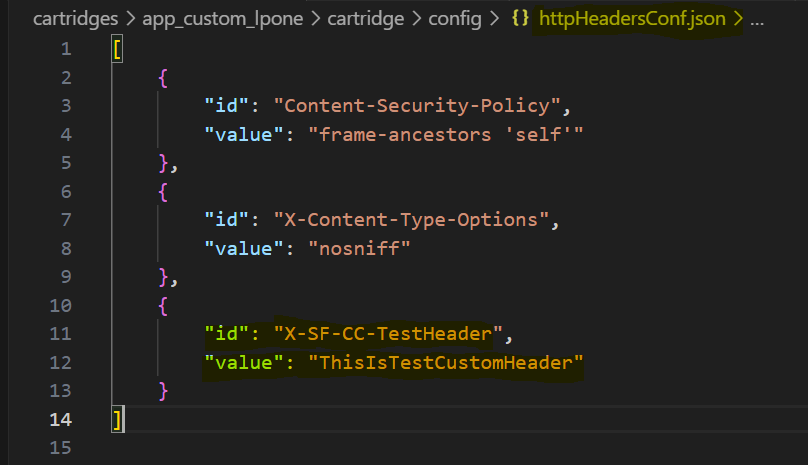
The Storefront Reference Architecture (SFRA) has a config file named ‘httpHeadersConf.json’ under app_storefront_base → cartridge → config (https://github.com/SalesforceCommerceCloud/storefront-reference-architecture/blob/master/cartridges/app_storefront_base/cartridge/config/httpHeadersConf.json) where we can add the headers.
This config file can be updated to add a custom header that automatically sets HTTP response headers on all responses.. Please note, Custom header names must begin with the prefix "X-SF-CC-" and can contain only alphanumeric characters, dash, and underscore.
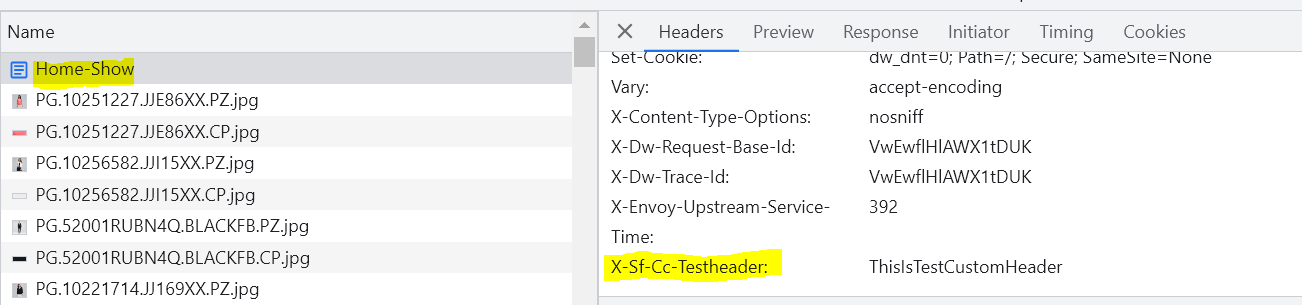
Once added, you can verify it by checking the Response headers in Developer Tools:
Knowledge-artikelnummer
000396592
Löste denna artikel ditt problem?
Berätta för oss vad vi kan förbättra!
