Select An Org
Turn "New Case Email Notification" Emails Off in Salesforce
Publish Date: Dec 27, 2024
Description
The "New Case Email Notification" email that case owners receive when customers respond to case comments via Email-to-Case may not provide the level of detail desired by users. The fact that the "New Case Email Notification" email is system-generated means that administrators can’t edit what information is presented to the receiving user. The inability to edit the email can lead to instances of the administrator wanting to disable these emails and create their own custom notifications. To ensure users aren’t overloaded with emails, you’ll want to disable the system-generated email after implementing the custom solution.
Resolution
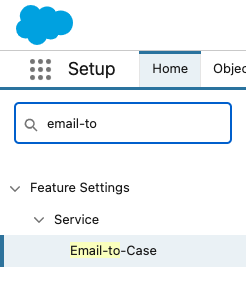
- From Setup, in the Quick Find box, enter Email-To-Case, then select it.
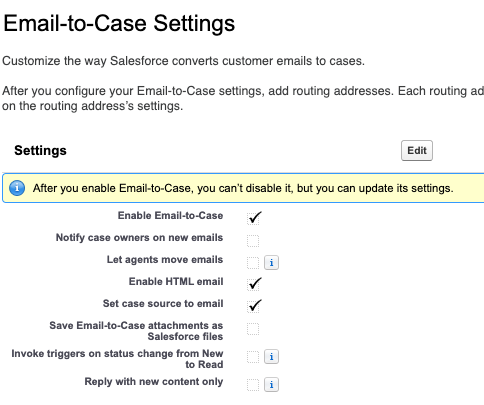
- From the Email-to-Case Settings screen, click edit.
- After you’ve entered the edit screen, uncheck the box titled "Notify case owners on new emails" and click Save.
Additional Resources
Vote and comment on the Idea Exchange for 'Notify Case Owners on New Emails' should be configuable for each email address.
Knowledge Article Number
000396660
Did this article solve your issue?
Let us know so we can improve!
