Выбрать организацию
Turn "New Case Email Notification" Emails Off in Salesforce
Дата публикации: Jun 11, 2026
Описание
The "New Case Email Notification" email that case owners receive when customers respond to case comments via Email-to-Case may not provide the level of detail desired by users. The fact that the "New Case Email Notification" email is system-generated means that administrators can’t edit what information is presented to the receiving user. The inability to edit the email can lead to instances of the administrator wanting to disable these emails and create their own custom notifications. To ensure users aren’t overloaded with emails, you’ll want to disable the system-generated email after implementing the custom solution.
Решение
Steps to Disable New Case Email Notifications
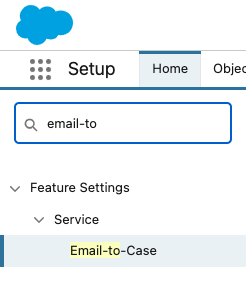
- From Setup, in the Quick Find box, enter Email-To-Case, then select it. (Screenshot : Quick Find box in Salesforce Setup with 'Email-To-Case' entered as the search term, and the Email-to-Case option highlighted in the results.)
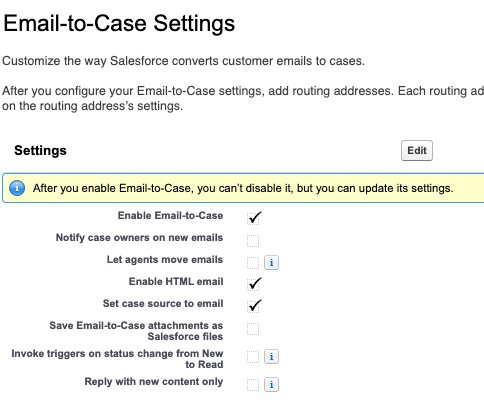
- From the Email-to-Case Settings screen, click edit.
- After you’ve entered the edit screen, uncheck the box titled "Notify case owners on new emails" and click Save. (Screenshot: The Email-to-Case Settings edit screen showing the "Notify case owners on new emails" checkbox visible and in an unchecked state.)
After disabling this setting, case owners will no longer receive the system-generated 'New Case Email Notification' email. To replace this with a custom notification, consider using Process Builder, Flow, or Salesforce Email Alerts to design a more informative email template.
Дополнительные ресурсы
Vote and comment on the Idea Exchange for 'Notify Case Owners on New Emails' should be configuable for each email address.
Номер статьи базы знаний
000396660
Эта статья решила вашу проблему?
Оставьте свой отзыв, чтобы мы могли стать лучше!
