Organisation auswählen
Using Flow to create a custom object record and assign an Account when a Lead is converted
Veröffentlichungsdatum: Aug 18, 2026
Beschreibung
A business requires that when a Lead is converted, a new Implementation__c record should be created (Implementation__c is a Custom Object with a custom Account__c lookup field). The Account should automatically be populated with the value of the Converted Account after the Lead is converted.
Lösung
We can use a Record-Triggered Flow based on the Lead conversion to create the Implementation__c record and populate the Account field with the converted Account's Id. As a best practice, be sure to build and test Flows in a Sandbox before deploying to a Production environment.
Build the Flow ### Step 1: Navigate to Flow Setup
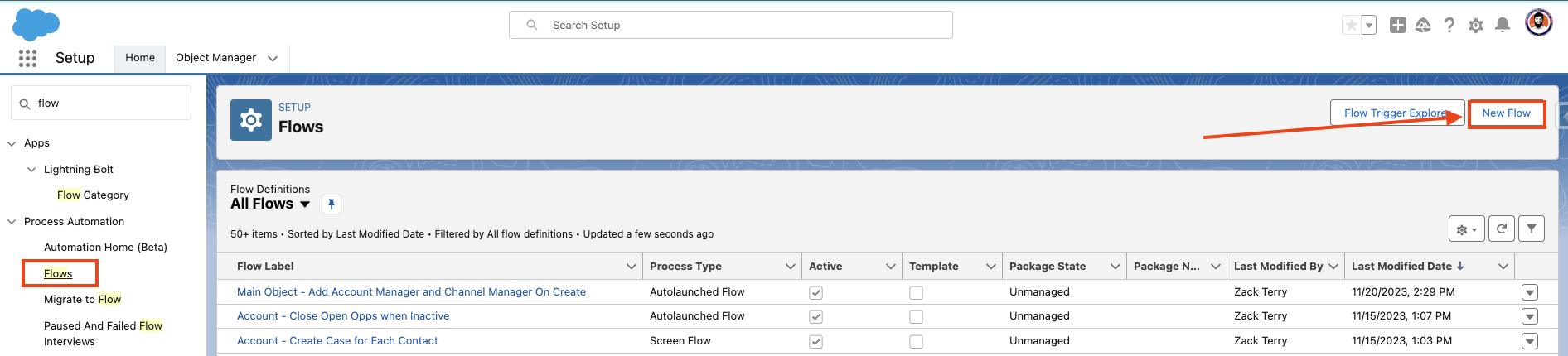
From Setup, navigate to the Home tab. In the Quick Find search box, search for Flows. Click on Flows to navigate to the Flow setup page.
### Step 2: Create a New Record-Triggered Flow
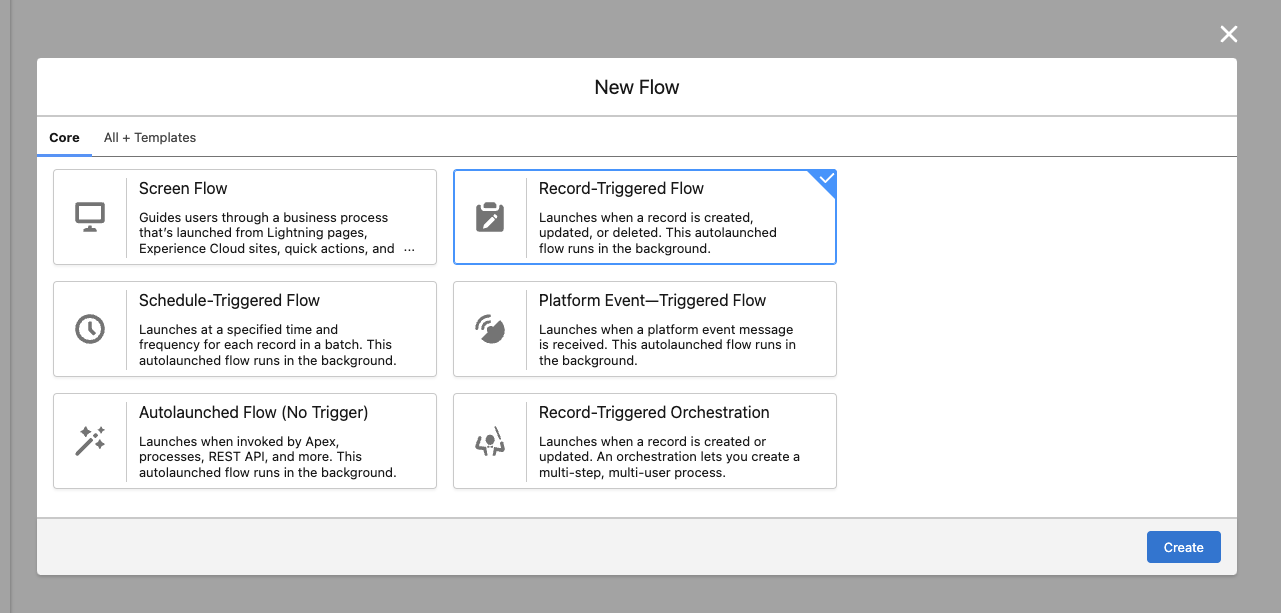
Select New Flow from the top right side of the page. A new window will open — select Record-Triggered Flow, then click the Create button.
### Step 3: Configure the Flow Trigger
The Flow Canvas is now open — from here, we will configure the Flow logic necessary to create an Implementation__c record when a Lead is converted.
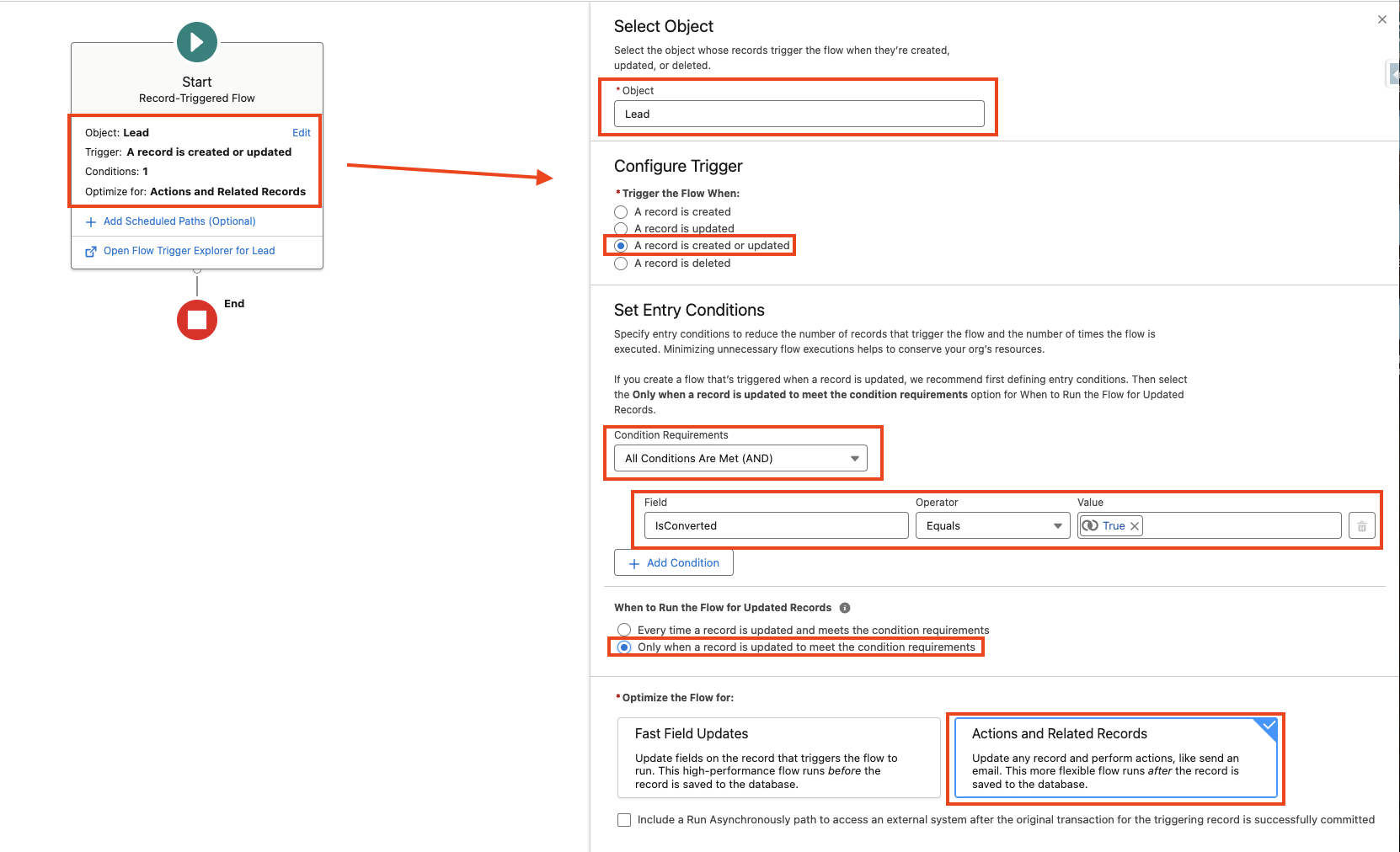
- For the Entry Criteria, select Lead as the Object, and configure the trigger to run when a record is created or updated
- Set the Condition Requirements to All Conditions Are Met, and then add the IsConverted field, checking that it is equal to {!$GlobalConstant.True}
- Select to run the Flow "Only when a record is updated to meet the condition requirements" — this ensures the Flow is only triggered when intended, at the point of Lead Conversion
- The Flow should be optimized for Actions and Related Records since we will be creating a related record when it is triggered
### Step 4: Add a Create Records Element
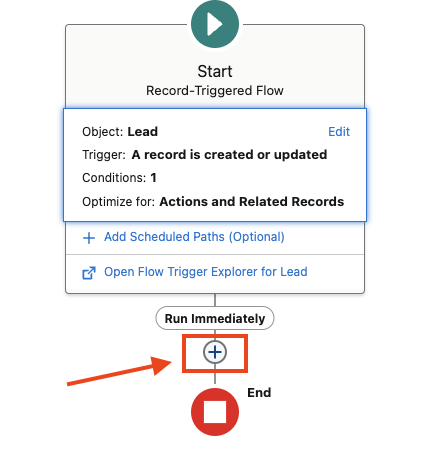
Underneath the Start element on the Flow canvas, click on the '+' icon, search for the Create Records element, and click on it to add the element to the canvas.
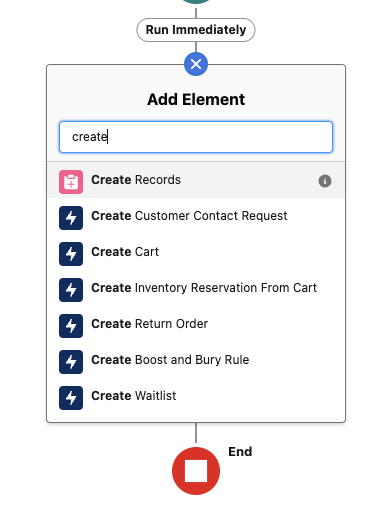
### Step 5: Configure the Create Records Element
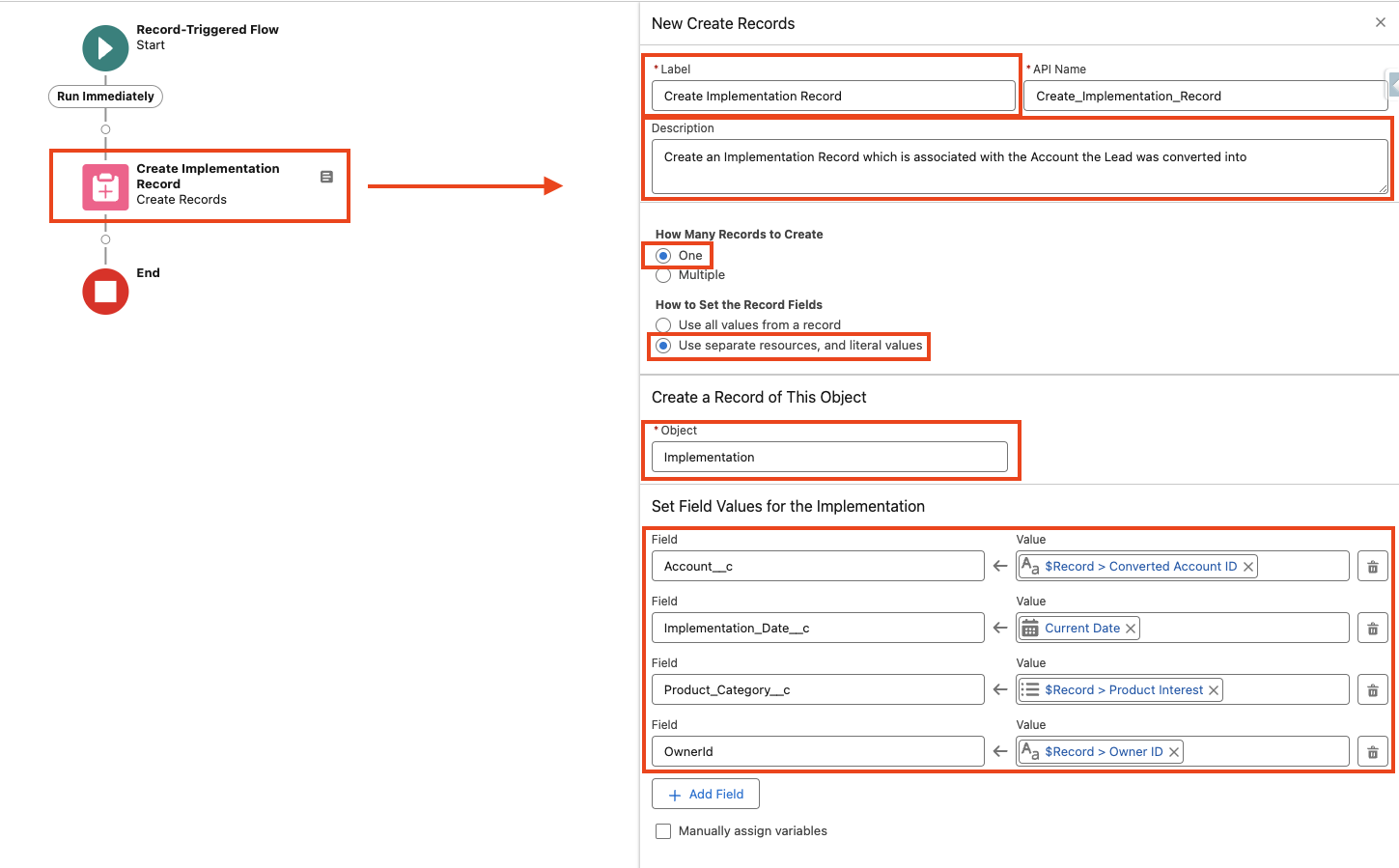
- Add a Label for the Element — we will call it "Create Implementation Record" in this example. The API Name will populate automatically. Be sure to add a good Description, as well
- Select One for how many records to create (this is the default selection) since we want to create one related Implementation record for the converted Lead
- Select Use separate resources, and literal values for How to Set the Record Fields
- Search for the Object for which we want to create a new record — in this example, we find the Implementation object
- Under Set Field Values for the <ObjectName>, start adding the fields which should be set on the newly created record — for this example, we will set the following:
- Account__c
- Implementation_Date__c
- Product_Category__c
- OwnerId
- Additional Fields can be added using the + New Field button
- Set the mappings and values for each field — these can be modified to meet your unique use case. Be sure to select the values from the dropdown and not copy/paste what is shown here
Field mappings used in this example:
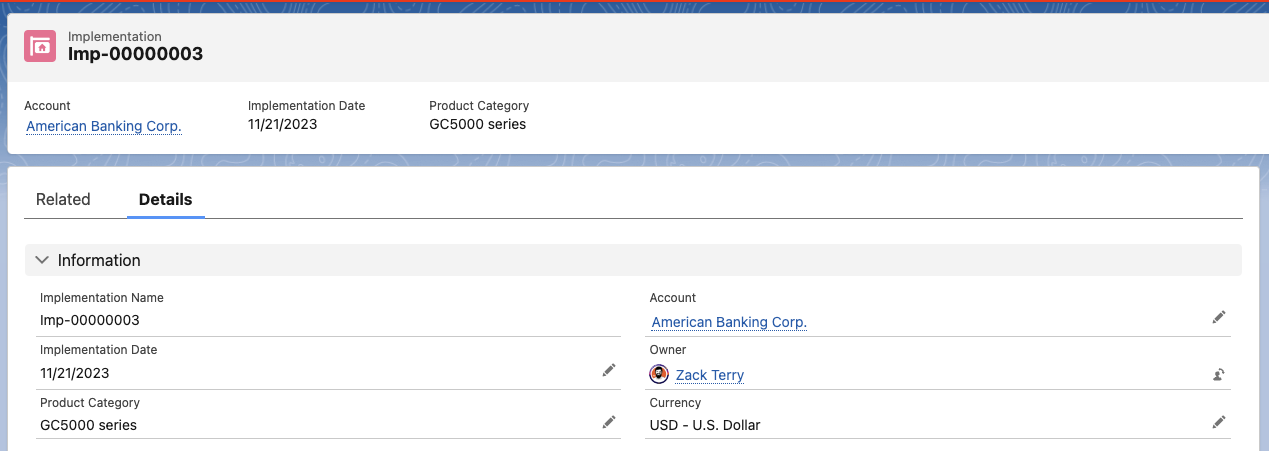
- Account__c = {!$Record.ConvertedAccountId} — this represents the Account to which the Lead was converted to in the conversion process

- Implementation_Date__c = {!$Flow.CurrentDate} — this sets the Implementation Date to the date the Flow is triggered (when the Lead is converted)

- Product_Category__c = {!$Record.ProductInterest__c} — this sets the Product Category value to the Product Interest value which was selected on the Lead

- OwnerId = {!$Record.OwnerId} — this sets the value of the Implementation Owner to the same User who owned the Lead

### Step 6: Save the Flow
In the top right, click Save to save the Flow — be sure to give it a good name and Description.
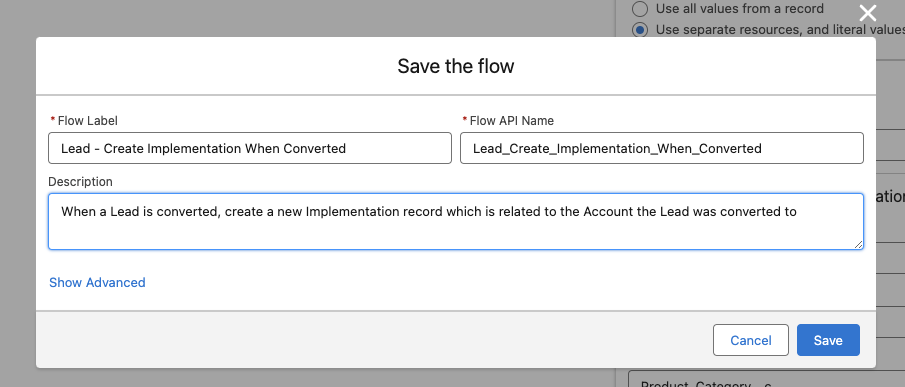
### Step 7: Test and Activate the Flow
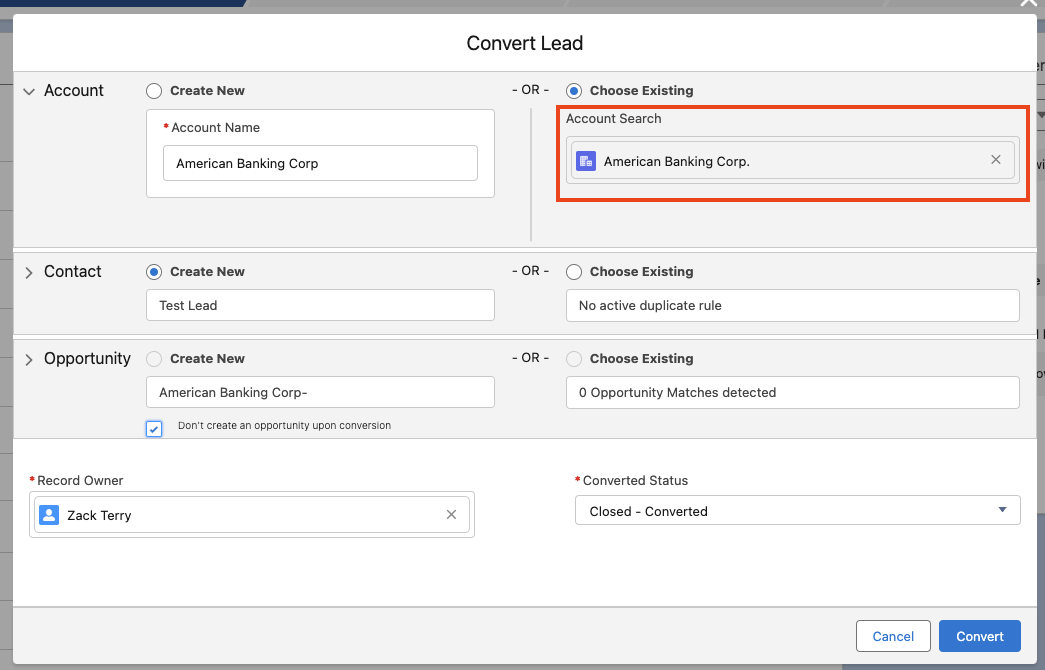
As a best practice, be sure to build and test this Flow in a Sandbox. Be sure the Flow is saved, and then click Activate to activate the Flow. Navigate to an unconverted Lead record, and begin the conversion process. After conversion, a new Implementation record should be successfully created, and it should be related to the Converted Account.

## About This Article
Written by: Zack Terry | Salesforce Answers Leader. Zack Terry is a Senior Salesforce Solution Architect at Fast Slow Motion, which aims to be a blessing to business leaders by helping them implement and maximize their use of the Salesforce platform. At the time of writing, Zack has worked in the Salesforce ecosystem for nearly a decade, holds 20 Salesforce Credentials, and has achieved the rank of "All-Star Ranger" on Trailhead. He regularly participates as an Answers Leader in the Salesforce Trailblazer Community.
## Disclaimer
Submissions reflect only the opinions of the user who made available the Submission and not the opinions of Salesforce, regardless of whether the user is affiliated with Salesforce, and may contain or constitute products, services, information, data, content and other materials made available by or on behalf of third parties ("Third Party Materials"). Salesforce neither controls nor endorses, nor is Salesforce responsible for, any Third Party Materials, including their accuracy, validity, timeliness, completeness, reliability, integrity, quality, legality, usefulness or safety, or any applicable intellectual property rights. Any Submissions made available through any message board or forum in response to posted questions, or that otherwise purports to answer any questions, including any questions about Salesforce or Programs, are made available for your general knowledge only and should never be relied upon as answers to your specific questions (even if an answer is marked as a "best" answer or with any similar qualifications). You should always contact Salesforce support for answers to your specific questions. Salesforce has no control over Submissions, and is not responsible for any use or misuse (including any distribution) by any third party of Submissions.
If you have questions, tap into the wisdom of our entire Trailblazer Community here: https://trailhead.salesforce.com/trailblazer-community/feed
Zusätzliche Ressourcen
Configure the Lead Conversion Process to Specify Default Opportunity Field Values
Specify Opportunity Name on Lead Object before Lead Conversion
Nummer des Knowledge-Artikels
000397077
Konnten Sie Ihr Problem mithilfe dieses Artikels lösen?
Geben Sie uns Feedback, damit wir uns verbessern können.
