Select An Org
Require a Text Field to be populated when the ‘Other’ option is selected in a picklist
Publish Date: Apr 2, 2026
Description
Sometimes there are business requirements to collect additional information when there is a picklist option like Other. To allow for requiring the secondary field only when the Other option is selected, you can use a validation rule. In this example we are going to look at the account object however this can be done on any object including Lead, Contact, Opportunity, Custom Objects etc.
Resolution
Creating a Validation Rule to Selectively enforce the Field Requirement.
This image shows the completed validation rule that was created based on the below instructions in the help article.
Step 1: In the Setup, navigate to an object that you need to have the picklist on
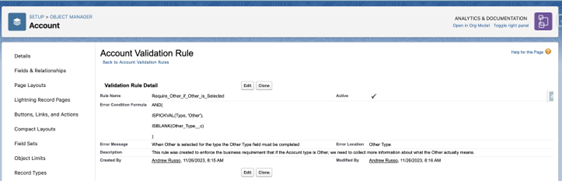
- In this example, we are going to use Account
Step 2: On Account we have the standard Type picklist field
- This picklist has a value option called Other
Step 3: Create a Text field called Other Type and set the Characters to 255
Step 4: Save the field
Step 5: Now on Account create a new Validation Rule
Step 6: Give the Validation Rule a meaningful Rule Name and Description
Step 7: Use the formula below:
AND(
ISPICKVAL(Type, 'Other'),
ISBLANK(Other_Type__c)
)
Step 8: Add an Error Message and then click Save
Pro Tip: If you are using dynamic forms, you can hide the Other Type field on the page to only be visible with the Type field is selected as Other, this will create the best user experience.
Additional Resources
See Also:
Validation Rules
Create Validation Rules
Create a Custom Field
Knowledge Article Number
000580368
Did this article solve your issue?
Let us know so we can improve!
