Выбрать организацию
Salesforce Platform: Migrate from OAuth Username-Password to Client Credentials Flow
Дата публикации: Aug 18, 2026
Описание
OAuth (Open Authorization) is an industry-standard authorization framework that allows a client application to obtain limited access to a resource (such as Salesforce data) on behalf of a user or system without exposing the user's credentials. Instead of sharing a username and password directly with the client, OAuth uses access tokens issued by an authorization server after a successful authentication and authorization process.
Username-Password Flow
The Username-Password Flow is an OAuth 2.0 authentication method where the client application directly sends the user's Salesforce username and password (and security token if required) to obtain an access token. Because this approach requires storing and transmitting user credentials within the client application, it introduces security risks and bypasses modern authentication mechanisms such as MFA. For this reason, Salesforce is deprecating this flow and recommends migrating to more secure OAuth flows.
Client Credentials Flow
The Client Credentials Flow is an OAuth 2.0 flow designed for server-to-server integrations where a client application accesses Salesforce resources using its own identity rather than acting on behalf of a specific user. The application authenticates using its client ID and client secret, and Salesforce issues an access token representing the integration itself. This flow is suitable when a single integration identity is sufficient and user-level context is not required.
JWT Bearer Flow (JSON Web Token Bearer Flow)
The JWT Bearer Flow is another OAuth 2.0 flow typically used for server-to-server integrations that require user context. In this flow, the client application signs a JSON Web Token (JWT) with a private key and sends it to Salesforce. Salesforce verifies the signature using the corresponding public certificate and then issues an access token for the specified user. This flow is commonly used when an integration needs to act on behalf of specific users without storing their passwords.
The Username-Password flow is being deprecated for security reasons. For server-to-server integrations that currently rely on this flow, it is recommended to migrate to the Client Credentials Flow to support secure headless authentication without storing user credentials.
You're using the OAuth username-password flow to authorize your client and want to migrate to a more secure flow. You've come to the right place.
Note: The client credentials flow doesn't support calls to login.salesforce.com or test.salesforce.com. If you're using either of these host domains, for every set of username-password credentials that your client has, update your code to use the correct domain for the corresponding org. Instead of login.salesforce.com, switch to the org's My Domain login URL, such as https://MyCompany.my.salesforce.com. Instead of test.salesforce.com, use the sandbox's My Domain login URL, such as https://MyDomainName--SandboxName.sandbox.my.salesforce.com.
Note: If your client is currently using multiple usernames in a single org, you can't migrate to the client credentials flow. Instead, we recommend that you migrate to the OAuth JWT Bearer Flow for use cases involving multiple usernames in the same org. If your client is directly accepting a username and password from the user, we recommend migrating to headed OAuth flows such as the web-server flow or switching to headless authentication APIs (for Experience Cloud use cases only).
Решение
Step One: Update the Developer-Side Settings on the Connected App
Log in to the org that hosts your connected app. From Setup, in the Quick Find box, enter App, and then select App Manager. On the dropdown menu next to your app, select Edit. You see a page that looks like this:
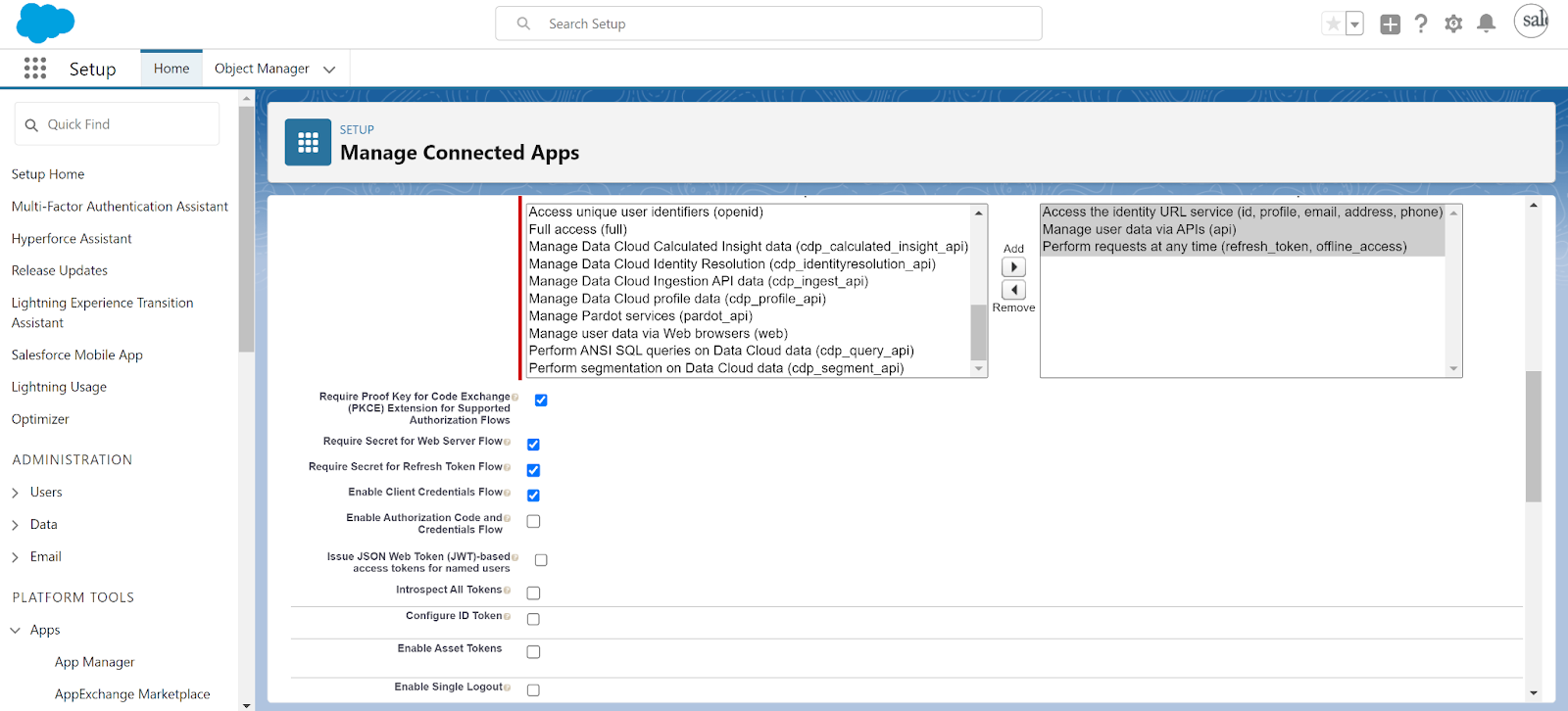
Select Enable Client Credentials Flow, and accept the alert that you get:
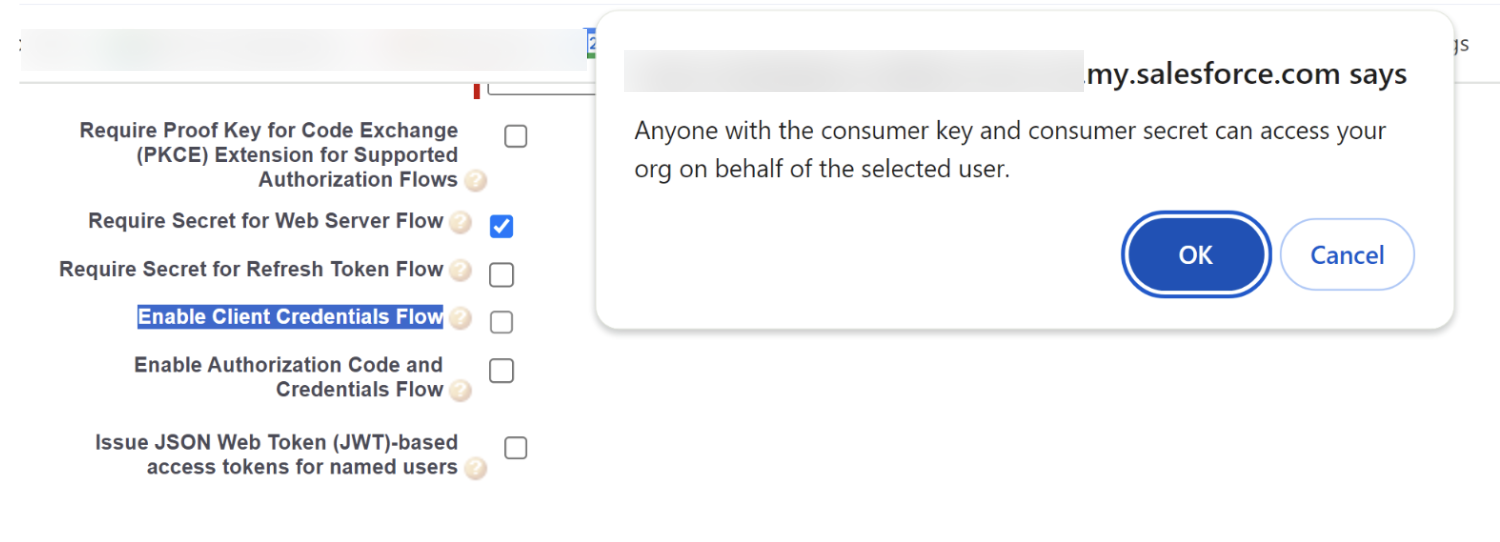
You do this step only once. As noted in the message that appears when you save, it can take a few minutes for the change to propagate before you can start Step Two.
Step Two: Update the Manage-Side Settings on the Connected App
Complete this step for every org where you're using the OAuth username-password flow. For every set of username-password credentials that your client has, you must change the manage-side policies in the corresponding org.
Log in to that org as an admin. From Setup, in the Quick Find box, enter App, and then select App Manager. On the dropdown menu next to your app, select Manage, and then click Edit Policies. You see a page that looks like this:
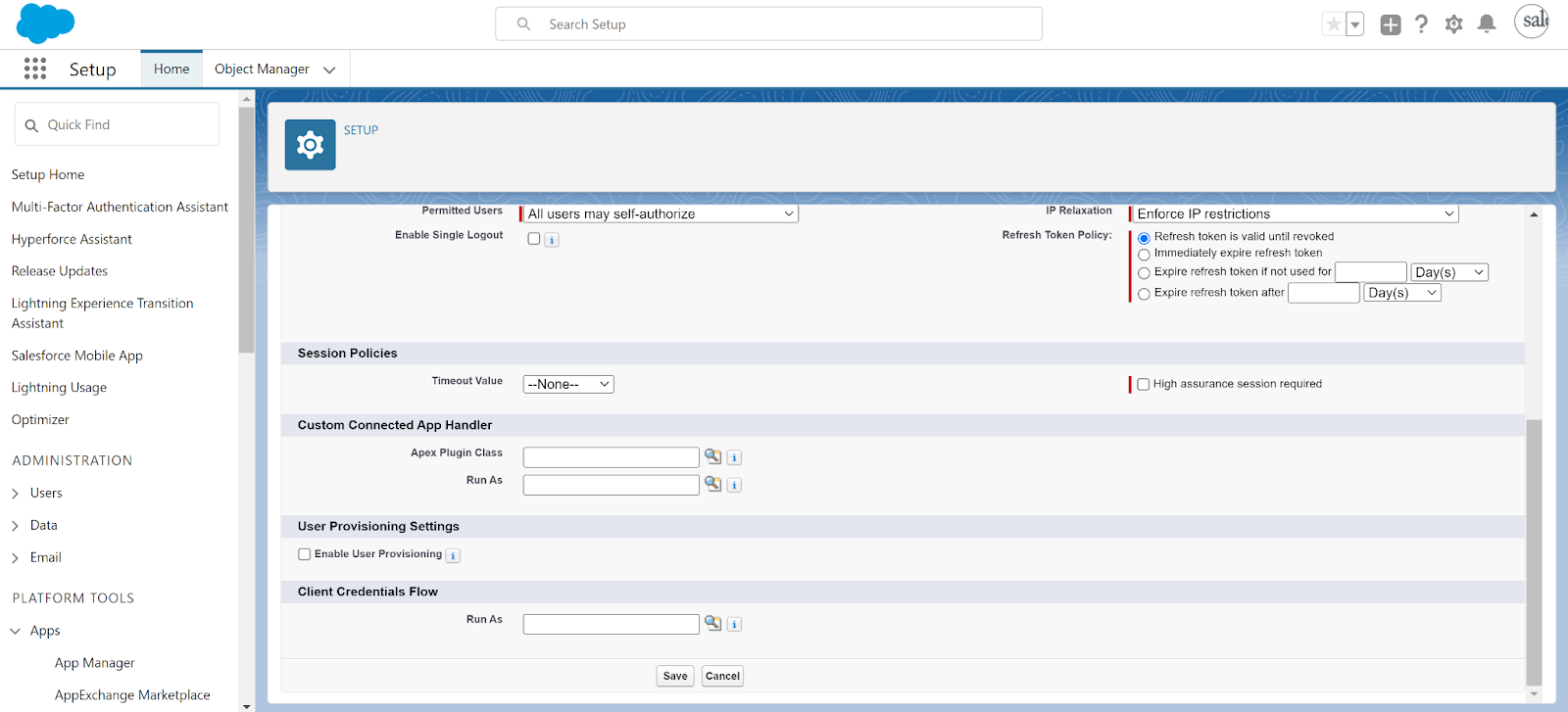
In the Client Credentials Flow section, use the lookup field for Run As to look up the user in the org whose username you were using with the OAuth username-password flow.
For example, if your client was previously using the OAuth username-password flow with the username test@example1.com, locate the user in the org with the username test@example1.com.
Select the user and click Save.
Step Three: Update Your Client Code
Update your client to request an access token using the client credentials flow instead of the username-password flow. See the developer guide here (for client credentials).
Note: The resulting access tokens differ slightly between the flows. The token returned from the client credentials flow should be more compliant with OAuth standards.
Дополнительные ресурсы
Номер статьи базы знаний
000886201
Эта статья решила вашу проблему?
Оставьте свой отзыв, чтобы мы могли стать лучше!
