Seleccionar una organización
Aura & LWC to build custom navigation menu when using Aura templates in Salesforce Experience Cloud
Fecha de publicación: Mar 4, 2024
Descripción
This knowledge article will help you understand and learn how to display menu Items on a Custom Navigation Bar when using Aura Template on Experience Cloud using Aura & LWC
Solución
When using Aura as a template during building a site using the Experience Cloud , we need to develop custom Lightning components ( Aura & Lightning Web Components) and place them on the site through the Experience Builder.
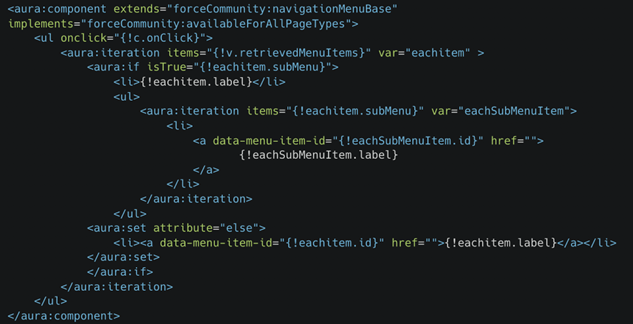
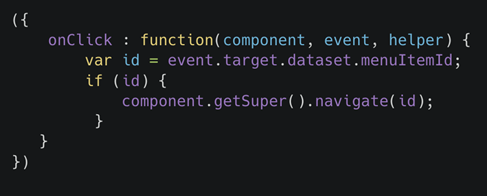
While using Aura we can easily retrieve the menu Items that were already being preconfigured in the Experience Builder by extending the aura components with forceCommunity:navigationMenuBase.
Aura Code to retrieve Navigation Menu Items
- customNavigationMenu.cmp ( Aura )
- customNavigationMenu.js ( Aura Controller )
However when using Standalone LWC components we need to write custom Apex Controllers and test classes in order to retrieve the Menu Items that are usually stored in NavigationLinkSet and NavigationMenuItem Objects in Salesforce.
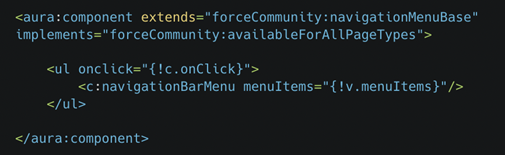
In order to pass MenuItems information from Aura to Lightning Web Components we need to invoke the web components in Aura additionally pass the menuItems information to @api property declared variables in the web components.
Aura Code to pass data to Lightning Web Components
- customNavigationMenu.cmp ( Aura )
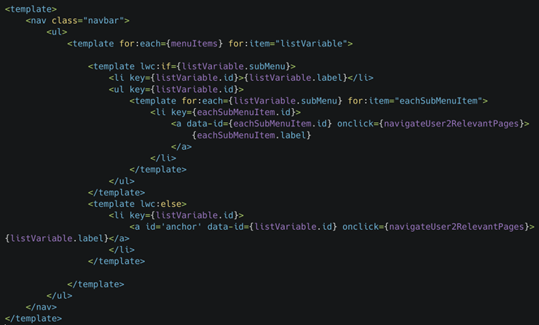
- navigationMenuItems.html ( LWC )
- navigationMenuItems.js ( LWC )
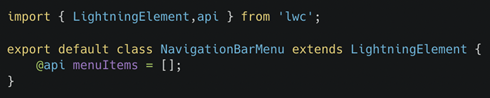
Lightning web components now have the menu Items list with the following JSON properties.
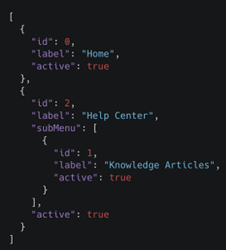
However we still need the navigation link in order to navigate the user to respective pages of the menu items that was pre configured using the Experience Builder.
Currently the Aura Components can navigate the user based on the Id that is present in the menuItems list while Lightning Web Components cannot and thus require the link that is currently being stored in the NavigationMenuItem.
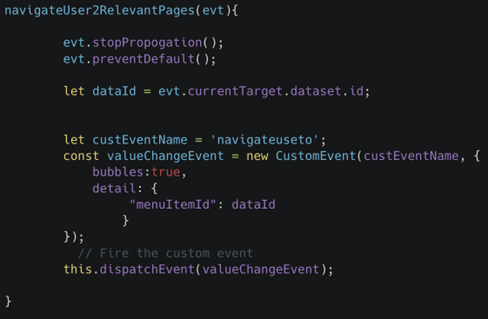
For the menuItems in the Lightning Web Components to perform relevant actions we need to throw JavaScript Custom events from the web components and later catch them in Aura components.
- navigationMenuItems.js ( LWC )
- navigationMenuItems.html ( LWC )
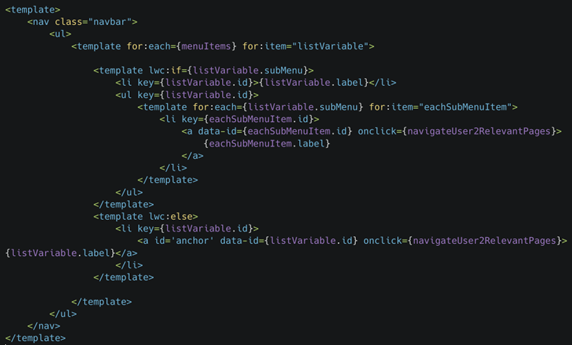
In the Aura Component we have to declare an event handler which can catch the event and further navigate the user based on the id of the navigation menu item using the on{CustomEventName} attribute.
- customNavigationMenu.cmp (Aura)
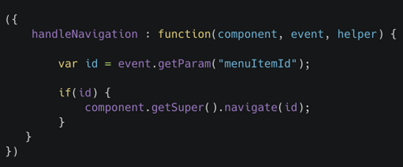
Thus using both the moving the entire logic processing to the LWC and only having necessary functions in Aura we can easily build Custom Navigation Menu without having to write extra Apex Controllers to fetch the Navigation Menu Items.
_____________________________________________
Written By: Meghesh Shenoy | Salesforce Answers Leader
Meghesh Shenoy is a Salesforce developer and a Mulesoft mentor. He is also a Salesforce Developer Days speaker, a Mulesoft and Salesforce Certified Developer, carrying knowledge on building automation solutions using Salesforce and Mulesoft. Meghesh is passionate about sharing knowledge and experience and also helping others sharpen and grow their Mulesoft & Salesforce skills together.
Submissions reflect only the opinions of the user who made available the Submission and not the opinions of Salesforce, regardless of whether the user is affiliated with Salesforce, and may contain or constitute products, services, information, data, content and other materials made available by or on behalf of third parties ("Third Party Materials). Salesforce neither controls nor endorses, nor is Salesforce responsible for, any Third Party Materials, including their accuracy, validity, timeliness, completeness, reliability, integrity, quality, legality, usefulness or safety, or any applicable intellectual property rights. Any Submissions made available through any message board or forum in response to posted questions, or that otherwise purports to answer any questions, including any questions about Salesforce or Programs, are made available for your general knowledge only and should never be relied upon as answers to your specific questions (even if an answer is marked as a “best” answer or with any similar qualifications). You should always contact Salesforce support for answers to your specific questions. Salesforce has no control over Submissions, and is not responsible for any use or misuse (including any distribution) by any third party of Submissions.
If you have questions, tap into the wisdom of our entire Trailblazer Community here: https://trailhead.salesforce.com/trailblazer-community/feed
Número del artículo de conocimiento
001096518
¿Resolvió este artículo su problema?
¡Háganos saber cómo podemos mejorar!
