組織を選択
多要素認証 (MFA) における複数の検証方法の登録
公開日: Aug 31, 2026
説明
Salesforce ではバックアップとして複数の検証手段を登録することを推奨しています。組み込みAuthenticator と物理セキュリティキーの登録を組み合わせるなど、ユーザーは MFA (多要素認証) のために複数の検証手段を登録して使用することが可能です。
この記事ではユーザーが 2 つ目以降の追加の検証手段を登録する方法について説明します。
解決策
| フィッシング耐性 MFA 必須化に伴い、システム管理者と特権ユーザーは Salesforce Authenticator およびサードパーティー製のワンタイムパスワードアプリケーションの利用はできません。 |
2 つ目以降の検証手段を登録する場合、ログイン後の個人設定から接続します。
1. 右上のプロファイルアイコン 
2. [クイック検索] ボックスに「高度なユーザーの詳細」と入力し、[高度なユーザーの詳細] を選択
3. 接続する検証手段にあわせて、下記のいずれかで登録を進める
- パスキー( 生体認証を用いた組み込みAuthenticator や、スマートフォンをセキュリティキーとして) 登録をする場合
3-1. 下部に表示される [組み込み Authenticator] セクションの [追加] をクリック
※ ID 検証が要求される場合、既存の検証手段で認証を実施します
パスキーを複数登録する場合で登録済みのパスキーや検証手段を用いた ID 検証が実施できない場合は、仮の確認コードを管理者から生成してもらい、仮の確認コードを用いてログインしてから手順を実施します
3-2. [パスキーを作成] をクリック
3-3. パスキーの保存場所を選択
※ 認証情報(パスキー)をスマートフォンやパスキー対応のパスワードマネージャーなどに登録する場合 Windows 端末で「変更」Mac 端末では「キャンセル」をクリックし、ご利用環境で使用可能なほかの保存先を選択して進めます。端末のOS や制御設定起因で、表示される選択肢が異なります
例:
- この Windows デバイス (Mac の場合は [パスワード] )
- iPhone、iPad、またはAndroid デバイス(Mac の場合は [スマートフォン、タブレット、またはセキュリティキー] )
- セキュリティキー
- パスワードマネージャー
- 自分のChrome プロフィール
※ PC とモバイルなど複数端末からログインする可能性のあるユーザーは、スマートフォンにパスキーを保存すると便利です。
3-4. 選択先に応じた認証で登録を進める
「iPhone、iPad、またはAndroid デバイス」(「スマートフォン、タブレット、またはセキュリティキー」) を選択した場合は、PC とスマートフォンの両方でBluetooth を有効にし、表示される QR コードをスマートフォンのカメラ機能で読み込み、[パスキーを保存(パスキーを使用)]をクリックしてパスキーを保存します
手順通りに進められない場合は PC やモバイル端末の機能が制限されている場合がありますので、組織内の端末管理者にご確認ください。 - セキュリティキー ( YubiKey などの物理セキュリティキー)を使用する場合
3-1. [セキュリティキー (U2F または WebAuthn)] 横の [登録] をクリック
※ ID 検証が要求される場合、既存の検証手段で認証を実施します
3-2. [パスキーを作成] を選択
3-3. パスキー保存先の選択肢一覧を確認するため、Windows 端末で「変更」、Mac 端末では「キャンセル」をクリック
3-4. パスキーの保存場所の選択肢が表示されることを確認
3-5. セキュリティキー(Mac の場合は[スマートフォン、タブレット、またはセキュリティキー])を選択
メッセージが表示されたらセキュリティキーをコンピューターやモバイルデバイスの適切なポートに挿入
※ボタンがある場合はボタンを押します
セキュリティキーは生体認証デバイスではありませんが、一部にはボタンが付いており、ユーザーがそのボタンに触れてデバイスを有効にする必要があります。
3-6. PIN を登録したら、表示されるガイダンスに従いセキュリティキーをタップし登録を完了させる
※ご利用の OS 次第で異なります
- Salesforce Authenticator を使用する場合
※システム管理者や特権ユーザーは使用不可
事前準備としてスマートフォンに Salesforce Authenticator をインストールします
3-1. [アプリケーション登録: Salesforce Authenticator] 横の [接続] をクリック
※ ID 検証が要求される場合、既存の検証手段で認証を実施します
3-2. Salesforce Authenticator の設定方法 の「■A.初めて Salesforce Authenticator を接続する場合」セクションを展開して手順を確認する
- Google Authenticator などのサードパーティ製のワンタイムパスワードアプリケーションを使用する場合
※ システム管理者や特権ユーザーは使用不可
3-1. 画面下部の [別の検証方法を選択] をクリックし、[ワンタイムパスワードアプリケーション] をクリック
※ ID 検証が要求される場合、既存の検証手段で認証を実施します
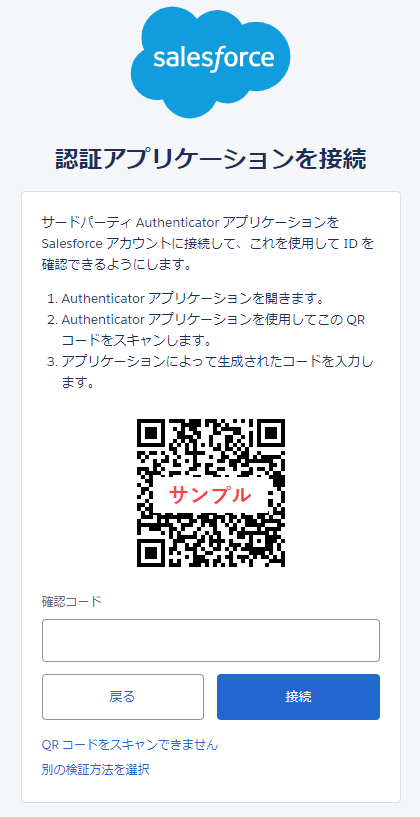
3-2.「認証アプリケーションを接続」画面に QR コードが表示されたら、スマートフォンにインストール済みの認証アプリケーションを起動して QR コードを読み込む
※ ワンタイム認証アプリケーションに QR コードの読み込み機能がない場合は、画面下部の [QR コードをスキャンできません] をクリックし、「キー」欄に表示される文字列をワンタイム認証アプリケーションに登録します
3-3. ワンタイム認証アプリケーションに表示される 6 桁の確認コードを「認証アプリケーションを接続」画面の「確認コード」欄に入力し、[接続] をクリックし
4. ログインが完了したことを確認する
メモ:
・検証手段を追加で [接続]/[登録]/[追加] する場合、1 つ目の検証手段を登録する際のようにメールアドレス宛に確認コードは送信されません。すでに接続済みの検証手段を用いて ID 検証を行います
その他のリソース
MFA の検証手段を追加登録するとき、ID 検証用のコードがメールアドレス宛に送られてこない
複数の検証手段を登録しているときに検証手段を選択して認証する
多要素認証 (MFA) の よくあるトラブルシューティング
Salesforce 多要素認証に関する FAQ
ナレッジ記事番号
001111733
この記事で問題は解決されましたか?
ご意見をお待ちしております。
