Valitse organisaatio
Common Questions When Renewing Flex Gateway Certificate
Julkaisupäivä: Aug 6, 2025
Vaiheet
The full steps to renew Flex Gateway are written in the document Renewing Flex Gateway Registration
This article gives quick guidance and common questions related to the certificate update.
Q: How can I update the Flex Gateway certificate?
A: Steps depend on your setup, Linux, Docker, Podman, or Kubernetes.
See prerequisites and the full details in the document Renewing Flex Gateway Registration, the following is a quick guidance for each type of setup.
[Linux]
- To use a username and password, follow the steps in Renew Registration with Anypoint Platform User Credentials
This is a quick example of using the default path
$ mkdir flex-renew-registration
$ cd flex-renew-registration
$ sudo flexctl registration renew --username=<your-username> --password=<your-password> /usr/local/share/mulesoft/flex-gateway/conf.d/registration.yaml

Starting registration renewal, please be patient.
Registration renewal completed, new expiration date is 2025-09-25 19:27:47 +0000 UTC.
Configuration files were written in directory ".".
For security, modify the file permissions to restrict production scenario access to the user running flex.

$ sudo cp ./registration.yaml /usr/local/share/mulesoft/flex-gateway/conf.d/registration.yaml
- To use Connected App, follow the steps in Renew Registration with Connected App Credentials
This is a quick example of using the default path
$ mkdir flex-renew-registration
$ cd flex-renew-registration
$ sudo flexctl registration renew --client-id=<your-client-id> --client-secret=<your-client-secret> /usr/local/share/mulesoft/flex-gateway/conf.d/registration.yaml

Starting registration renewal, please be patient.
Registration renewal completed, new expiration date is 2025-09-25 19:27:47 +0000 UTC.
Configuration files were written in directory ".".
For security, modify the file permissions to restrict production scenario access to the user running flex.

$ sudo cp ./registration.yaml /usr/local/share/mulesoft/flex-gateway/conf.d/registration.yaml
[Docker, Podman]
- To use a username and password, follow the [Docker] or [Podman] tab in Renew Registration with Anypoint Platform User Credentials
- To use Connected App, follow the [Docker] or [Podman] tab in Renew Registration with Connected App Credentials
[Kubernetes]
Follow the steps in Renew Registration for Flex Gateway Running in Kubernetes
Q: Do I need to restart the replica after renewing the cert?
A: If you do not see the updated Expiration Date for your certificate, please restart the replica
Q: What happens if my Flex Gateway cert expires?
A: These are the main impacts. See the document Renew an Expired Registration for full detail
- Runtime Manager UI will show your Flex Gateway as Disconnected
- New replicas fail to download API configurations from Anypoint Platform, thereby becoming unusable. Existing clusters fail to reload.
- Logs and metrics fail to upload to Anypoint Platform. Troubleshooting using Anypoint Platform is not possible.
- If a certificate expires, you can still invoke "flexctl registration renew" which updates the expired certificate.
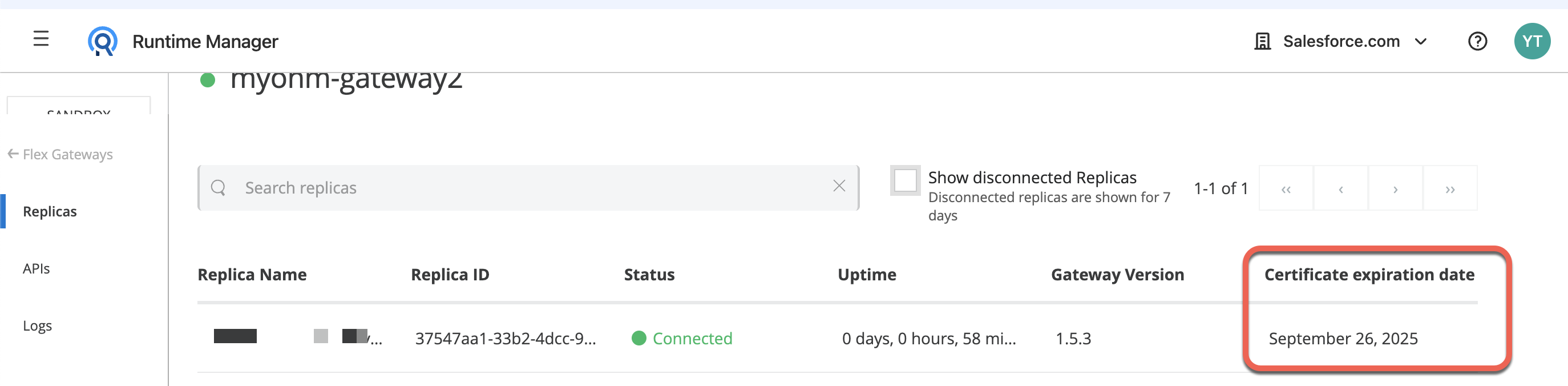
Q: How to check my Flex Gateway cert expiration date?
A: You can check it on Runtime Manager ==> Flex Gateway, or run "flexctl registration inspect"
Example)
$ flexctl registration inspect
{"expiration_date":"2025-09-25 19:28:00 +0000 UTC"}
$
Q: When my "/usr/local/share/mulesoft/flex-gateway/conf.d/registration.yaml" was generated?
A: That file was generated during "flexctl register" with the specified Output Directory
Example)
$ sudo flexctl register \
--username=<YourUserName> \
--password=<YourPassword> \
--environment=<EnvId> \
--organization=<OrgId> \
--connected=true \
--output-directory=/usr/local/share/mulesoft/flex-gateway/conf.d \   <=== The Output Directory
<FGWName>
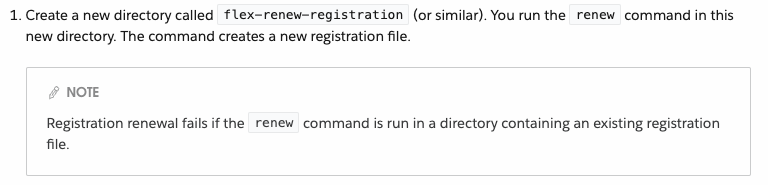
Q: Why I am seeing "Error: file already exists: registration.yaml" from "flexctl registration renew"?
Example)
$ sudo flexctl registration renew --username=myuser --password=mypass /usr/local/share/mulesoft/flex-gateway/conf.d/registration.yaml
Starting registration renewal, please be patient.
Error: file already exists: registration.yaml
A: That happens if you run the command in a directory where file "registration.yaml" exists. Step 1 in the document Renew Registration with Anypoint Platform User Credentials needs to be performed before executing the renew command
Knowledge-artikkelin numero
001114252
Ratkaisiko tämä artikkeli ongelmasi?
Anna palautetta, jotta voimme kehittyä!
