Välj en organisation
How to fetch the secrets from Amazon Secrets Manager using Amazon Secrets Manager Properties Provider
Publiceringsdatum: Jul 25, 2025
Steg
QUESTION
How to fetch the secrets from Amazon Secrets Manager using Amazon Secrets Manager Properties ProviderANSWER
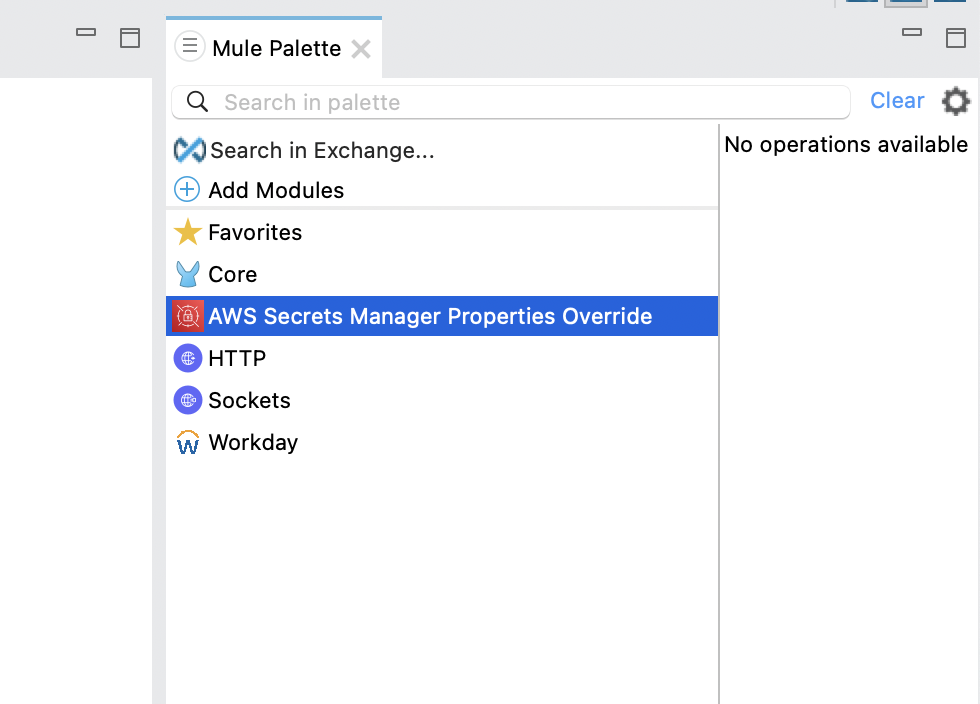
- In your Application, Add the AWS Secrets Manager Properties Provider from Exchange. As shown below, it doesn't contain any operations available as of now.
- In the Global Elements, you can find AWS Secret Manager Override Config, Provide all the required values and create the configuration.
- Now, To fetch the value of the secret from the AWS secret manager, the properties can be referenced via the following property syntax
- ${aws-secrets::testSecret} or Mule::p('aws-secrets::testSecret') by calling this property in a Logger or Transform Message or any configuration.
- Here testSecret is the name of the secret in AWS secret manager
- It will retrieve all the values or key/value pairs present under the Secret Name
- You will not be able to fetch a specific value from the secret. You will only be able to fetch all the values in the secret ( or key-value pairs from the secret). Using the transform message, you can make use of the required keys and values.
- Also, If you just need a single value, you can create a secret (in AWS) containing only that value as plaintext/binary and not using the key/value structure. In this case, you will be able to get the single values instead of key-value pairs.
ADDITIONAL INFORMATION
Documentation : https://docs.mulesoft.com/amazon-secrets-manager-properties-provider-connector/latest/
Knowledge-artikelnummer
001114255
Löste denna artikel ditt problem?
Berätta för oss vad vi kan förbättra!
