Seleccionar una organización
How to change the default Session Timeout in my Anypoint Platform organization?
Fecha de publicación: Jan 28, 2025
Tarea
GOAL
You would like to change the default Session Timeout in your Anypoint Platform organization.
Note: The default session timeout is 60 minutes.
Pasos
The default Session Timeout setting is configurable from the main Business Group and this value will apply to your entire Anypoint Platform (not Business Group specific).
To configure it follow these steps:
1- Log into Anypoint Platform with an Organization Administrator user
2- Go to Access Management section
3- Click on the Business Groups tab
4- Click on your master organization name
5- Edit "Default session timeout" value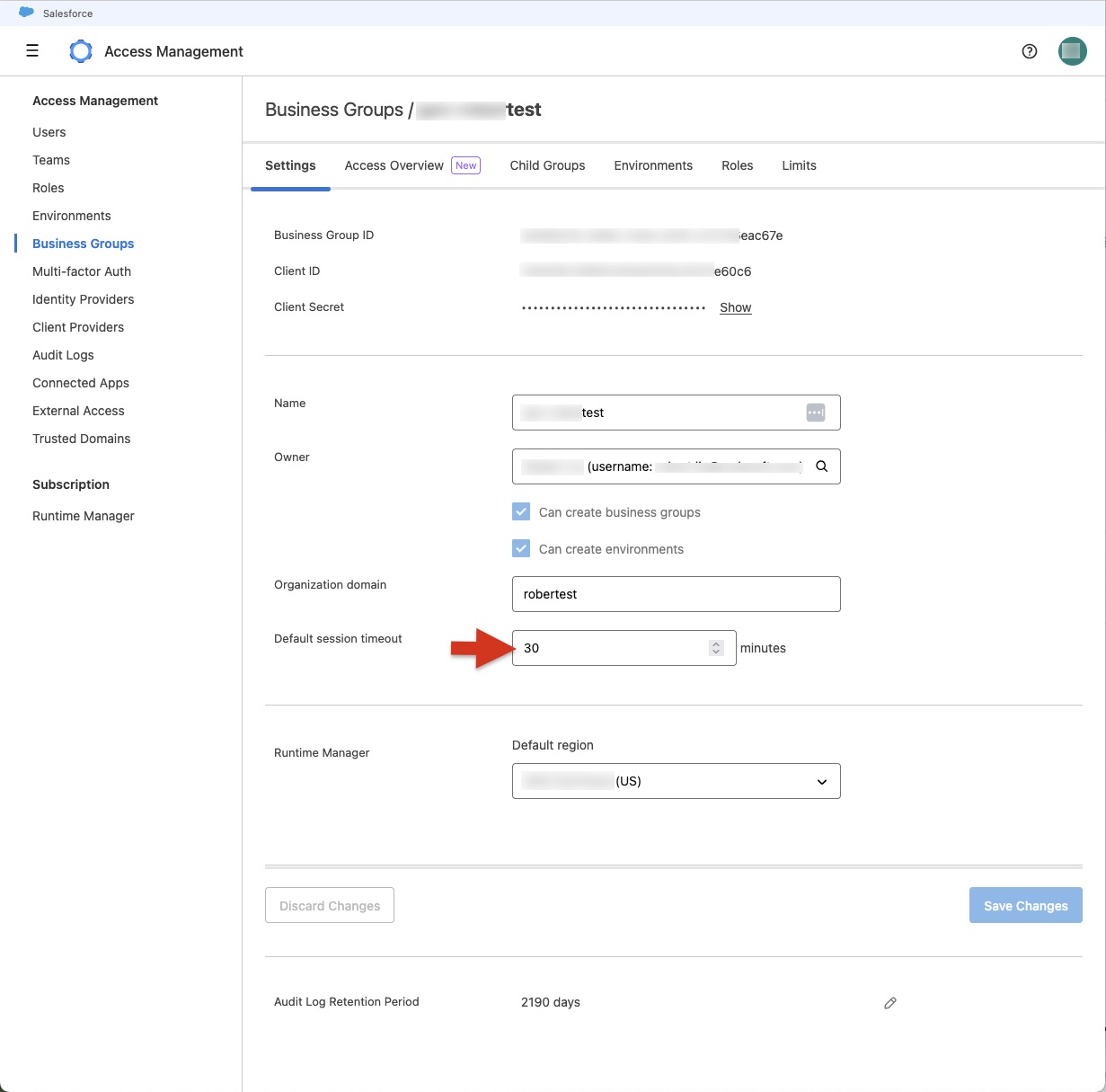
Be aware that changing this value will affect your entire Anypoint Platform, let's say:
- Requires a user to re-login after a period of inactivity (no matter the Business Group he is working on)
- Requires to generate a new bearer token for API calls after this period of time.
Número del artículo de conocimiento
001114446
¿Resolvió este artículo su problema?
¡Háganos saber cómo podemos mejorar!
