Select An Org
How to pass additional parameters to OAuth2 client credentials authorization to generate a Bearer Token
Publish Date: Mar 2, 2024
Task
GOAL
Many APIs secured with OAuth requires additional parameters to generate a Token. In addition to username/password or client/secret, some APIs may require extra parameter. Like the case of Azure's Resource Manager API, which requires an additional "resource" parameter. Currently, the HTTP Connector does not support this. But there is an alternative solution that can be implemented to bypass this limitation.
Steps
These additional parameters should be passed inside the message to be sent by the HTTP Requester. In a normal request (that does not require additional parameters) this would be done using only one HTTP Requester. We are going to separate this into two HTTP Requester:
1.- One to retrieve the Auth Token.
2.- One to access the protected resource using the token generated before.
Although the solution is the same, there are slightly differences between Mule 3 and Mule 4, on how to achieve this:
MULE 3
The additional parameters (resource in this example) should be passed to the HTTP Requester as attachments of the message. No authentication method will be set in the connector. All this configuration will be sent as attachments as well (client_id, client_secret, grant_type).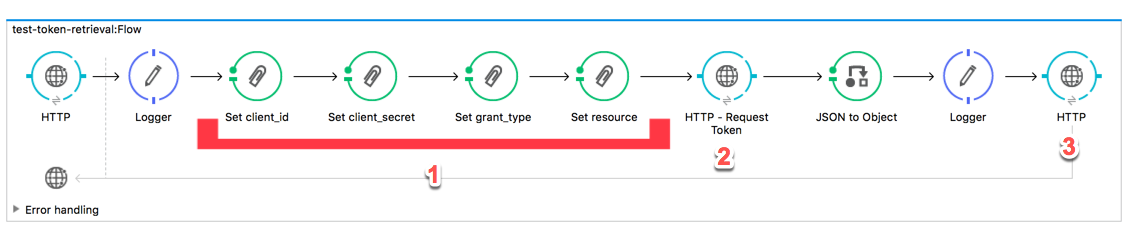
1.- Set parameters as attachments (client_id, client_secret, grant_type, resource).
2.- HTTP Request to retrieve auth token
3.- HTTP Request calling the API using the token from previous step.
Example request:
curl -X GET \
  http://localhost:8081/test-token \
  -H 'Postman-Token: 640f2ccb-4626-4529-b7da-b9c2ff3fd416' \
  -H 'cache-control: no-cache'
MULE 4
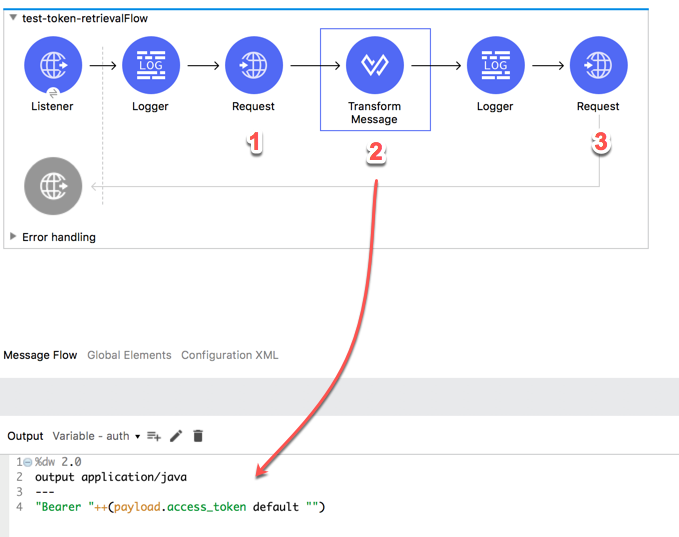
In Mule 4 the message does not contain attachments anymore. Therefore, this is replaced as multi-part content of the request.
1.- A HTTP Requester to retrieve the Auth Token that sends in the message the multi-parts received in the listener.
2.- Transform Message to store in a variable (auth) the Authentication header.
3.- A second HTTP Requester calling the API
Example request:
curl -X GET \
  http://0.0.0.0:8081/test-token \
  -H 'Postman-Token: f0793c97-05ca-4d6c-8916-6f8b77387cdf' \
  -H 'cache-control: no-cache' \
  -H 'content-type: multipart/form-data; boundary=----WebKitFormBoundary7MA4YWxkTrZu0gW' \
  -F client_id=80cb23ed-0d55-4cd2-7628f6e407f6 \
  -F client_secret=YBm/aHAaQkJ3o/0CS3r4SHctcOrojUE9JVbGos= \
  -F grant_type=client_credentials \
  -F resource=https://graph.microsoft.com
Check the projects attached to review the full configuration of this examples.
NOTE: client_id, client_secret are not valid values, they were just written to mock the example.
Additional Resources
Mule 4 Sample Project
Knowledge Article Number
001114526
Did this article solve your issue?
Let us know so we can improve!
