組織を選択
Dataweave- How do I extract key/value pairs from JSON payload and store them into flow variables with the keys and their corresponding values in Mule4.
公開日: Aug 5, 2025
タスク
GOAL
This article shows you an example of how to extract key/value pairs from JSON payload and store them into flow variables with variable name as the keys and their corresponding values in Mule4.ステップ
{"firstName": "jason", "job": "engineer", "dept":"support"}
1. First, you would need to use the Pluck function in Dataweave, to extract out keys and values, and then put them into an array.The pluck function is defined as:
payload pluck (value,key)  -> {
	Test:{
		Key: key,
		Value: value
	}
}
And the pluck function above will transform the original JSON payload to the following payload:
[
  {
    "Test": {
      "Key": "firstName",
      "Value": "jason"
    }
  },
  {
    "Test": {
      "Key": "job",
      "Value": "engineer"
    }
  },
  {
    "Test": {
      "Key": "dept",
      "Value": "support"
    }
  }
]
2. Then, you will need to iterate the above array payload. To perform this task, you will need to use the For Each Scope, with collection set as #[payload.Test] for the For Each Scope.3. During each iteration, you will then set the flow variable name as the Key and variable value as the Value in the JSON array.
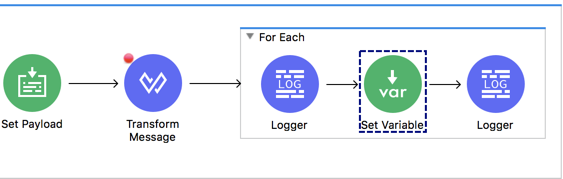
Please refer to the sample project attached for more details.
その他のリソース
ナレッジ記事番号
001114536
この記事で問題は解決されましたか?
ご意見をお待ちしております。
