Seleziona un'organizzazione
How to Read HTTP Attachments in Mule 4
Data pubblicazione: Mar 4, 2025
Operazione
GOAL
Different from Mule 3, Mule 4 does not have the attachments in the Mule event. This article gives an example of how to extract the HTTP attachments, read them and write them to local files.
Fasi
Prepare a PostMan test with 2 files to send to Mule application
Assuming mule app's listening on http://localhost:8081/test, below's the PostMan request:
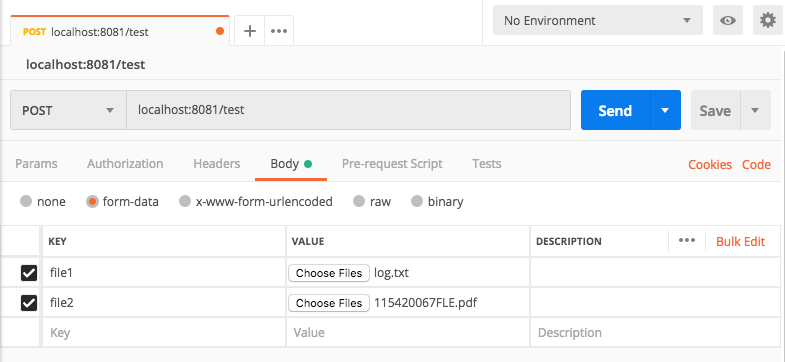
Use dataweave to extract the attachments
- After the HTTP listener, put a dataweave to extract the attachment:
<http:listener doc:name="Listener" doc:id="62702d1c-a913-40bb-9b53-baef97099c65" config-ref="HTTP_Listener_config" path="/test"/>
<ee:transform doc:name="Transform Message" doc:id="3cdb42df-8c13-44c5-8575-9617c7842349" >
  <ee:message >
    <ee:set-payload ><![CDATA[%dw 2.0
output application/java
var payloadParts=payload pluck($) default []
---
payloadParts[0] pluck($) default []]]></ee:set-payload>
  </ee:message>
</ee:transform>
Note:
- the HTTP inbound payload is a map of only one entry "parts".
- The variable "payloadParts" is an array of parts(only 1 item) that are plucked from the HTTP inbound map payload.
- the variable "payloadParts" is also a map, where keys are the HTTP form data keys, like "file1" and "file2" in this case, the values are the actual attachments.
- The dataweave script then plucks the attachments into an array, to be processed by the following steps.
Iterate through the attachments and write to file
For each attachment, print the file name and write it to local files<foreach doc:name="For Each" doc:id="77f6eeb0-6af3-4d4d-86c1-c71a17d6ba13">
<logger level="INFO" doc:name="Logger" doc:id="ad801e73-c208-464f-9641-dbaa1b5191eb" message='#[payload.headers."Content-Disposition".filename]' />
<file:write doc:name="Write" doc:id="7bab023a-d246-4afd-a60b-f348aaf52b3d" config-ref="File_Config" path='#[payload.headers."Content-Disposition".filename]'>
<file:content><![CDATA[#[payload.content]]]></file:content>
</file:write>
</foreach>
The payload in the "foreach" component is a map with 2 keys: headers and content. We could get information about the attachment from the headers, for example, filename:
payload.headers."Content-Disposition".filename
Risorse aggiuntive
Numero articolo Knowledge
001114538
Questo articolo ha risolto il problema?
Facci sapere, così possiamo migliorare!
