Sélectionner une organisation
How to configure HTTP Caching Policy for a specific HTTP resource in API?
Date de publication: Mar 2, 2024
Tâche
GOAL
An API typically contains a baseUrl and multiple resources URI defined in RAML. Please see the attached application where you see the implementation for "/api/users/" and "/api/users/{userId}". This article shows how to configure HTTP Caching Policy for a specific HTTP resource uri-param "/api/users/{userId}" in an API.Étapes
Following screenshot shows the configuration of this policy for "/api/users/{userId}".
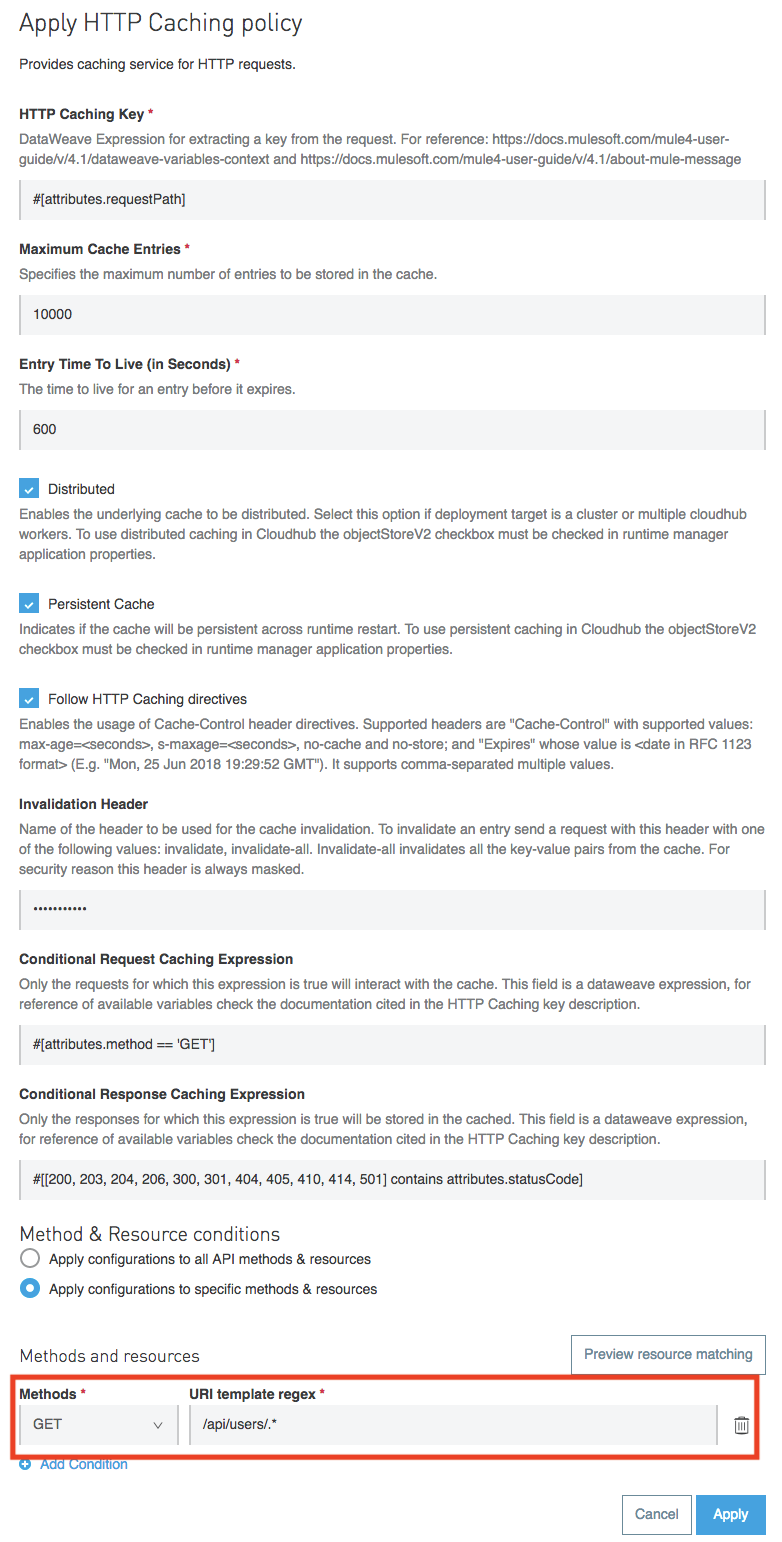
Here are few important things to keep in mind while configuring this policy.
- When "Persistent Cache" option is used, If the application is deployed in CloudHub, then the policy makes use of Object Store v2 to store the cache response. When the application is deployed using Runtime Manager, its important to enable it by checking "Use Object Store v2".
- If the application is deployed in Hybrid or OnPrem then the cache response will be stored InMemory. There is no additional configuration required in the app or during deployment for the policy to work.
- The policy also works in Clustered environment with no additional configuration.
- In CloudHub, when there are more than one workers/instances available for an application, then "Persistent Cache" has to be used with Object Store v2 enabled for the app during the deployment. Otherwise the workers/instances will not be able to share the cache.
- There is size limit of 1MB for each entry in Object Store.
- When the policy needs to be applied to specific resource, URL template regex can be used as shown in screenshot. This URL template must consider the base url also. In the attached example "/api" is the base url and the resource "/users/{userId}" is defined in RAML file. To store all the {userId} responses in cache, the regex "/api/users/.*" should be used.
How to to test and make sure the policy is working?
- Once the policy is configured correctly and applied to an application, you can hit the application using curl command. In the attached example following curl command can be used to trigger the app. When you run the below command for the first time, the result will be stored in cache and when you run the same command the second time, the result will be fetched from the cache.
curl http://localhost:8081/api/users/1
- Some of the tools like 'Postman' automatically adds "cache-control: no-cache" header in the HTTP request which overrides the cache behavior. Due to the presence of this header, mule will ignore the cache.
- Enabling the verbose for the curl command shows the HTTP response header "age" which will show the age of cache in seconds. This is a proof that the response id received from cache.
curl -vvv X GET   http://localhost:8081/api/users/1


< HTTP/1.1 200 OK
< age: 23
< Content-Type: application/json; charset=UTF-8
< Date: Mon, 22 Oct 2018 06:46:15 GMT
< Server: nginx
< Content-Length: 96
< Connection: keep-alive
<
{
  Hello User
* Connection #2 to host localhost left intact
Ressources supplémentaires
Numéro d’article de la base de connaissances
001114582
Cet article a-t-il résolu votre problème ?
Dites-nous ce que nous pouvons améliorer !
