조직 선택
How to connect to a CloudHub VPC via Direct Connect
게시 일자: Mar 2, 2024
과업
GOAL
AWS Direct Connect (DX) lets you create a dedicated network connection between your network and one of the DX locations. Once you have established DX connectivity in your own (or your partner's) AWS account, you can establish connectivity with a CloudHub VPC. This article explains which options are available for connecting to a CloudHub VPC via Direct Connect.
단계
- For connectivity via AWS Direct Connect using a Virtual Interface (VIF), refer to: How to connect to a CloudHub VPC via Direct Connect Virtual Interfaces
- For connectivity via AWS Direct Connect using a Hosted Connection (DXCON), refer to: How to connect to a CloudHub VPC via Direct Connect Hosted Connections
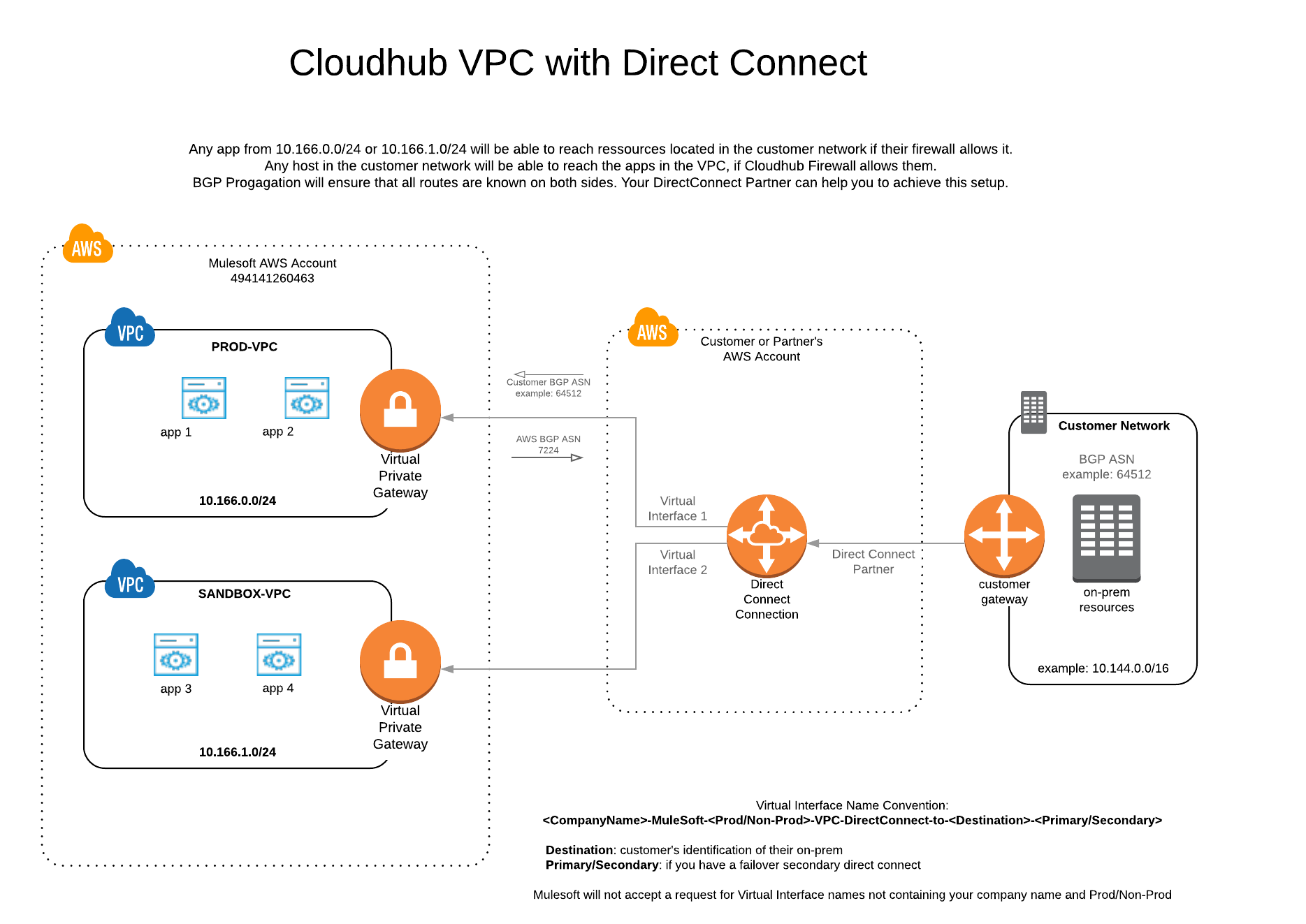
FAQ
1. Can I connect to a CloudHub VPC with a secondary DX connection?Yes. That's AWS best practice. If you have established a second DX connection, traffic will failover to the second link automatically. You can even establish a third DX connection for redundancy.
2. Can I use Anypoint VPN connections as a backup for DX?
No, it is not possible to establish Anypoint VPN connections and DX connections for the same VPC.
3. Can I use static routes?
Direct Connect requires the use of the Border Gateway Protocol (BGP) for dynamic routing. This allows you to have full control of the routes advised to the CloudHub VPC. The entire VPC CIDR block will be advertised by the MuleSoft peer.
4. How do I establish DX connectivity?
Please review the AWS Direct Connect documentation, and reach out to AWS support for further assistance if needed.
5. Is it mandatory to have an AWS Account?
Yes, you need to establish connectivity in your own AWS account, or your partner's AWS account. Some partners hide the AWS Account, which means they are the ones initiating the requests on your behalf. Behind the scenes, it is the same setup but please ensure your partner follows the naming convention <CompanyName>-MuleSoft-<Prod/Non-Prod>-VPC-DirectConnect-to-<Destination>-<Primary/Secondary> when creating a VIF or Hosted Connection request.
Knowledge 기사 번호
001114632
이 기사를 통해 문제를 해결했습니까?
개선을 위한 의견을 보내주세요.
