Valitse organisaatio
Checking your Anypoint Platform Subscription usage (vCores, VPC, etc.)
Julkaisupäivä: Mar 2, 2024
Tehtävä
GOAL
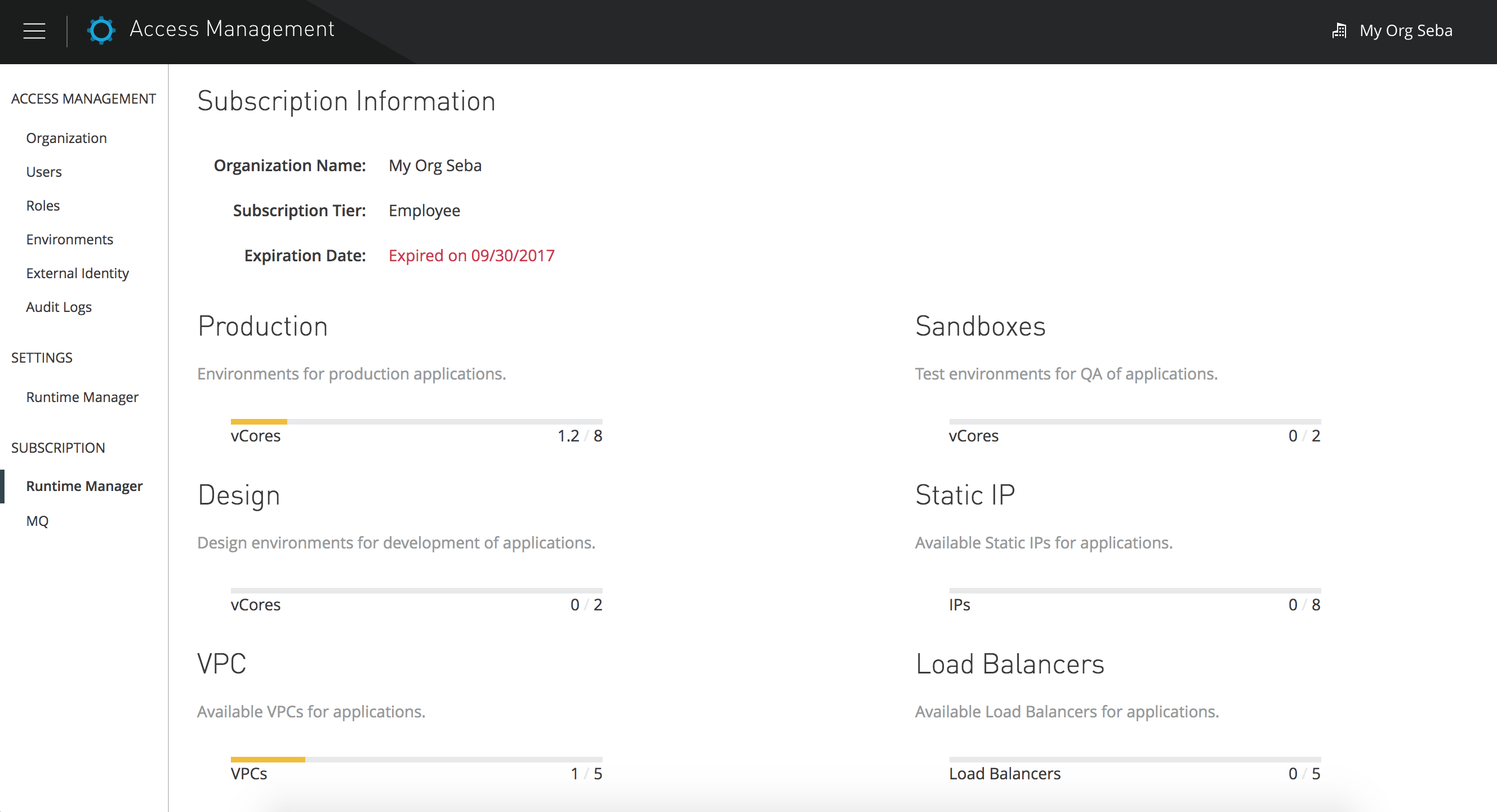
You have an Anypoint Platform subscription and you need to check your current usage of:- vCores
- VPCs
- Load Balancers
- Static IPs
Vaiheet
- Log in to Anypoint Platform
- On the top right corner, click on your organization's name and then select Business Groups
- On the left-hand panel, select Runtime Manager under Subscriptions
Important Note
** The total vCores, VPCs and Static IPs shown are the total in use including the ones reassigned to sub organizations.
** Anypoint Platform does not show entitlement counts for On Premise Core Licenses. See I cannot see my on premise core license entitlements or usage in Runtime Manager
** Anypoint Platform does not show entitlement counts for On Premise Core Licenses. See I cannot see my on premise core license entitlements or usage in Runtime Manager
Knowledge-artikkelin numero
001114663
Ratkaisiko tämä artikkeli ongelmasi?
Anna palautetta, jotta voimme kehittyä!
