Seleziona un'organizzazione
How to configure API Autodiscovery for an application deployed to RunTime Fabrics and pair it with API Manager
Data pubblicazione: Jul 28, 2025
Operazione
GOAL
This article explains how to pair an application deployed to the RunTime Fabrics with the API from API Manager.Fasi
- To configure Autodiscovery on the Mule 3.X application, you can follow below documentation :
- https://docs.mulesoft.com/api-manager/2.x/configure-autodiscovery-3-task
- To configure Autodiscovery on the Mule 4.X application, you can follow below documentation :
- https://docs.mulesoft.com/api-manager/2.x/configure-autodiscovery-4-task
- Deploy an application to RunTime Fabrics.
- Once an application is deployed, to configure the properties click on the name of an application deployed to the RunTime Fabrics.
- It will show 3 tabs in the middle of the screen - Deployment Target, Ingress and Properties
- Click on the Properties tab and add below 2 properties -
- anypoint.platform.client_id
- anypoint.platform.client_secret
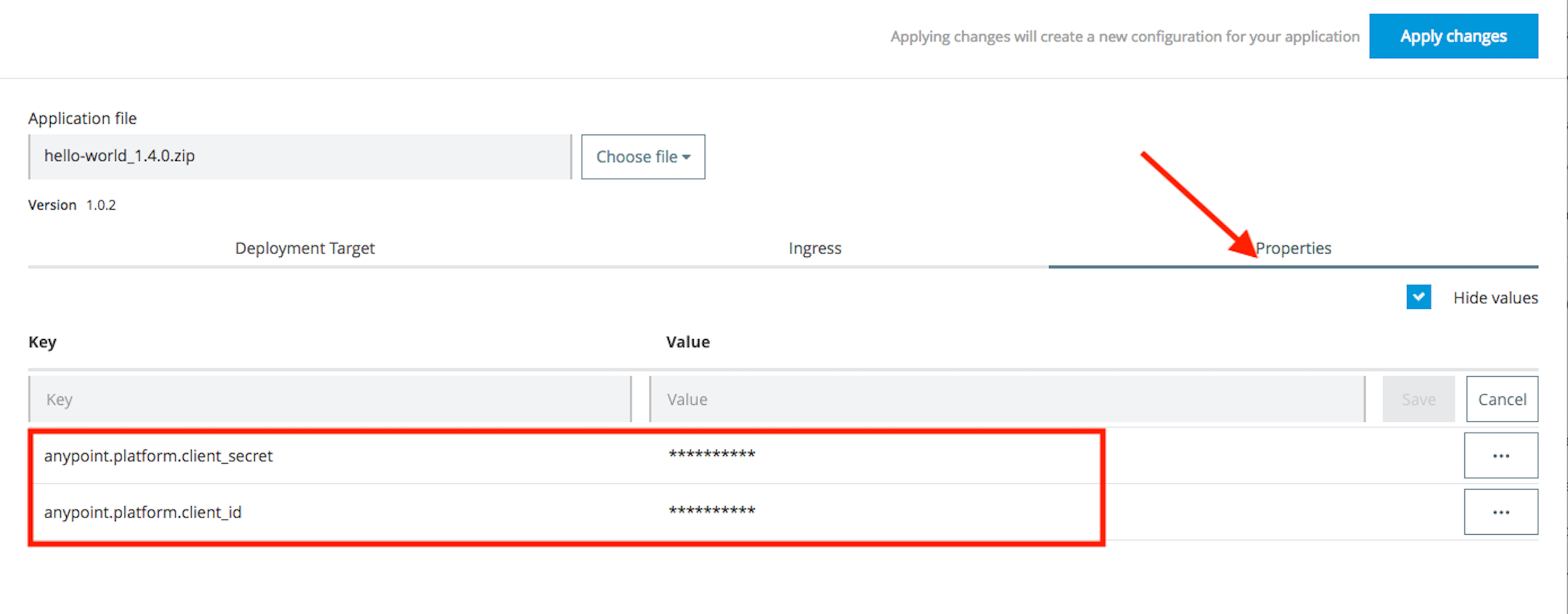
- Once properties are added click on the Apply Changes button at the right.
- Once the config changes are applied successfully, API status in API Manager is active and pairing is done.
Numero articolo Knowledge
001114711
Questo articolo ha risolto il problema?
Facci sapere, così possiamo migliorare!
