Vælg en organisation
How to Separate Logging Levels in an Application, e.g., INFO, WARNING, DEBUG
Udgivelsesdato: Aug 6, 2025
Opgave
GOAL
When an application is being developed and tested, or, for example, troubleshoot, it is always a good idea to have more information on what information is processed. One of the methods is to use verbose logging. For example, print full/partial payload which provides more information for debugging purposes.However, when application is tested, UAT is signed off and deployed to the production environment, to reduce the load onto system resources or, for example, due to security restrictions, verbose logging should be turned off and only some indicative processing information logged.
Trin
<logger message="Just info message: the payload was set" level="INFO" doc:name="Logger INFO"/>It is recommended to have 2 or more logging components in a sequence but with different logging levels, e.g., INFO and DEBUG and different categories defined:
<logger message="Just info message: the payload was set" level="INFO" category="com.mulesoft.support.logging-levels-poc.info" doc:name="Logger INFO"/>
<logger message="The payload is: #[payload]" level="DEBUG" category="com.mulesoft.support.logging-levels-poc.debug" doc:name="Logger DEBUG"/>
As a result, by default, the application will log only INFO level informative messages.
On the other hand, if an application needs to be debugged, the DEBUG logging level can simply be changed by editing src/main/resources/log4j2.xml file with a respective debugging CATEGORY and restarting the application if deployed locally:
<Loggers>
...
<!-- TRUNCATED -->
...
        <!-- Custom DEBUG logger -->
        <AsyncLogger name="com.mulesoft.support.logging-levels-poc.debug" level="DEBUG"/>
...
<!-- TRUNCATED -->
...
    </Loggers>
Or, if an application is deployed via Anypoint Runtime Manager (including Anypoint Platform Private Cloud Edition) to CloudHub, On-premise, by changing on Settings page -> Logging tab similar to:
com.mulesoft.support.logging-levels-poc.debug=DEBUG
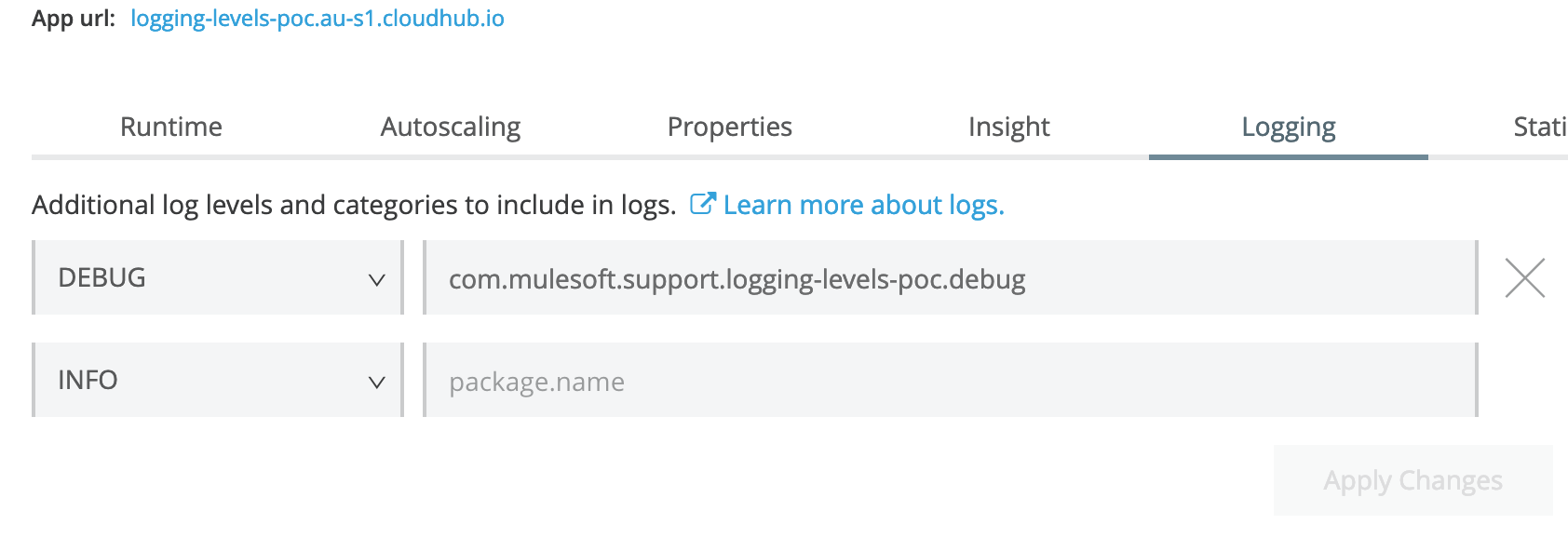
In this scenario the logging level will change without application restart. This can be very important for production deployments.
IMPORTANT:
- Logger component CATEGORY must be defined. Something meaningful, similar to the above: com.mulesoft.support.logging-levels-poc.debug It is used to turn off and on customised logging.
- By defining different logger categories, e.g., for different flows, DEBUG or another logging level can be enabled not for the whole application but for certain processing chains.
In addition, if DEBUG logging level messages need to be saved to a separate file, the approach explained in the following article can be used: How to direct some log entries to a different log file
Yderligere ressourcer
Vidensartikelnummer
001114712
Løste denne artikel dit problem?
Giv os besked, så vi kan forbedre os!
