Välj en organisation
How To troubleshoot When DLB Is Stuck In "Starting" Status
Publiceringsdatum: Mar 2, 2024
Steg
GOAL
In some circumstances, DLB stuck in "Starting" status. Sometimes it's because of the issue described in DLB Stuck In "Starting" Status Because Of Too Many Internal Domains. Please check first.
If this is not the case, this KB explains how to troubleshoot the issue
PROCEDURE
1. Get your Anypoint platform token, refer to How to generate your Authorization Bearer token for Anypoint Platform and How to generate a bearer token for Anypoint Platform API calls using a SAML enabled account
2. Get your organisation ID, refer to How to know my Organization ID (Org ID) on the Anypoint Platform
2. Get your organisation ID, refer to How to know my Organization ID (Org ID) on the Anypoint Platform
3. Get your VPC and DLB ID from the URL in the DLB console
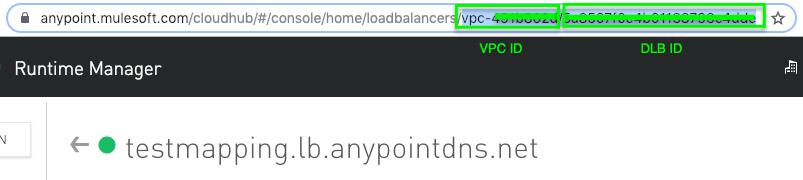
4. Get from the deployment endpoint and check the output
GET https://anypoint.mulesoft.com/cloudhub/api/organizations/<Org ID>/vpcs/<VPC ID>/loadbalancers/<DLB ID>/deployments
5. Usually the error is related to certificates, please double check the certificates. Probably because of some old certificate. If you can't figure it out, please raise a support case with the response from the deployment endpoint.
6. Please use the Net Tools app to check if you can resolve "www.google.com" or an internal domain towards all of your DNS servers configured for your VPC. (Net Tools app: How To Use Network Tools Application?)
6. Please use the Net Tools app to check if you can resolve "www.google.com" or an internal domain towards all of your DNS servers configured for your VPC. (Net Tools app: How To Use Network Tools Application?)
Knowledge-artikelnummer
001114744
Löste denna artikel ditt problem?
Berätta för oss vad vi kan förbättra!
