Valitse organisaatio
How to Allowlist FTP Connector in Passive Mode on a FTP Server
Julkaisupäivä: Aug 26, 2025
Tehtävä
GOAL
If an FTP server needs to allowlist FTP connector applications in PASSIVE mode, not only port 21 but also certain data ports have to be allowed to in order for the application to work properly. This knowledge article explains what ports should be allowed.
Vaiheet
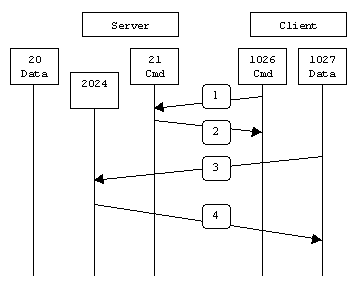
In passive mode FTP, when opening an FTP connection, the client opens two random unprivileged ports locally (N > 1023 and N+1). The first port contacts the server on port 21, then the client will issue the PASV command. The result of this is that the server then opens a random unprivileged port (P > 1023) and sends P back to the client in response to the PASV command. The client then initiates the connection from port N+1 to port P on the server to transfer data.
Firstly, decide what's the PASV port range of the FTP server. For example, the port range is specified by pasv_min_port and pasv_max_port as below in the vsftp.conf for vsftpd backed FTP server
pasv_min_port=1024
pasv_max_port=1048
Secondly, allow TCP access from allowlisted IPs to port 21 and the PASV ports, 1024 to 1048 as in the example above.
Lisäresurssit
Knowledge-artikkelin numero
001114929
Ratkaisiko tämä artikkeli ongelmasi?
Anna palautetta, jotta voimme kehittyä!
