Vælg en organisation
How to delete a user using the Anypoint Access Management API?
Udgivelsesdato: Aug 5, 2025
Opgave
GOAL
This article explains how to delete a user using the Anypoint Access Management UI or when it needs to be done programmatically via Access Management REST API.
Trin
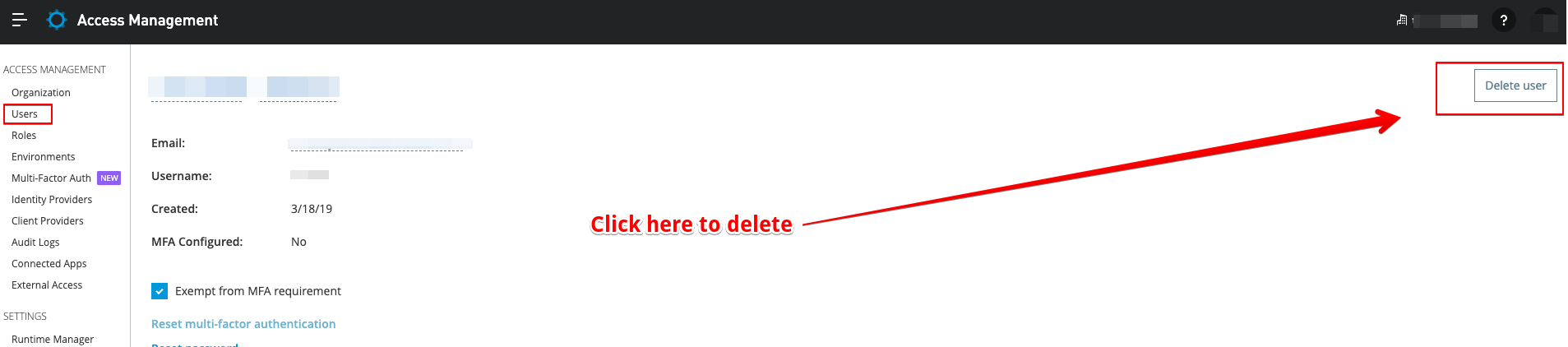
Login to Anypoint Platform - Access Management - Users
You may delete a user by selecting the user and clicking on Delete user on the top right corner.
Important - You require the Organization Administrators role to manage users within an Anypoint Platform organization and deleting a user can ONLY be performed from the Master Organisation. If you are not in the master Organisation, you will only be able to remove all permissions to that business group, which effectively deletes the user from that business group.
Please also see Access Management Documentation for Managing Users.
Bulk Delete

- (Optional) Search to filter in/out users
- Click on upper left button to select all
- Delete
API call to delete a user
To delete a user using the Access Management REST API, you will need to do a DELETE request to the following endpoint with the Organization ID and the User ID:DELETE /api/organizations/{orgId}/users/{userId}
Please find below an example with sample IDs for organization and user (the <<TOKEN>> can be attained by following this article: How to generate your Authorization Bearer token for Anypoint Platform):
curl -X DELETE -H "Authorization: Bearer <<TOKEN>>" "https://anypoint.mulesoft.com/accounts/api/organizations/1e7ea50f-a9de-4c99-b0a7-900698576991/users/845499a0-3a99-4dbc-b799-48183d999604"
What happens to a user that is deleted from an Organization?
It is a common misconception that this will delete the user's account and the details that are in this account. What actually happens is that the account is simply removed from the organization, but the account itself remains. No details are altered, but the user cannot access the original organization or any data in the original organization unless re-invited. This account can then be used as an Unassociated Account
What is the impact of deleting a user from Access Management to resources associated with that user?
- When a user is deleted from Access Management the user is no longer having access to Anypoint Platform.
- Existing client applications, i.e. contracts, created by the user should not be affected.
- If the deleted user was the only one having access to certain resources then org admin should make sure to assign another user having similar permissions/ownership as the deleted user had.
- E.g. if only this user was doing manual approval for SLA based contract then someone else should be assigned to do that.
Vidensartikelnummer
001114957
Løste denne artikel dit problem?
Giv os besked, så vi kan forbedre os!
