Seleziona un'organizzazione
How to extract log files from specific pods on "Anypoint Private Cloud Edition" or "Runtime Fabric on VMs/Bare Metal"
Data pubblicazione: Jul 25, 2025
Operazione
GOAL
When analyzing an issue with the Anypoint Private Cloud Edition or Runtime Fabric on VMs/Bare Metal, the logs of specific pods will oftentimes be required by the Support team. This article details the recommended procedure to obtain those logs.Fasi
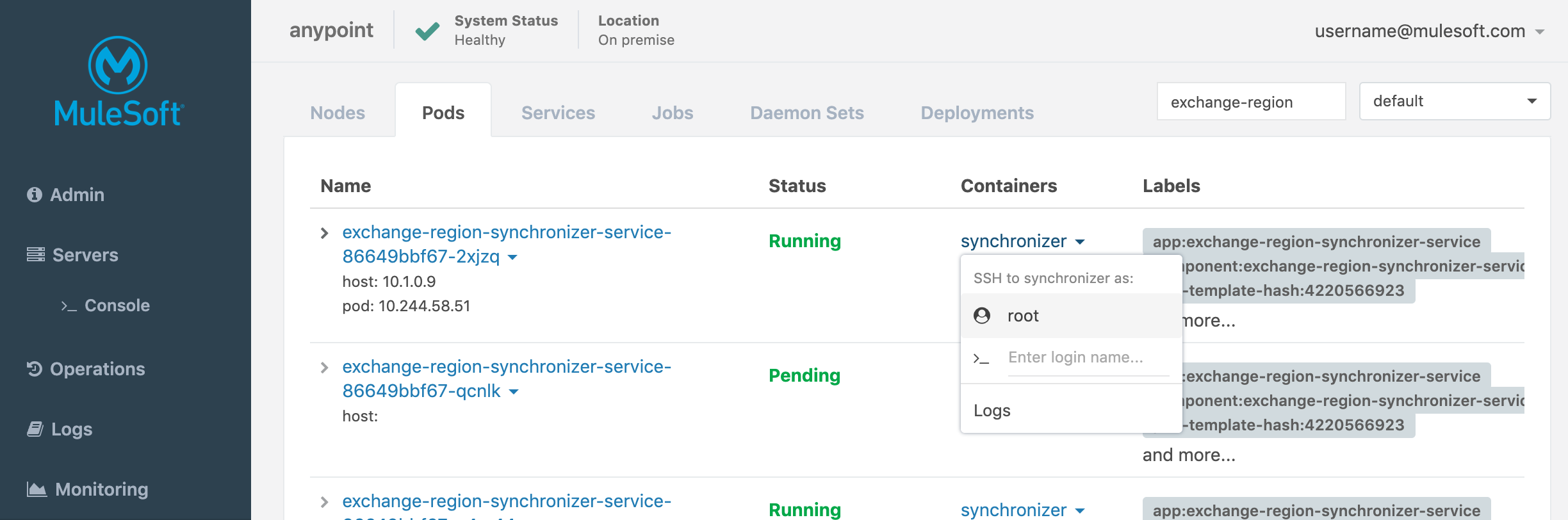
From Ops Center
- Login into Ops Center
- Go to Kubernetes on the left menu bar
- Access the Pods tab
- Select the correct namespace right next to the search bar
- Search for the desired pod by name
- Click on the pod or specific container name and then select logs
- You will be directed tho the logging tab with a pre-populated filter and your log will be displaying
From command line
- Log into any one of the nodes of your cluster (usually through SSH) and from a Unix shell, enter the Gravity container by issuing:
sudo gravity enter
- Obtain the names of all pods by issuing:
kubectl get pods --all-namespaces
This will list all of the pods; the namespace containing them (first column), their names (second column), their current running status and their age (i.e. time since last restart)
This will list all of the pods; the namespace containing them (first column), their names (second column), their current running status and their age (i.e. time since last restart)
- Find the pods of interest and, for each one, issue:
kubectl logs [pod-name] --namespace=[pod-namespace] > /ext/share/[pod-name].log
where [pod-name] needs to be replaced with the name as listed from the previous command as well as the corresponding [pod-namespace]. It is important to redirect the output into a file located in /ext/share inside the container, as this makes the file available in directory /var/lib/gravity/planet/share on the host. This is the standard folder in which temporary working files are normally stored. If /ext/share is omitted, then the log file will be saved in the current directory, and the mapping from this to the corresponding folder on the host is not transparent.
where [pod-name] needs to be replaced with the name as listed from the previous command as well as the corresponding [pod-namespace]. It is important to redirect the output into a file located in /ext/share inside the container, as this makes the file available in directory /var/lib/gravity/planet/share on the host. This is the standard folder in which temporary working files are normally stored. If /ext/share is omitted, then the log file will be saved in the current directory, and the mapping from this to the corresponding folder on the host is not transparent.
- Exit the Gravity container and transfer the log files from /var/lib/gravity/planet/share to your local machine.
- Zip the log files up and attach the zip file to the support case.
Numero articolo Knowledge
001115019
Questo articolo ha risolto il problema?
Facci sapere, così possiamo migliorare!
