Seleziona un'organizzazione
Issues clustering more than one runtime node in the same server
Data pubblicazione: Jul 25, 2025
Fasi
When the clusters have more than one runtimes/nodes on the same physical server there is some instability due to the communication port assignation.
WARN 2017-01-31 16:07:58,340 [hz.1.IO.thread-in-2] com.hazelcast.nio.ReadHandler: [10.64.118.125]:5703 [259677] hz.1.IO.thread-in-2 Closing socket to endpoint Address[10.64.119.104]:5701, Cause:java.io.EOFException: Remote socket closed!
INFO 2017-01-31 16:08:01,858 [hz.1.IO.thread-in-1] com.hazelcast.nio.TcpIpConnection: [10.64.118.125]:5703 [259677] Connection [Address[10.64.119.104]:5702] lost. Reason:
INFO 2017-01-31 16:08:07,150 [hz.1.IO.thread-Acceptor] com.hazelcast.nio.SocketAcceptor: [10.64.118.125]:5703 [259677] Accepting socket connection from /10.64.118.125:45302
INFO 2017-01-31 16:08:07,150 [hz.1.IO.thread-Acceptor] com.hazelcast.nio.TcpIpConnectionManager: [10.64.118.125]:5703 [259677] 5703 accepted socket connection from /10.64.118.125:45302
CAUSE
The cluster tries to assign automatically the communication ports it will try to connect and establish a connection with the other nodes in the same server -or a different- by scanning ports from a default range. If there are more than two cluster per server it will confuse up the nodes by the first available one.
SOLUTION
The solution depending on how you create the cluster will be specify the communication port and IP.
If you created manually just add the port to the mule-cluster.properties located in the directory <MULE_HOME>/.mule in format IP:PORT
mule.cluster.nodes=192.168.1.128:7823,192.168.1.128:7824,192.168.1.128:7825for MMC ( Mule Management Console ) you have to create the cluster first and then specify the port in the same way than manually.
for ARM ( Anypoint Runtime Manager ) you can specify the ports into the cluster configuration of Runtime Manager, then the platform will sent that configuration to the Runtimes.
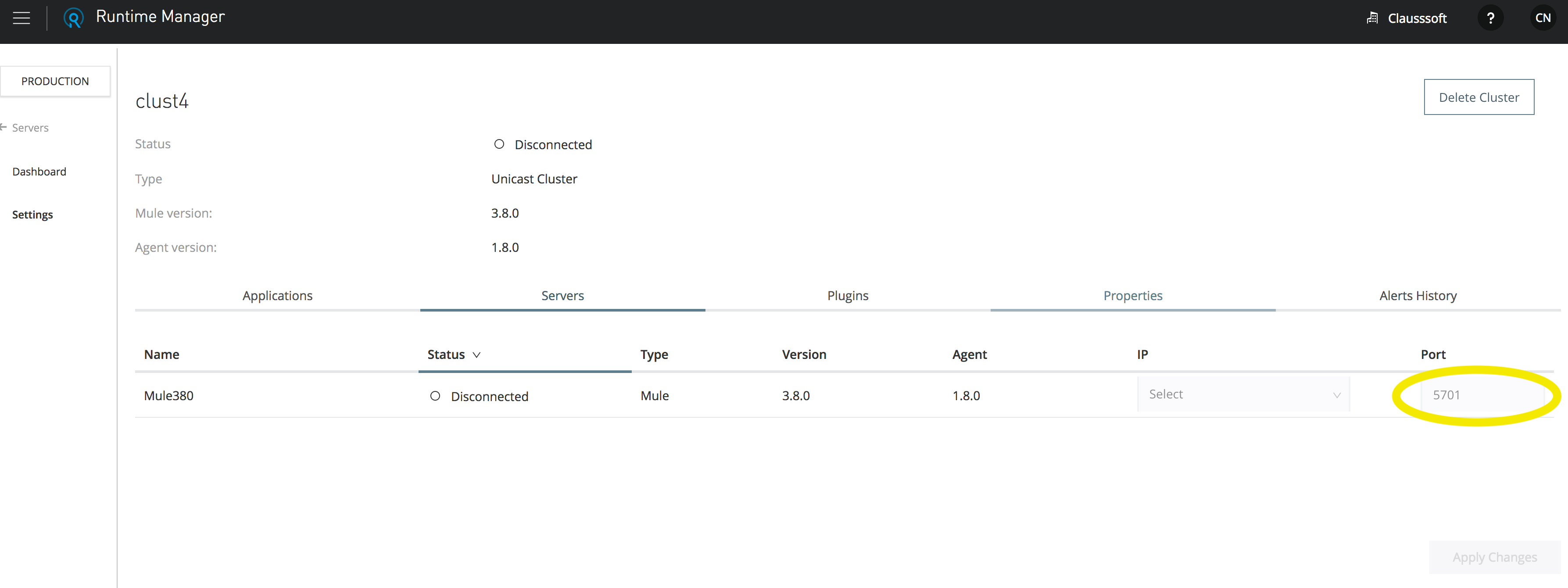
If any of the previous mentioned methods could't be applied you can apply the changes overriding the properties. how to override cluster properties using wrapper.conf
Multicast scenario:
If you notice this kind of behaviors when having multiple multicast clusters running in the same servers, then it is possible that the issue relies on the fact that all the clusters are in the same subnet/network, thereby collision takes place where a node from cluster A will try to communicate with a node of cluster B because all of them use the same default Multicast IP address.
In that case, you can leverage different options:
- placing each cluster in a different subnet
- use a different multicast address for each cluster as mentioned in Common considerations during Cluster Setup in Mule runtime --> The multicast IP address on our server is different from the one mentioned in prerequiste[224.2.2.3]. Is it possible to change the default multicast address for Mule runtime?
Numero articolo Knowledge
001115055
Questo articolo ha risolto il problema?
Facci sapere, così possiamo migliorare!
