Выбрать организацию
How to know my Organization ID (Org ID) on the MuleSoft Anypoint Platform
Дата публикации: Mar 25, 2026
Задача
Some operations require specifying the Organization ID for MuleSoft applications. The Organization ID (Org ID) can also be used to distinguish exactly the Business Group or Master Organization against which some requests need to be performed.
Действия
There are several methods that can be used to obtain the Organization ID for MuleSoft's Anypoint Platform.
Method 1: Use anypoint-cli
You can use the anypoint-cli (command-line interface) tool to execute account business-group to get a list of the business groups, their types, and the organization id. Note that you must install anypoint-cli first.
Example:
Example:
> account business-group list
┌────────────────────────────────────────┬───────────────┬────────────────────────────────────────┐
│ Name                                   │ Type          │ Id                                     │
├────────────────────────────────────────┼───────────────┼────────────────────────────────────────┤
│ Great Company                          │ Master        │ 12345678-7831-8734-9999-a0a0a0a0a0a0   │
├────────────────────────────────────────┼───────────────┼────────────────────────────────────────┤
│ Retail                                 │ Business unit │ abcdef01-1234-53e1-a3b4-b0b0b0b0b0b0   │
├────────────────────────────────────────┼───────────────┼────────────────────────────────────────┤
│ Engineering                            │ Business unit │ 87654321-abcd-e8e2-bab4-c0c0c0c0c0c0   │
└────────────────────────────────────────┴───────────────┴────────────────────────────────────────┘
Method 2: Extract it from the URL
After login into Anypoint Platform, choose Access Management. Alternatively, you can also use the following URL: https://anypoint.mulesoft.com/accounts/businessGroups
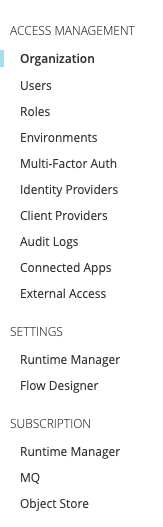
If you are using the classic UI, click on Organization from the left-hand side menu:
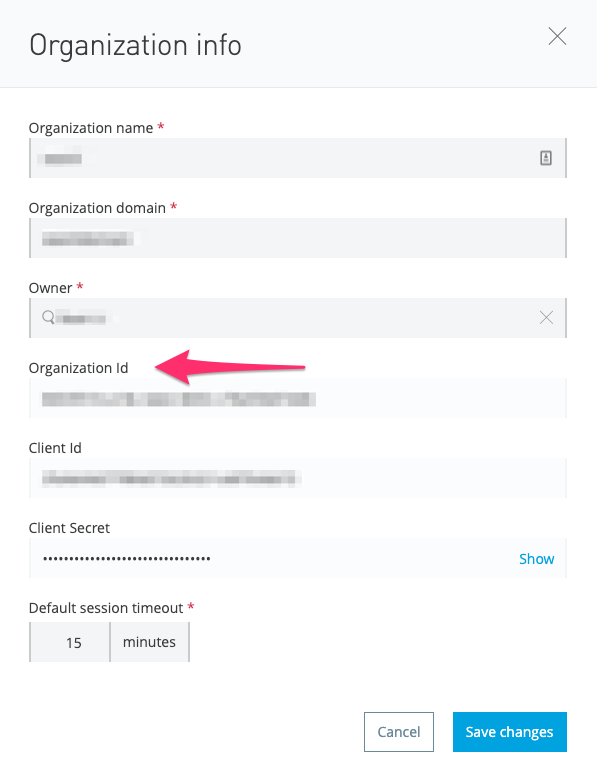
You will see the tree view of the Master Org and business groups listed. Click on the Master Org or a business group, you will see the Organization ID:
If you are using the New Feature UI, click on Business Groups from the left-hand side menu:
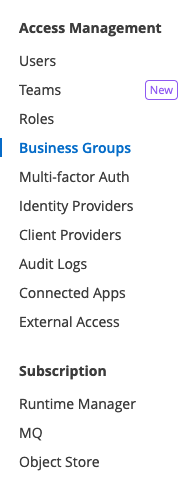
You will see the tree view of the Master Org and business groups listed. Click on the Master Org or a business group. You will notice that the URL of your web browser's location bar has changed to something like this:
https://anypoint.mulesoft.com/accounts/businessGroups/XXXXXXX-XXXX-XXXX-XXXX-XXXXXXX
The masqueraded string ('XXXXXXX-XXXX-XXXX-XXXX-XXXXXXX') on the example-provided URL (after 'businessGroups/') is the Org ID of the selected organization.
Method 3: Use Anypoint Platform REST API
Please see the article How to generate your Authorization Bearer token for Anypoint Platform to get a token to invoke the API. Then invoke the URL https://anypoint.mulesoft.com/accounts/api/me with the token.
Example:
curl -H "Authorization: Bearer [YOUR_ACCESS_TOKEN]" https://anypoint.mulesoft.com/accounts/api/me tags: Core Services ID
Номер статьи базы знаний
001115130
Эта статья решила вашу проблему?
Оставьте свой отзыв, чтобы мы могли стать лучше!
