Выбрать организацию
How to set or reset environment client_secret in Anypoint Platform
Дата публикации: Mar 20, 2025
Задача
GOAL
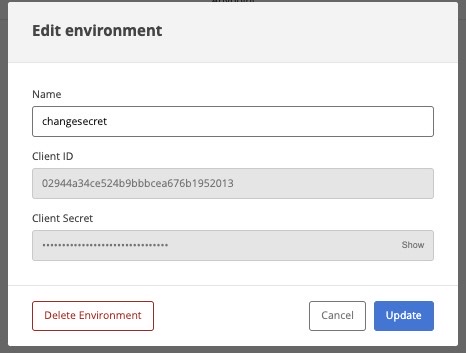
You are looking to change the client_secret for an environment, perhaps due to accidental leakage of the environmental credentials or due to a requirement to rotate credentials. InAccess Management -> Business Groups -> Environments the Client ID and Client Secret fields are greyed out, so you can not change them on the Anypoint Platform UI:
Действия
You will need to acquire a bearer token with an Organization Administrator user and use the REST API in order to accomplish this.
- Please see this article to obtain the bearer token: How to generate your Authorization Bearer token for Anypoint Platform
If you use a Connected App, the only required scope for this operation is "Admin Particular Organization Clients". - Below is an example curl:
curl -H 'Authorization: bearer ADMINISTRATORS-TOKEN' 'https://anypoint.mulesoft.com/accounts/api/organizations/<ORG-ID>/clients/<CLIENT-ID>?resetSecret=true' -X PATCH
Please replace ADMINISTRATORS-TOKEN with the token from step 1
ORG-ID for your organization ID (you can see this in the URL when you go to Access Management and on the "Organization" tab, click on the business group for the client). For more information, please refer to KB "How to know my Organization ID (Org ID) on the Anypoint Platform"
CLIENT-ID for the client id of the environment. To find out the CLIENT-IDs, you can run the command below.
curl --location --request GET 'https://anypoint.mulesoft.com/accounts/api/organizations/<ORG-ID>/clients' \
--header 'Authorization: Bearer <token>'
CONSIDERATIONS
- As stated in the Procedure part, Organization Administrator permissions are required, Environment Administrator is not enough
- To understand what can the environment credentials be used for, please review this article: What Can the Access Token Acquired by Organization/Environment Client ID/Secret Do
- Changing the environment client_secret will break your applications' connection to API Manager, you will need to update your applications/Autodiscoveries with the new environment client_secret. You will see errors such as
Failed to obtain contracts for API 'API XXXXXXXX'. This request will be retried after some backoff time. Reason: com.mulesoft.mule.runtime.gw.client.exception.UnauthorizedException: Authorization request to Anypoint Platform was not successful, client_id and/or client_secret may be wrong.
Status code: 401
Server Payload:
Unauthorized
- To roll back this change, you can call the same endpoint with the old client_secret in the body, it will set the old credentials back:
curl -H 'Authorization: bearer ADMINISTRATORS-TOKEN' PATCH 'https://anypoint.mulesoft.com/accounts/api/organizations/<ORG-ID>/clients/<CLIENT-ID>' -X PATCH
With the following body:
{
"client_secret": "old secret"
}
Номер статьи базы знаний
001115221
Эта статья решила вашу проблему?
Оставьте свой отзыв, чтобы мы могли стать лучше!
