조직 선택
How to handle a huge files in HTTP connector and what are the file size limitations
게시 일자: Jul 24, 2025
과업
GOAL
To pass huge files in the HTTP request/listener operations and to understand if there are any file size limitations.Note: Please make sure you are using the latest connector version by referring to the Release Notes.
단계
To handle the transferring of huge files through the HTTP Listener and Request connectors you can utilize the "Streaming Strategy" option as explained below. There are no hard limitations on the file size in the HTTP connector as far as the system where the Mule app is deployed has sufficient CPU and Memory to handle the flow as required.
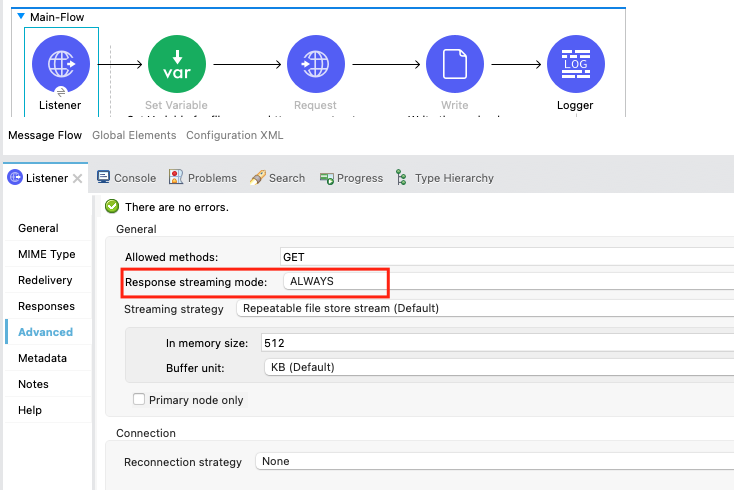
Streaming Strategy in HTTP Listener:
The HTTP Listener provides an option to configure the Response Streaming mode where you can select the option for "Transfer-Encoding: chunked" which means the data stream is divided into a series of non-overlapping "chunks" and sent out to the invoking system. You can select the Response Streaming mode as ALWAYS.
Please refer to the documentation for more understanding: https://docs.mulesoft.com/http-connector/1.7/http-listener-ref#configure-response-streaming-mode
When we mention "Response streaming mode" as ALWAYS in the HTTP listener the MuleSoft HTTP connector will add a "Transfer-Encoding: chunked" header. The use of Transfer-Encoding: chunked is what allows streaming within a single request or response. This means that the data is transmitted in a chunked manner, and does not impact the representation of the content. Chunked encoding is useful when larger amounts of data are sent to the client and the total size of the response may not be known until the request has been fully processed.
You can test by implementing an HTTP Request operation as illustrated in the below article.
https://help.salesforce.com/s/articleView?id=HTTP-Request-Connector-Response-Streaming-Example-in-Mule-4&type=1&language=en_US
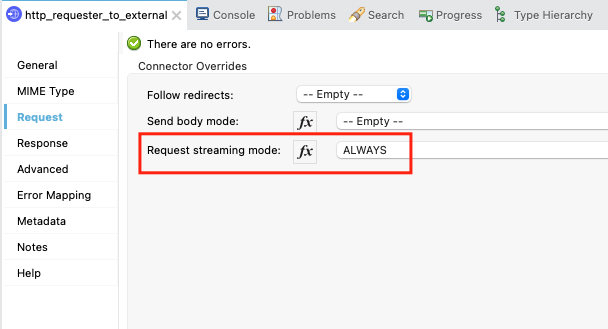
Streaming Strategy in HTTP Request:
Similar to Listener, the HTTP Request provides an option to configure the Request Streaming mode where you can select the option ALWAYS.
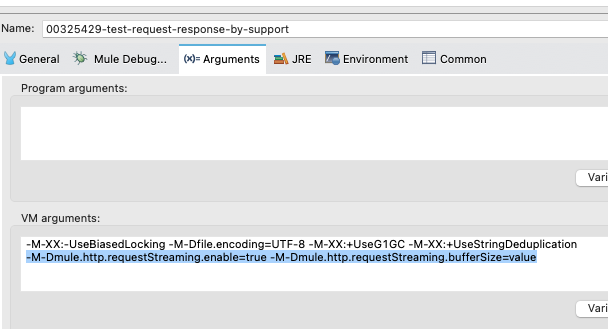
Please note that Setting Request streaming mode ALWAYS causes an out-of-memory error if we are passing a large payload. So you have to set up additional JVM properties as mentioned in the below documentation.
https://docs.mulesoft.com/http-connector/1.6/http-request-ref#configure-the-request-streaming-system-property
Additionally, you can refer to the below article to retry a failed HTTP request.
https://help.salesforce.com/s/articleView?id=How-to-Retry-a-Failed-HTTP-Request-Due-to-HTTP-CONNECTIVITY-or-Other-Errors-in-Mule-4&type=1&language=en_US
ADDITIONAL INFORMATION
Basically, the HTTP chunked streaming is an algorithm within the HTTP 1.1 protocol through which the sender can send data that is beyond the sender's memory limit, and the receiver can act on the data stream in chunks immediately instead of waiting for the entire data to arrive. This Wiki page provides more understanding of how the chunked Transfer encoding works.
Disclaimer: This article involves products and technologies which do not form part of the MuleSoft product set. Technical assistance for such products is limited to this article.
Knowledge 기사 번호
001115266
이 기사를 통해 문제를 해결했습니까?
개선을 위한 의견을 보내주세요.
