Seleziona un'organizzazione
Mismatch in CPU Allocation Results Via RTF API Vs Kubectl command
Data pubblicazione: Sep 30, 2024
Operazione
QUESTION
We are using various RTF APIs to get the monitoring stats related to Mulesoft Runtime Fabric running in our organization.
One of those RTF APIs is used to get the CPU allocation on various RTF nodes.
We recently noticed that the CPU allocation retrieved using RTF REST API is not the same as the RTF CPU allocation returned by "kubectl describe node <nodeName>" command.
Fasi
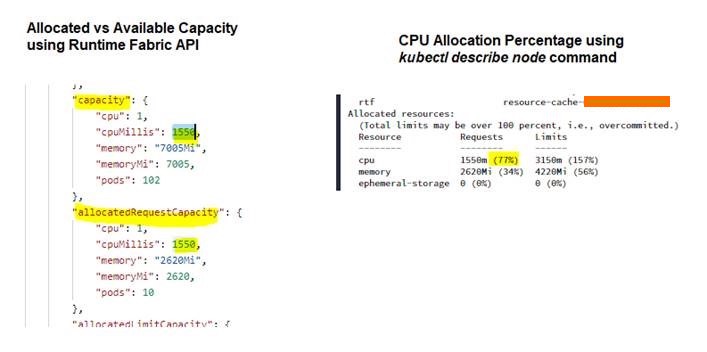
The result of a controller node's CPU allocation using both methods is attached as screenshots.
The Runtime Fabric API used to get node level available CPU capacity and allocated CPU capacity is https://anypoint.mulesoft.com/runtimefabric/api/organizations/<orgId>/fabrics/<fabric ID>
ANSWER
The capacity.cpuMillis and capacity.memory from each node is the total CPU and memory capacity available for mule apps, inbound traffic and external log forwarder on the node. The capacity.cpuMillis and capacity.memory value is calculated by deducting an amount from the actual CPU and memory capacity. (As of writing up this article in May 2022)
1. On a controller, it deducts the sum of the requested CPU and memory of all components running on the node apart from Ingress and External Log Forwarder
2. On a worker, it deducts the sum of the requested CPU and memory of all components running on the node apart from Mule Applications and External Log Forwarder
The cpuMillis and memory in allocateRequestCapacity and allocatedLimitCapacity body are the same as Requests and Limits from the kubectl describe nodes output
It's confusing in the screenshot that the capacity.cpuMillis is 1550 and the requested CPU from kubectl describe nodes output is also 1550m
In the screenshot, 1550m requests CPU from kubectl output means requested CPU of all pods running on the node. This includes the requested CPU of the pods from other components which is 2000m - 1550m = 450m. We can calculate the actual mule app requested CPU is 1550m - 450m = 1100m. The capacity.cpuMillis 1550 means the CPU capacity available for apps, so you can still deploy 450m requested CPU apps.
If you want to use the API response, then deduct the resource consumption of other components from allocateRequestCapacity.cpumills (1550 - (2000 - 1550)) = 1100 then you will get the actual app requested CPU. The same rule applies to memory
ADDITIONAL INFORMATION
A sample output from the RTF REST API.
GET https://anypoint.mulesoft.com/runtimefabric/api/organizations/b2ee7923-e6c7-4ca3-86a0-0123456789ab/fabrics/64c94e79-a49e-4648-a810-0123456789ab
{
    "id": "64c94e79-a49e-4648-a810-0123456789ab",
    "name": "rtf-test",
    "region": "us-east-1",
    "vendor": "gravitational",
    "organizationId": "b2ee7923-e6c7-4ca3-86a0-0123456789ab",
    "version": "1.12.28",
    "status": "Active",
    "desiredVersion": "1.12.28",
    "lastUpgradeTimestamp": 1649031974066,
    "createdAt": 1645436371550,
    "nodes": [
        {
            "uid": "566299c8-92fe-11ec-9c41-021c461e6364",
            "name": "172.19.0.33",
            "kubeletVersion": "v1.13.13-gravitational.0",
            "dockerVersion": "docker://18.6.2",
            "role": "worker",
            "status": {
                "isHealthy": true,
                "isReady": true,
                "isSchedulable": true
            },
            "capacity": {
                "cpu": 1,
                "cpuMillis": 1750,
                "memory": "15216Mi",
                "memoryMi": 15216,
                "pods": 106
            },
            "allocatedRequestCapacity": {
                "cpu": 1,
                "cpuMillis": 1960,
                "memory": "4494Mi",
                "memoryMi": 4494,
                "pods": 10
            },
            "allocatedLimitCapacity": {
                "cpu": 9,
                "cpuMillis": 9850,
                "memory": "5544Mi",
                "memoryMi": 5544,
                "pods": 10
            }
        },
        {
            "uid": "4ff111a4-92fd-11ec-9c41-021c461e6364",
            "name": "172.19.0.29",
            "kubeletVersion": "v1.13.13-gravitational.0",
            "dockerVersion": "docker://18.6.2",
            "role": "controller",
            "status": {
                "isHealthy": true,
                "isReady": true,
                "isSchedulable": true
            },
            "capacity": {
                "cpu": 1,
                "cpuMillis": 1330,
                "memory": "6586Mi",
                "memoryMi": 6586,
                "pods": 95
            },
            "allocatedRequestCapacity": {
                "cpu": 1,
                "cpuMillis": 1020,
                "memory": "1570Mi",
                "memoryMi": 1570,
                "pods": 17
            },
            "allocatedLimitCapacity": {
                "cpu": 3,
                "cpuMillis": 3950,
                "memory": "3870Mi",
                "memoryMi": 3870,
                "pods": 17
            }
        }
    ],
    "secondsSinceHeartbeat": 12,
    "clusterVersion": "1.1.1636064094-8b70d2d",
    "kubernetesVersion": "1.13.13-gravitational.0",
    "isManaged": false,
    "appliance": {
        "version": "1.1.1636064094-8b70d2d"
    },
    "clusterConfigurationLevel": "unsupported",
    "features": {
        "enhancedSecurity": true,
        "persistentStore": false
    }
}
Numero articolo Knowledge
001115270
Questo articolo ha risolto il problema?
Facci sapere, così possiamo migliorare!
