Vælg en organisation
How to generate a client self-signed certificate for 2 way SSL authentication with Dedicated Load Balancer using Openssl
Udgivelsesdato: Apr 6, 2025
Opgave
Goal
When you want to enable client certificate validation on a Dedicated Load Balancer a client certificate is required. If the certificate is signed it must include certificates for Intermediate/root Certificate Authorities.
Trin
Procedure
To generate a self-signed client certificate for two way SSL authentication we can use Openssl utility. Follow the commands below:
❯ openssl req -newkey rsa:4096 -keyform PEM -keyout ca.key -x509 -days 3650 -outform PEM -out ca.pem

Generating a 4096 bit RSA private key
..................................................................................................................................++
............................................................................................................................................++
writing new private key to 'ca.key'
Enter PEM pass phrase:
Verifying - Enter PEM pass phrase:
-----
You are about to be asked to enter information that will be incorporated
into your certificate request.
What you are about to enter is what is called a Distinguished Name or a DN.
There are quite a few fields but you can leave some blank
For some fields there will be a default value,
If you enter '.', the field will be left blank.
-----
Country Name (2 letter code) []:
State or Province Name (full name) []:
Locality Name (eg, city) []:
Organization Name (eg, company) []:
Organizational Unit Name (eg, section) []:
Common Name (eg, fully qualified host name) []:my-ca-sign
Email Address []:


❯ openssl genrsa -out client.key 4096

Generating RSA private key, 4096 bit long modulus
.............................++
...........................................................................................++
e is 65537 (0x10001)


❯ openssl req -new -key client.key -out client.req

You are about to be asked to enter information that will be incorporated
into your certificate request.
What you are about to enter is what is called a Distinguished Name or a DN.
There are quite a few fields but you can leave some blank
For some fields there will be a default value,
If you enter '.', the field will be left blank.
-----
Country Name (2 letter code) []:
State or Province Name (full name) []:
Locality Name (eg, city) []:
Organization Name (eg, company) []:
Organizational Unit Name (eg, section) []:
Common Name (eg, fully qualified host name) []:myclientcert
Email Address []:

Please enter the following 'extra' attributes
to be sent with your certificate request
A challenge password []:

❯ Create a file "cert_ext.cnf" with content

[ client ]
basicConstraints = CA:FALSE
keyUsage = digitalSignature, keyEncipherment
extendedKeyUsage = clientAuth
subjectKeyIdentifier = hash

❯ openssl x509 -req -in client.req -CA ca.pem -CAkey ca.key -extfile cert_ext.cnf -extensions client -days 365 -outform PEM -out client.pem

Signature ok
subject=/CN=myclientcert
Getting CA Private Key
Enter pass phrase for ca.key:


You will see the files generated:

❯ ls -lrt
total 40
-rw-r--r--  1 dtufino  staff  3418 16 Dec 11:32 ca.key
-rw-r--r--  1 dtufino  staff  1667 16 Dec 11:32 ca.pem
-rw-r--r--  1 dtufino  staff  3243 16 Dec 11:33 client.key
-rw-r--r--  1 dtufino  staff  1590 16 Dec 11:33 client.req
-rw-r--r--  1 dtufino  staff  1663 16 Dec 11:34 client.pem


Finally concatenate the CA and client certificates to upload to the DLB:

cat client.pem ca.pem > client-bundle.pem
Upload your client certificate to the DLB and you can set the Client validation to Mandatory
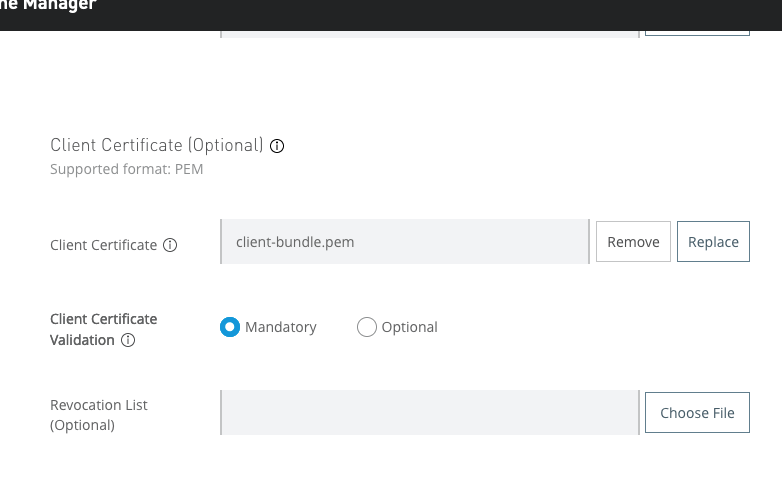
Validation
Finally you can test it is working using curl or Postman
Using curl
If you are using a self signed certificate for your server certificate you can pass the -k option to curl to ignore
curl -v -k https://dlbtest.mulefabric.ml/hello-dlbtest/hiiii-test  --cert client.pem --key client.key

*   Trying 34.231.173.1...
* TCP_NODELAY set
* Connected to dlbtest.mulefabric.ml (34.231.173.1) port 443 (#0)
* ALPN, offering h2
* ALPN, offering http/1.1
* successfully set certificate verify locations:
*   CAfile: /etc/ssl/cert.pem
  CApath: none
* TLSv1.2 (OUT), TLS handshake, Client hello (1):
* TLSv1.2 (IN), TLS handshake, Server hello (2):
* TLSv1.2 (IN), TLS handshake, Certificate (11):
* TLSv1.2 (IN), TLS handshake, Server key exchange (12):
* TLSv1.2 (IN), TLS handshake, Request CERT (13):
* TLSv1.2 (IN), TLS handshake, Server finished (14):
* TLSv1.2 (OUT), TLS handshake, Certificate (11):
* TLSv1.2 (OUT), TLS handshake, Client key exchange (16):
* TLSv1.2 (OUT), TLS handshake, CERT verify (15):
* TLSv1.2 (OUT), TLS change cipher, Change cipher spec (1):
* TLSv1.2 (OUT), TLS handshake, Finished (20):
* TLSv1.2 (IN), TLS change cipher, Change cipher spec (1):
* TLSv1.2 (IN), TLS handshake, Finished (20):
* SSL connection using TLSv1.2 / DHE-RSA-AES256-GCM-SHA384
* ALPN, server accepted to use http/1.1
* Server certificate:
*  subject: C=UK; O=my DLB d2fino; OU=IT; CN=dlbtest.mulefabric.ml
*  start date: Sep 17 16:07:11 2021 GMT
*  expire date: Sep 17 16:07:11 2022 GMT
*  issuer: C=UK; O=my DLB d2fino; OU=IT; CN=dlbtest.mulefabric.ml
*  SSL certificate verify result: self signed certificate (18), continuing anyway.
> GET /hello-dlbtest/hiiii-test HTTP/1.1
> Host: dlbtest.mulefabric.ml
> User-Agent: curl/7.64.1
> Accept: */*
>
< HTTP/1.1 200 OK
< Date: Thu, 16 Dec 2021 11:59:57 GMT
< Content-Type: text/plain
< Content-Length: 11
< Connection: keep-alive
< X-MULE_SESSION: AYfjToxvhKpF6d3eZMKuLSIko5wuAwdyHimcx9FjNXXdrO0ABXNyACNvcmcubXVsZS5zZXNzaW9uLkRlZmF1bHRNdWxlU2Vzc2lvbi7rdtEW7GGKAwAFWgAFdmFsaWRMAA1mbG93Q29uc3RydWN0dAAmTG9yZy9tdWxlL2FwaS9jb25zdHJ1Y3QvRmxvd0NvbnN0cnVjdDtMAAJpZHQAEkxqYXZhL2xhbmcvU3RyaW5nO0wACnByb3BlcnRpZXN0AA9MamF2YS91dGlsL01hcDtMAA9zZWN1cml0eUNvbnRleHR0ACdMb3JnL211bGUvYXBpL3NlY3VyaXR5L1NlY3VyaXR5Q29udGV4dDt4cAFwdAAkYjA5YjhmNzAtNWU2Ny0xMWVjLTg4MTgtMGEzNDQ1Y2Q3NWZmc3IAJWphdmEudXRpbC5Db2xsZWN0aW9ucyRTeW5jaHJvbml6ZWRNYXAbc/kJS0s5ewMAAkwAAW1xAH4AA0wABW11dGV4dAASTGphdmEvbGFuZy9PYmplY3Q7eHBzcgAkb3JnLm11bGUudXRpbC5DYXNlSW5zZW5zaXRpdmVIYXNoTWFwndHZ72dFzgADAAB4cHcMP0AAAAAAABAAAAAAeHEAfgAJeHB4
< Strict-Transport-Security: max-age=31536000; includeSubdomains;
< X-Content-Type-Options: nosniff
< X-Frame-Options: SAMEORIGIN
< X-XSS-Protection: 1; mode=block
<
* Connection #0 to host dlbtest.mulefabric.ml left intact
/hiiii-test* Closing connection 0
Caveats: This was tested using curl on Linux, Mac. On Windows the curl version may throw errors abut client certificate, instead please use Postman if using Windows.
Using Postman:
In settings go to Certificates and select the client cert and client key
Test
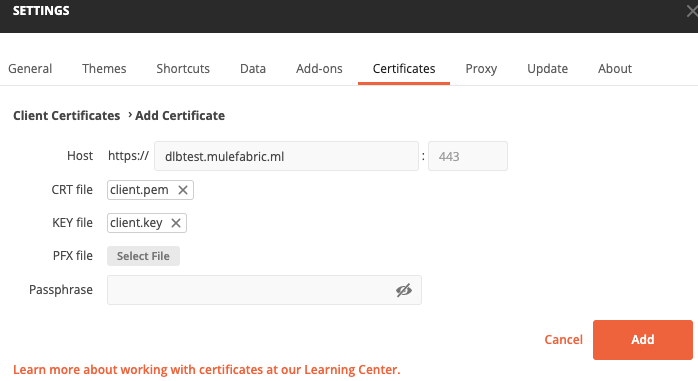
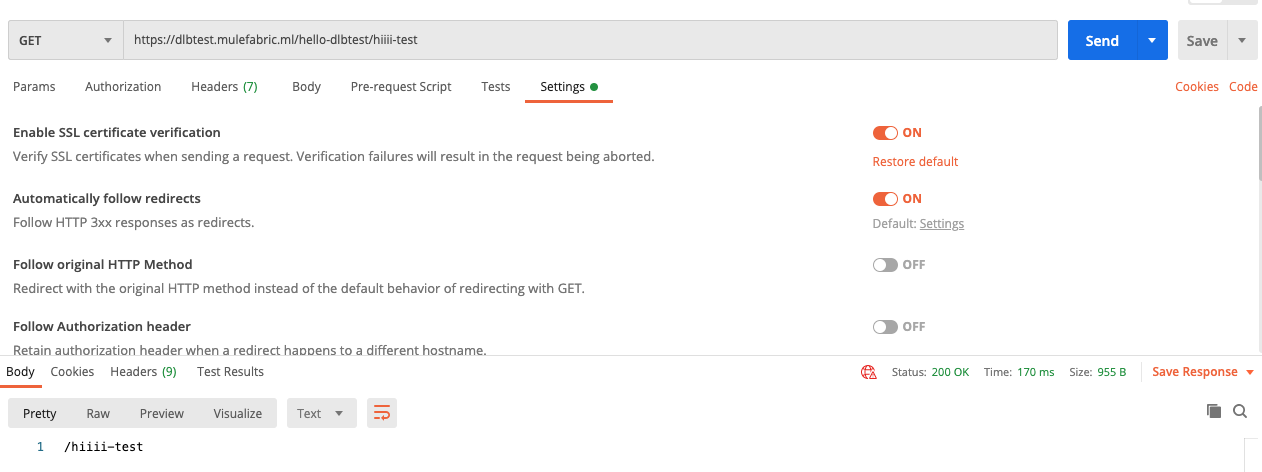
Troubleshooting
If you get any errors about certificate such as:
<html>
<head><title>400 The SSL certificate error</title></head>
<body>
<center><h1>400 Bad Request</h1></center>
<center>The SSL certificate error</center>
</body>
</html>
Please ensure you are using the correct client certificate and key. Alternatively you can try to generate a new self-signed client certificate following the guide here:
https://verifalia.com/help/sub-accounts/how-to-create-self-signed-client-certificate-for-tls-mutual-authentication
Vidensartikelnummer
001115290
Løste denne artikel dit problem?
Giv os besked, så vi kan forbedre os!
