Vælg en organisation
How to Enable both Last-Mile Security and Mutual TLS in Runtime Fabric (RTF)
Udgivelsesdato: Apr 22, 2025
Opgave
GOAL
Enable both Last-Mile Security and Mutual TLS for an application in a Runtime Fabric environment. This will enforce that both the client and server are who they say they are, while also continuing to enforce encryption between Edge and the Mule.
Quick Answer
In order to use mTLS with LMS, mTLS must terminate at ingress(edge) as the client certificate is not sent to the Mule. Instead, the Edge certificate is sent to the Mule. You need to exclude the truststore from the TLS configuration in the Mule Application's HTTP Listener Configuration. Secrets Manager is in charge of mTLS from requesting Client to Edge, LMS is in charge of maintaining encryption from Edge to Mule.
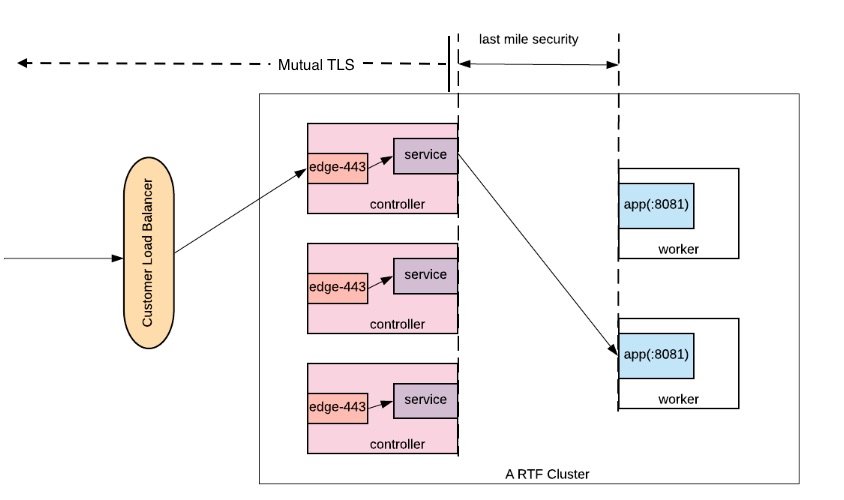
Important Concept 2: The Mule app is assumed to trust whatever is given by the ingress through last-mile security. Ingress can also be configured to pass headers regarding the original certificate via "Forward SSL Session" option for the Mule app. This will contain certificate's CN information and other details about the certificate that the app can use to parse out required information.
Trin
Create an HTTPS connector listening on the port 8081
-
Create a Key Store as well as a Trust Store and set up the Key Store Configuration in an HTTP listener config. Do NOT include the Trust Store, leave those fields blank. Make sure to export a copy of the certificate and key as you will need these as well for Secrets Manager later.
-
Specify the Protocol as HTTPS and the listening port to ${https.port} or 8081 if it's hard-coded. Do bear in mind, unlike CloudHub which listens on the port 8081 for HTTP and 8082 for HTTPS, an RTF application has to listen on the port 8081 for both HTTP and HTTPS as edge-443 only forwards the request to this port. The property ${https.port} defaults to 8081 in RTF as well. See here for more info on RTF ports.
Configure Mutual TLS in Secrets Manager
-
In Secrets Manager, create a Secrets Group and create a Key Store with Type PEM using the certificate and key you created previously.
-
Create a Trust Store using the Trust Store file you created previously (usually JKS format).
-
Create a TLS Context with the Type of Anypoint Security and select your Trust Store and Key Store.
-
Add your certificate to RTF by navigating to "Runtime Manager>Runtime Fabrics>{your-rtf}>Inbound Traffic tab>Add Certificate"
-
Choose Import from Secrets Manager and select your Environment, Security Group, and TLS Context.
Enable Last Mile Security
-
Enable Inbound Traffic (Note: if this is greyed out, please see this documentation for enabling Inbound Traffic on RTF.)
-
To enable LMS, navigate to "Runtime Manager>Applications>{your-application}>Settings>Ingress" and checkmark the box for last-mile security.
-
Optionally enable Forward SSL Session if you would still like to pass the Client Certificate to the Mule via headers. More info here in step #14.
-
Select your Public Endpoint Domain.
-
Save and Deploy, once the application is back online, make a test request to your application with your cert and key.

Hint: You can use this example curl to override resolution with your Public IP of your RTF's Controller.
curl -kv --cert example.mydomain.com.cer --key example.mydomain.com.pkcs8 https://appname.example.mydomain.com/listener-endpoint --resolve appname.example.mydomain.com:443:###.###.###.###
Vidensartikelnummer
001115301
Løste denne artikel dit problem?
Giv os besked, så vi kan forbedre os!
