Organisation auswählen
How to trim the spaces in a CSV header file
Veröffentlichungsdatum: Mar 2, 2024
Aufgabe
GOAL
Trim the spaces that are present in the last column of the header in a CSV file.Schritte
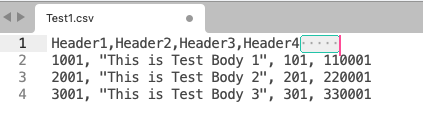
The below Dataweave code will trim these spaces from Header4 and allows you to read the values under this header.
%dw 2.0
output application/java
import * from dw::core::Objects
var headers=keySet(payload[0]) reduce ((key, acc = {}) -> acc ++ { (trim(key)): key})
fun searchKeyTrimmed(row, h)=row[headers[h]]
---
payload map {
    "Header1": payload.Header1,
    "Header2": payload.Header2,
    "Header3": payload.Header3,
    "Header4": searchKeyTrimmed($, 'Header4')
}
Nummer des Knowledge-Artikels
001115321
Konnten Sie Ihr Problem mithilfe dieses Artikels lösen?
Geben Sie uns Feedback, damit wir uns verbessern können.
