組織を選択
How to trim the spaces in a CSV header file
公開日: Mar 2, 2024
タスク
GOAL
Trim the spaces that are present in the last column of the header in a CSV file.ステップ
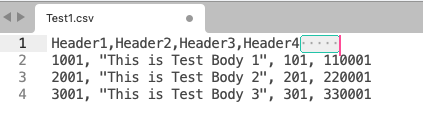
The below Dataweave code will trim these spaces from Header4 and allows you to read the values under this header.
%dw 2.0
output application/java
import * from dw::core::Objects
var headers=keySet(payload[0]) reduce ((key, acc = {}) -> acc ++ { (trim(key)): key})
fun searchKeyTrimmed(row, h)=row[headers[h]]
---
payload map {
    "Header1": payload.Header1,
    "Header2": payload.Header2,
    "Header3": payload.Header3,
    "Header4": searchKeyTrimmed($, 'Header4')
}
ナレッジ記事番号
001115321
この記事で問題は解決されましたか?
ご意見をお待ちしております。
