Seleziona un'organizzazione
How to Change the Default Timeout Settings For a Flex Gateway API?
Data pubblicazione: Aug 4, 2025
Operazione
GOAL
The default timeout for an upstream request in flex gateway is 15 seconds. If the transaction takes longer time, the call would receive HTTP 504 Gateway Timeout or similar. How can we increase the timeout for large/long transactions?Fasi
For Flex Gateway 1.9.0 and later:
You can refer to the official documentation to configure the timeout.
For Flex Gateway 1.8.x and below:
IN CONNECTED MODE
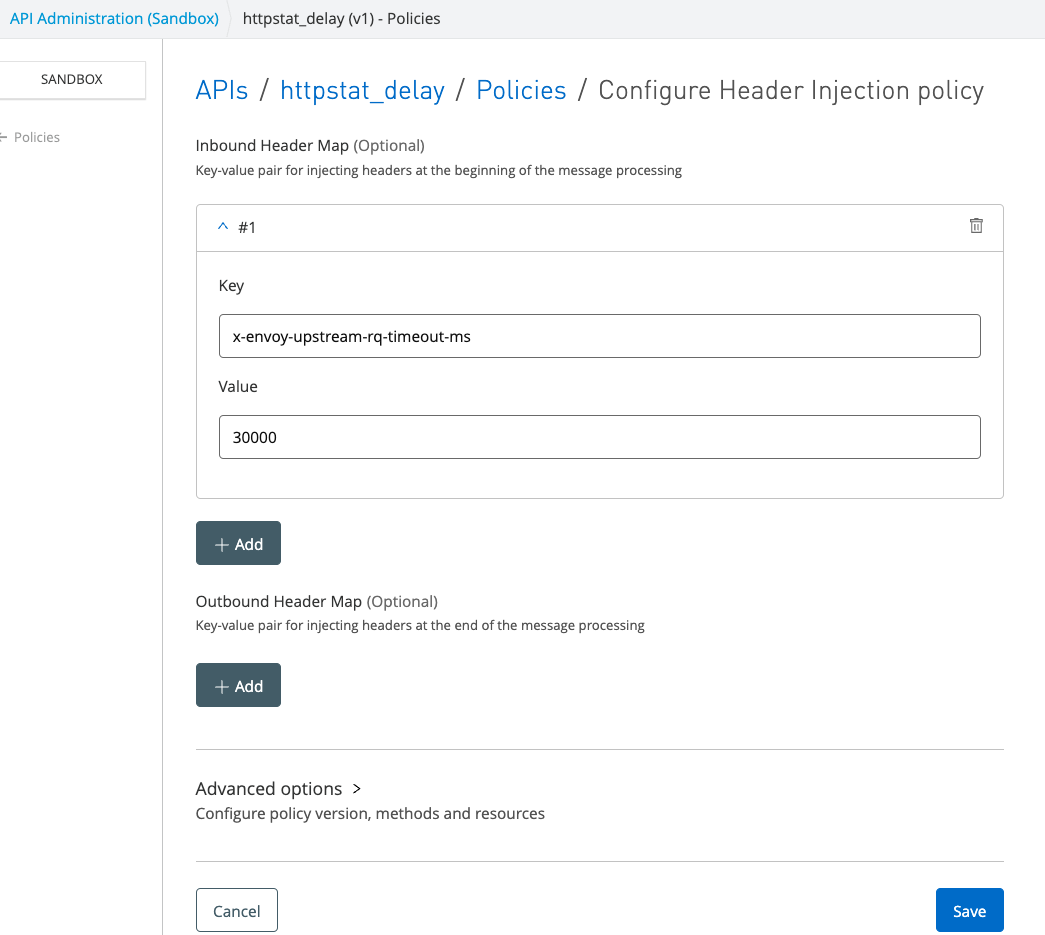
- Go to the API Manager => Select the API => Policies => Add a policy => Select Header Injection
- Add the following header:
Key: x-envoy-upstream-rq-timeout-ms
Value: your preffered value in milliseconds. For example, 30000 for 30 seconds
3. Save and test the API.
IN LOCAL MODE
Add a header injection policy for the API instance in its corresponding declarative configuration file as shown below:
- policyRef:
    name: header-injection-flex
    config:
      inboundHeaders:
        - key: x-envoy-upstream-rq-timeout-ms
          value: "30000"
For more details, refer to the "Policy Binding" and "Examples" sections in the following link:
https://docs.mulesoft.com/gateway/latest/flex-local-configuration-reference-guide#policy-binding
ADDITIONAL INFORMATION
- Example outputs for default timeout(15s):
# curl -v http://127.0.0.1:8081/200?sleep=20000
*   Trying 127.0.0.1:8081...
* Connected to 127.0.0.1 (127.0.0.1) port 8081 (#0)
> GET /200?sleep=20000 HTTP/1.1
> Host: 127.0.0.1:8081
> User-Agent: curl/7.81.0
> Accept: */*
>
* Mark bundle as not supporting multiuse
< HTTP/1.1 504 Gateway Timeout
< content-length: 24
< content-type: text/plain
< date: Tue, 31 Jan 2023 05:39:16 GMT
< server: Anypoint Flex Gateway
<
* Connection #0 to host 127.0.0.1 left intact
upstream request timeout
- After adding the policy(30s):
# curl -v http://127.0.0.1:8081/200?sleep=20000
*   Trying 127.0.0.1:8081...
* Connected to 127.0.0.1 (127.0.0.1) port 8081 (#0)
> GET /200?sleep=20000 HTTP/1.1
> Host: 127.0.0.1:8081
> User-Agent: curl/7.81.0
> Accept: */*
>
* Mark bundle as not supporting multiuse
< HTTP/1.1 200 OK
< content-length: 6
< content-type: text/plain
< date: Tue, 31 Jan 2023 05:41:16 GMT
< request-context: appId=cid-v1:3548b0f5-7f75-492f-82bb-b6eb0e864e53
< server: Anypoint Flex Gateway
< set-cookie: ARRAffinity=8d9749e1ad54987267d51cda41194309f78e9fe336b09f44ea04d81342bdd40c;Path=/;HttpOnly;Secure;Domain=httpstat.us
< set-cookie: ARRAffinitySameSite=8d9749e1ad54987267d51cda41194309f78e9fe336b09f44ea04d81342bdd40c;Path=/;HttpOnly;SameSite=None;Secure;Domain=httpstat.us
< strict-transport-security: max-age=2592000
< x-envoy-upstream-service-time: 20551
<
* Connection #0 to host 127.0.0.1 left intact
200 OK
Disclaimer: This solution is provided as a reference for your own usage and is not to be considered a MuleSoft feature. This solution should be considered as a custom solution. The custom solution is not a Supported MuleSoft product.
Numero articolo Knowledge
001115387
Questo articolo ha risolto il problema?
Facci sapere, così possiamo migliorare!
