Vælg en organisation
How to Create a Self-Signed CA, Certificate, and CRL Revocation List for the DLB
Udgivelsesdato: Mar 2, 2024
Trin
CONTENTS
You are using the DLB. Here is how to create a self-signed CA, certificate and CRL revocation list for the DLB.STEPS TO FOLLOW
1) Please run the following command to generate CA key:openssl genrsa -out ca.key 40962) Run the following to create self-signed root CA:
Ensure all fields are filled out and "Common Name" is different from your certificate (to be generated later).
openssl req -new -x509 -days 1826 -key ca.key -out ca.crt3) Create private key for your certificate:
openssl genrsa -out cert.key 40964) Make a certificate request:
openssl req -new -key cert.key -out cert.csr5) Run the following:
touch certindex
echo 01 > certserial
echo 01 > crlnumber
6) Create a file called ca.conf and paste the following. Replace "test.com" with your desired certificate Common Name:
[ ca ]
default_ca = myca

[ crl_ext ]
# issuerAltName=issuer:copy
authorityKeyIdentifier=keyid:always

 [ myca ]
 dir = ./
 new_certs_dir = $dir
 unique_subject = no
 certificate = $dir/ca.crt
 database = $dir/certindex
 private_key = $dir/ca.key
 serial = $dir/certserial
 default_days = 729
 default_md = sha1
 policy = myca_policy
 x509_extensions = myca_extensions
 crlnumber = $dir/crlnumber
 default_crl_days = 729

 [ myca_policy ]
 commonName = supplied
 stateOrProvinceName = supplied
 countryName = optional
 emailAddress = optional
 organizationName = supplied
 organizationalUnitName = optional

 [ myca_extensions ]
 basicConstraints = CA:false
 subjectKeyIdentifier = hash
 authorityKeyIdentifier = keyid:always
 keyUsage = digitalSignature,keyEncipherment
 extendedKeyUsage = serverAuth
 crlDistributionPoints = URI:http://test.com/root.crl
 subjectAltName  = @alt_names

 [alt_names]
 DNS.1 = test.com
 DNS.2 = *.test.com
7) Sign your request:
openssl ca -batch -config ca.conf -notext -in cert.csr -out cert.crt
8) Export to a PKCS12 format:
openssl pkcs12 -export -out cert.p12 -inkey cert.key -in cert.crt -chain -CAfile ca.crt
9) Create the CRL file:
openssl ca -config ca.conf -gencrl -keyfile ca.key -cert ca.crt -out rt.crl.pem
openssl crl -inform PEM -in rt.crl.pem -outform DER -out root.crl
rm rt.crl.pem
10) Convert the CRL file to PEM format:
openssl crl -in root.crl -inform DER -out crl.pem
11) Create a new DLB: link
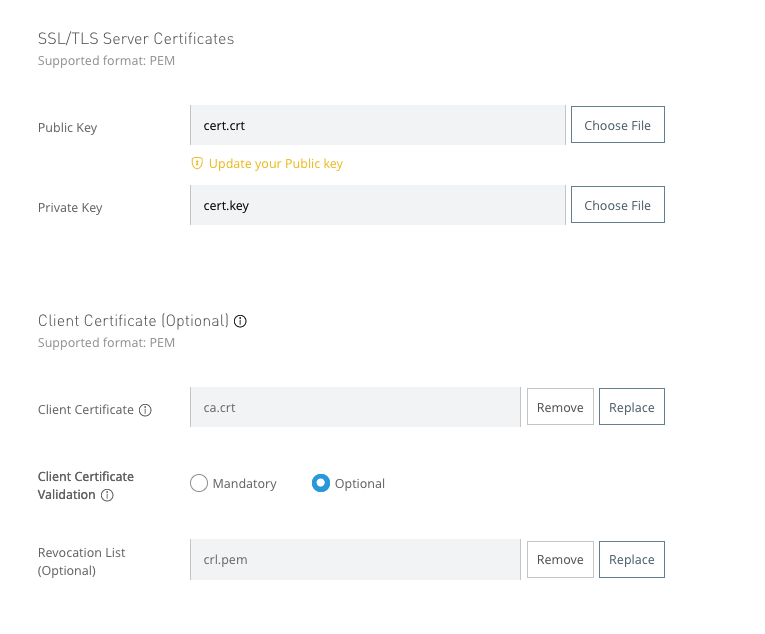
Ensure that you have the following files selected for certificate (You can choose mandatory or optional for client certificate validation)
Vidensartikelnummer
001115414
Løste denne artikel dit problem?
Giv os besked, så vi kan forbedre os!
