Seleziona un'organizzazione
How to verify the compatible Salesforce API versions and provide this in the Salesforce connector Mule 4
Data pubblicazione: Mar 2, 2024
Operazione
GOAL
To verify the compatible Salesforce API versions and to provide this API version in the Salesforce connector configuration in Mule 4Fasi
Please refer to the "Compatibility" section in the below connector Release Notes link to verify the compatible Salesforce API versions for a Salesforce connector version. Below is a copy of the Compatibility section for the Salesforce connector 10.14.4.
Release Notes: https://docs.mulesoft.com/release-notes/connector/salesforce-connector-release-notes-mule-4
Please note that it is strongly recommended to utilize the latest connector version from the above release notes link because this will includes all the latest features and bug fixes.
10.14.4
April 12, 2022
Compatibility
| Application/Service | Version |
|---|---|
| Mule | 4.1.1 and later |
| Anypoint Studio | 7.1.0 and later |
| Salesforce, Salesforce Government Cloud | v37.0, v38.0, v39.0, v40.0, v41.0, v42.0, v43.0, v44.0, v45.0, v46.0, v47.0, v48.0, v49.0, v50.0, v51.0, v52.0, v53.0, v54.0 |
Provide the Salesforce API version in the connector configuration:
The Salesforce API version can be provided while configuring the Salesforce Authentication in the connector.
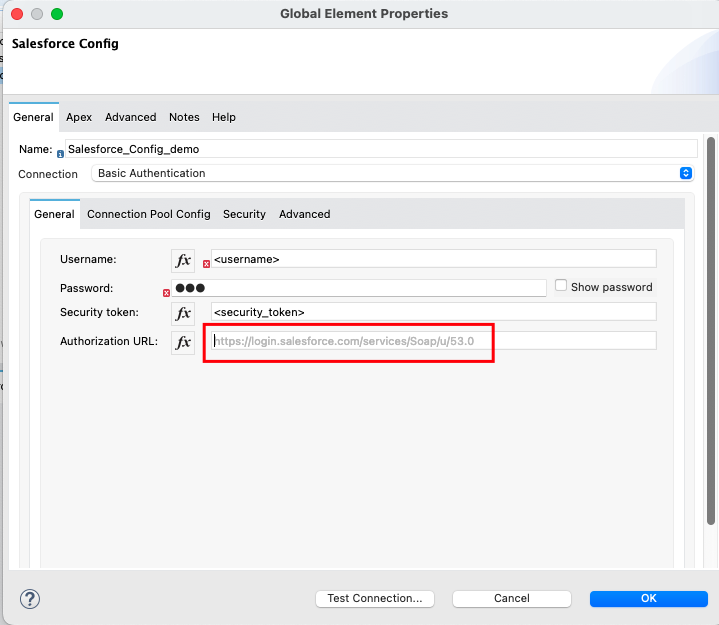
- For a "Basic Authentication" type of connection, please provide the API version in the "Authorization URL" field as shown in the below screenshot. It defaults to the URL containing the latest API version supported by the connector, for example,
https://login.salesforce.com/services/Soap/u/54.0
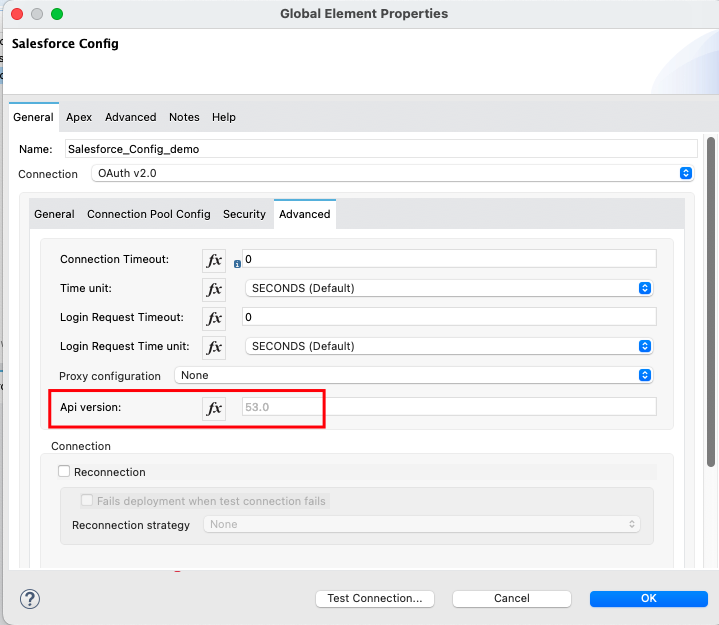
- For all the OAuth types of connections (i.e., OAuth v2.0, OAuth JWT, OAuth Username Password & OAuth SAML), please mention the API version in the "Api Version:" field under the "Advanced" tab of the configuration. This value defaults to the latest API version supported by the connector.
Numero articolo Knowledge
001115593
Questo articolo ha risolto il problema?
Facci sapere, così possiamo migliorare!
