Seleziona un'organizzazione
How to view a SAML Response in the browser
Data pubblicazione: Jul 28, 2025
Operazione
GOAL
The goal of this article is give more details of Doc View a SAML Response in the Browser , showing how to retrieve/parse SAML Response, and help troubleshoot sso issue.Fasi
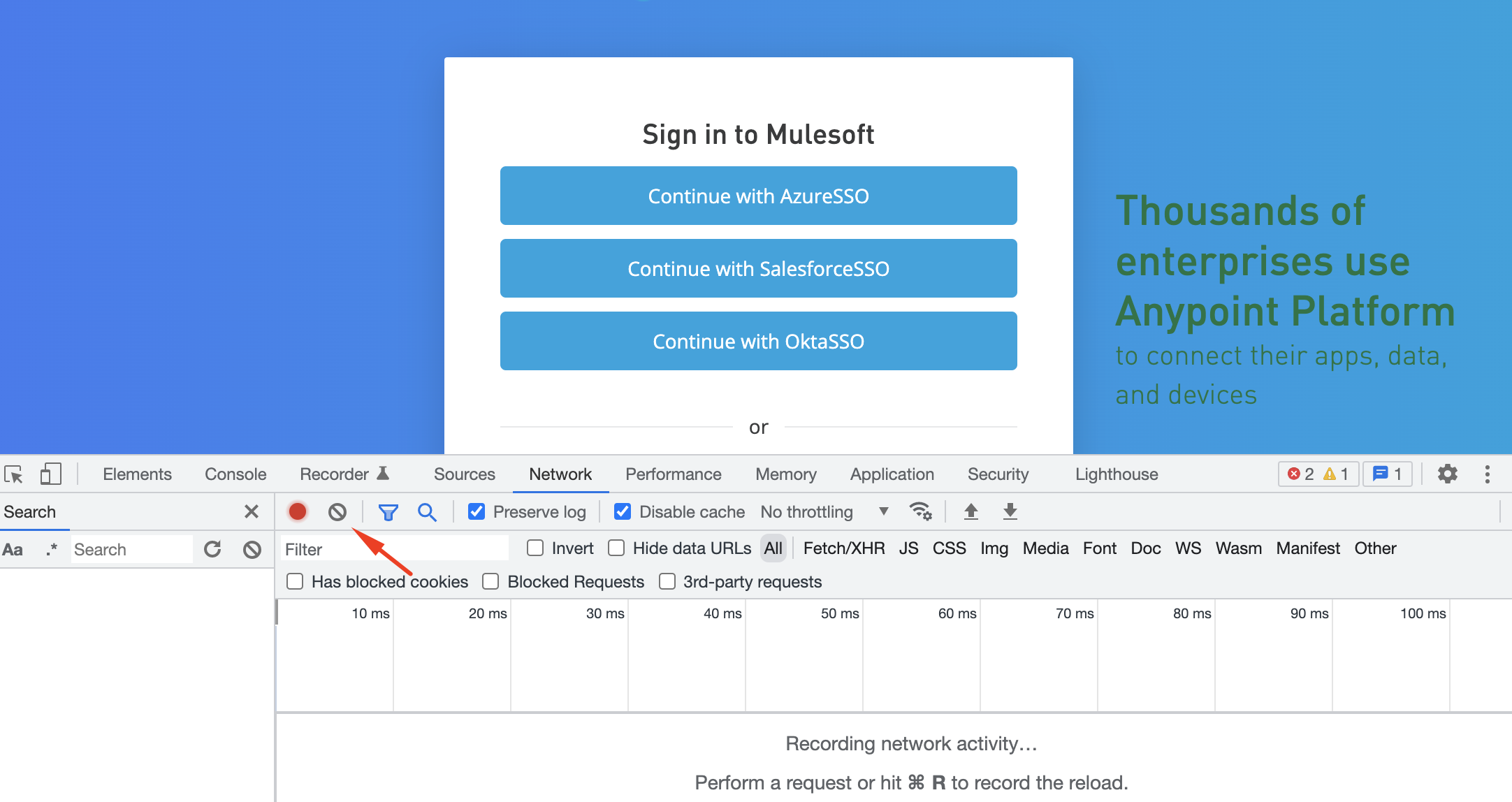
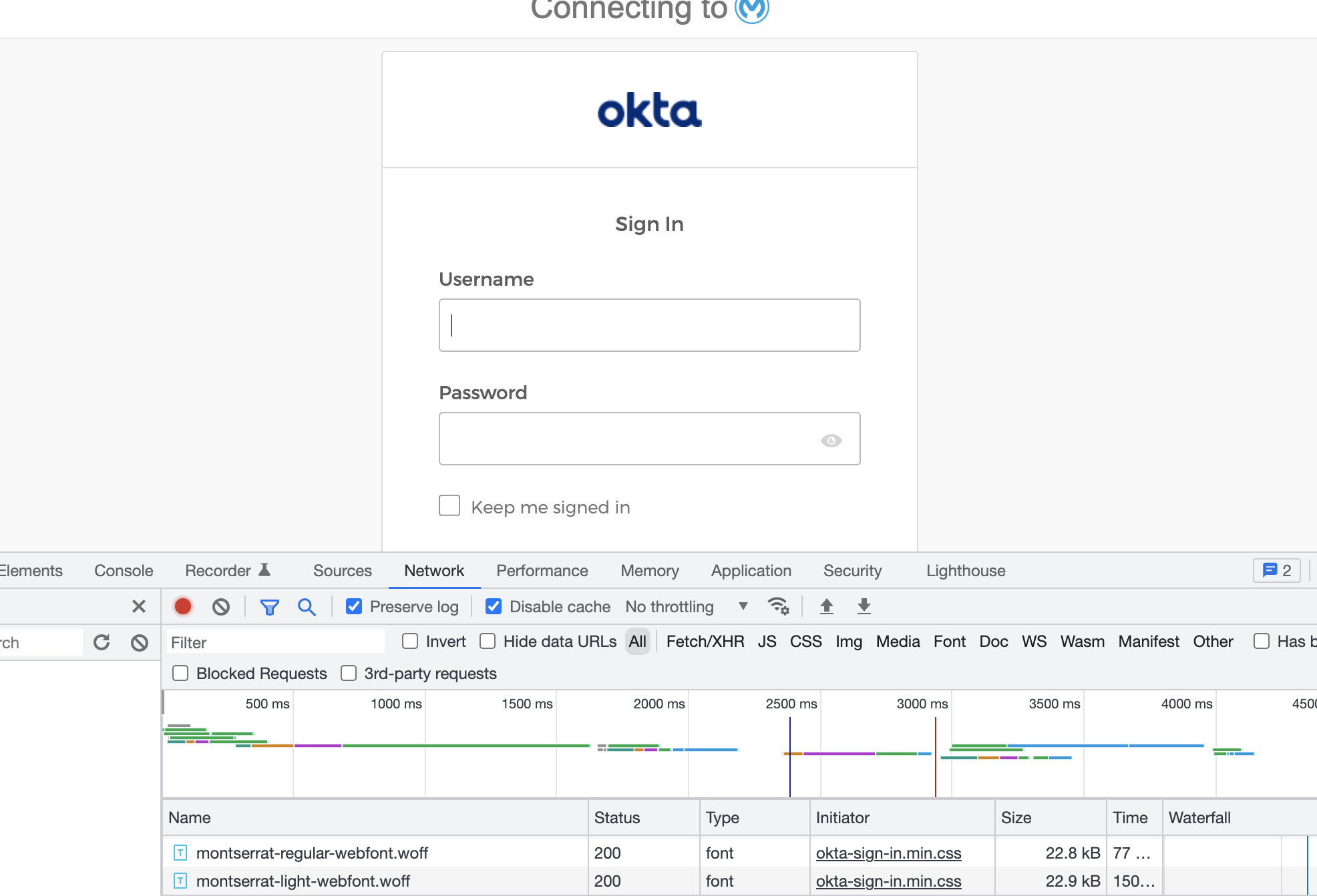
Step 2 : Click on the configured SSO button and log in at the identity provider screen
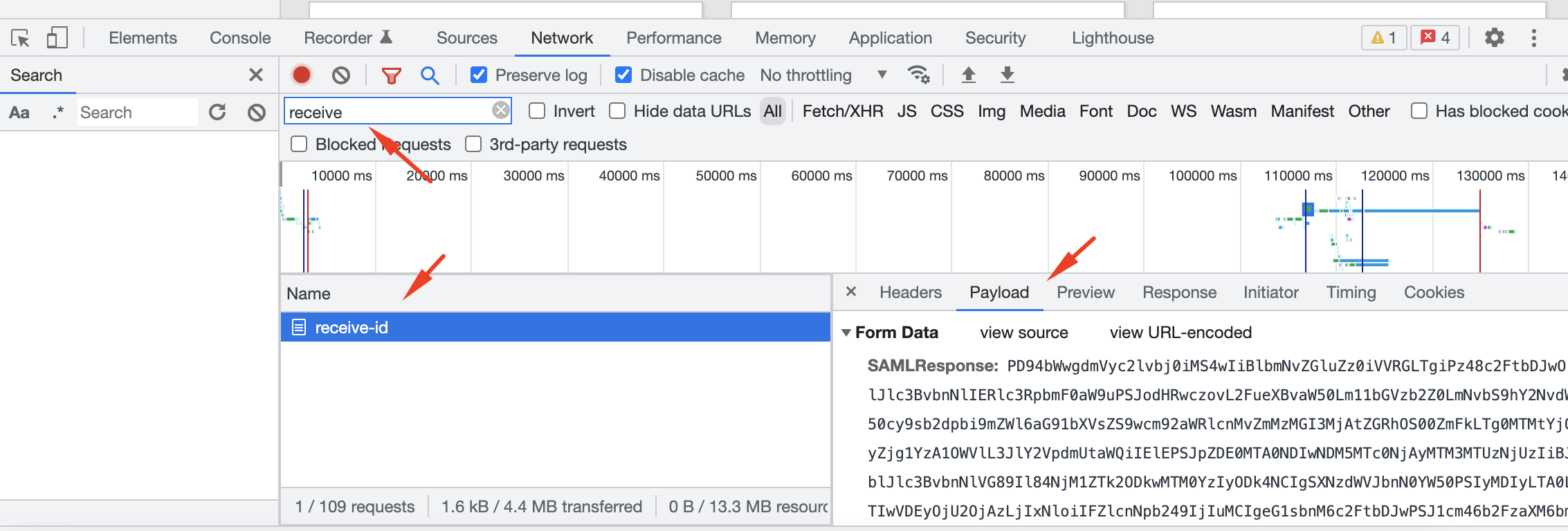
Step 3 : Filter requests by "receive-id" and copy the value in "Payload" tab (right click, copy value)
Step 4 : Decode the SAMLResponse and format the decoded xml
a. decode the SAML Response. for example, use https://toolbox.googleapps.com/apps/encode_decode/
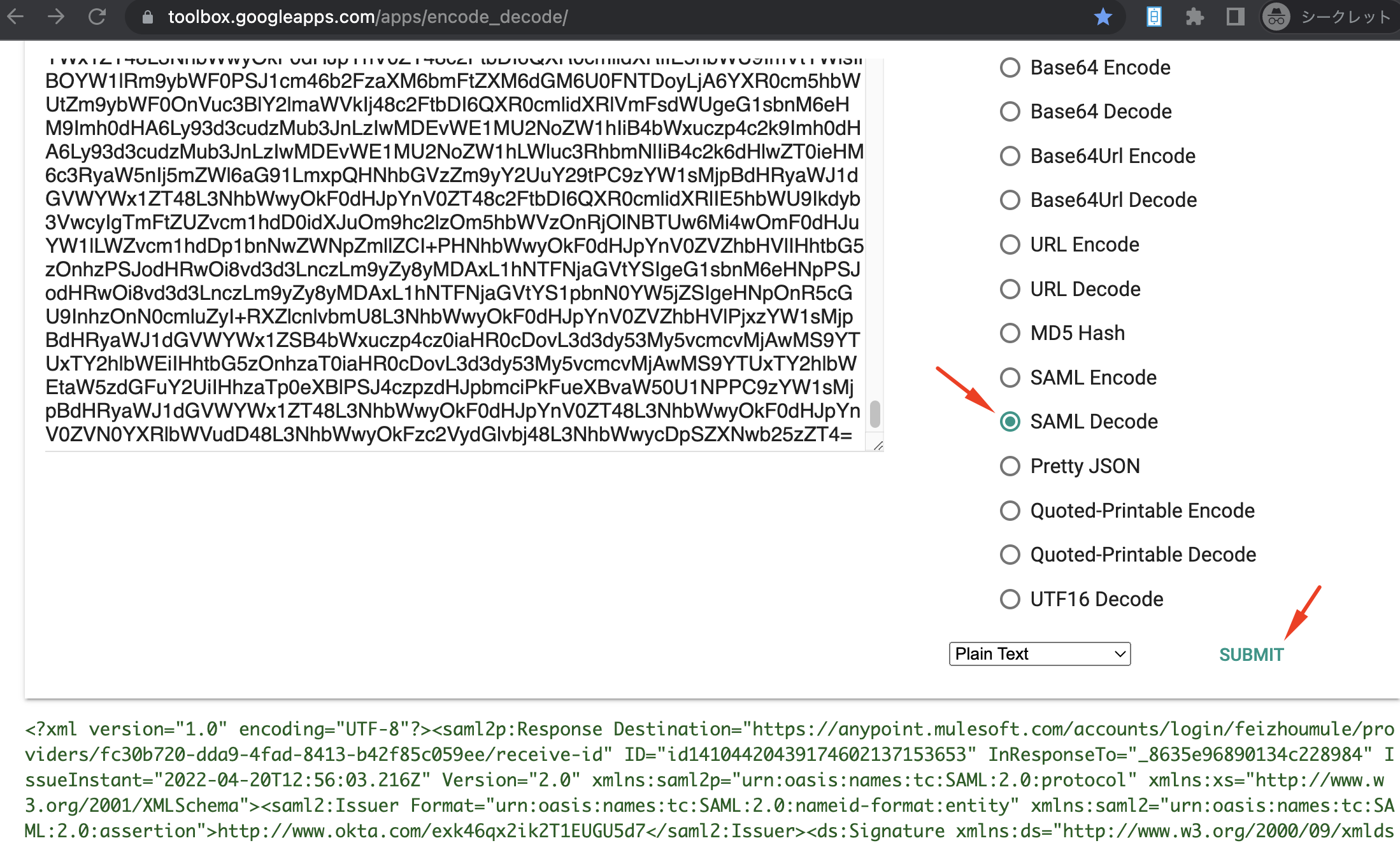
b. format the decoded xml. for example use XML Formatter on VSCode Or Chrome extension
from the readable xml, you can get the values passed from identity provider, such as username, email, groups
<?xml version="1.0" encoding="UTF-8"?>
<saml2p:Response xmlns:saml2p="urn:oasis:names:tc:SAML:2.0:protocol" xmlns:xs="http://www.w3.org/2001/XMLSchema" Destination="https://anypoint.mulesoft.com/accounts/login/{domain}/providers/fc30b720-dda9-4fad-8413-b42f85c059ee/receive-id" ID="id14104420439174602137153653" InResponseTo="_8635e96890134c228984" IssueInstant="2022-04-20T12:56:03.216Z" Version="2.0">
  <saml2:Issuer xmlns:saml2="urn:oasis:names:tc:SAML:2.0:assertion" Format="urn:oasis:names:tc:SAML:2.0:nameid-format:entity">http://www.okta.com/exk46qx2ik2T1EUGU5d7</saml2:Issuer>
  <ds:Signature xmlns:ds="http://www.w3.org/2000/09/xmldsig#">
    <ds:SignedInfo>
      <ds:CanonicalizationMethod Algorithm="http://www.w3.org/2001/10/xml-exc-c14n#"/>
      <ds:SignatureMethod Algorithm="http://www.w3.org/2001/04/xmldsig-more#rsa-sha256"/>
      <ds:Reference URI="#id14104420439174602137153653">
        <ds:Transforms>
          <ds:Transform Algorithm="http://www.w3.org/2000/09/xmldsig#enveloped-signature"/>
          <ds:Transform Algorithm="http://www.w3.org/2001/10/xml-exc-c14n#">
            <ec:InclusiveNamespaces xmlns:ec="http://www.w3.org/2001/10/xml-exc-c14n#" PrefixList="xs"/>
          </ds:Transform>
      ...
      </ds:KeyInfo>
    </ds:Signature>
    <saml2:Subject>
      <saml2:NameID Format="urn:oasis:names:tc:SAML:1.1:nameid-format:unspecified">xxx@mulesoft.com</saml2:NameID>
      <saml2:SubjectConfirmation Method="urn:oasis:names:tc:SAML:2.0:cm:bearer">
        <saml2:SubjectConfirmationData InResponseTo="_8635e96890134c228984" NotOnOrAfter="2022-04-20T13:01:03.216Z" Recipient="https://anypoint.mulesoft.com/accounts/login/{domain}/providers/fc30b720-dda9-4fad-8413-b42f85c059ee/receive-id"/>
      </saml2:SubjectConfirmation>
    </saml2:Subject>
    <saml2:Conditions NotBefore="2022-04-20T12:51:03.216Z" NotOnOrAfter="2022-04-20T13:01:03.216Z">
      <saml2:AudienceRestriction>
        <saml2:Audience>{domain}.anypoint.mulesoft.com</saml2:Audience>
      </saml2:AudienceRestriction>
    </saml2:Conditions>
    <saml2:AuthnStatement AuthnInstant="2022-04-20T12:56:03.216Z" SessionIndex="_8635e96890134c228984">
      <saml2:AuthnContext>
        <saml2:AuthnContextClassRef>urn:oasis:names:tc:SAML:2.0:ac:classes:PasswordProtectedTransport</saml2:AuthnContextClassRef>
      </saml2:AuthnContext>
    </saml2:AuthnStatement>
    <saml2:AttributeStatement>
      <saml2:Attribute Name="firstname" NameFormat="urn:oasis:names:tc:SAML:2.0:attrname-format:unspecified">
        <saml2:AttributeValue xmlns:xsi="http://www.w3.org/2001/XMLSchema-instance" xsi:type="xs:string">{FirstName}</saml2:AttributeValue>
      </saml2:Attribute>
      <saml2:Attribute Name="lastname" NameFormat="urn:oasis:names:tc:SAML:2.0:attrname-format:unspecified">
        <saml2:AttributeValue xmlns:xsi="http://www.w3.org/2001/XMLSchema-instance" xsi:type="xs:string">{LastName}</saml2:AttributeValue>
      </saml2:Attribute>
      <saml2:Attribute Name="email" NameFormat="urn:oasis:names:tc:SAML:2.0:attrname-format:unspecified">
        <saml2:AttributeValue xmlns:xsi="http://www.w3.org/2001/XMLSchema-instance" xsi:type="xs:string">xxx@mulesoft.com</saml2:AttributeValue>
      </saml2:Attribute>
      <saml2:Attribute Name="groups" NameFormat="urn:oasis:names:tc:SAML:2.0:attrname-format:unspecified">
        <saml2:AttributeValue xmlns:xsi="http://www.w3.org/2001/XMLSchema-instance" xsi:type="xs:string">Everyone</saml2:AttributeValue>
        <saml2:AttributeValue xmlns:xsi="http://www.w3.org/2001/XMLSchema-instance" xsi:type="xs:string">AnypointSSO</saml2:AttributeValue>
      </saml2:Attribute>
    </saml2:AttributeStatement>
  </saml2:Assertion>
</saml2p:Response>
Numero articolo Knowledge
001115617
Questo articolo ha risolto il problema?
Facci sapere, così possiamo migliorare!
