Organisation auswählen
Guide for Troubleshooting SSL Communication Issues
Veröffentlichungsdatum: Aug 6, 2025
Aufgabe
GOAL
How to troubleshoot SSL communication issues.Schritte
- Enable SSL to debug logs with the Knowledge article: How to enable SSL debug logging in MuleSoft Products
- Collect the tcpdump with the knowledge article: How to Capture Network Traffic Between Two Systems Using Tcpdump/WinDump Tool
- Try to collect tcpdump on Both Ends - Client and receiving end for example when using HTTP Listener mule application is a Receiver and when using HTTP Request Mule application is a client
- Collecting tcpdump on both the ends could help in a scenario if there is a proxy in between and certificates change because of the proxy
- Useful tools for troubleshooting - Troubleshooting Tools for Analysing HTTPS/SSL Servers
Different Scenarios for SSL issues
Mismatch of SSL/TLS Protocol
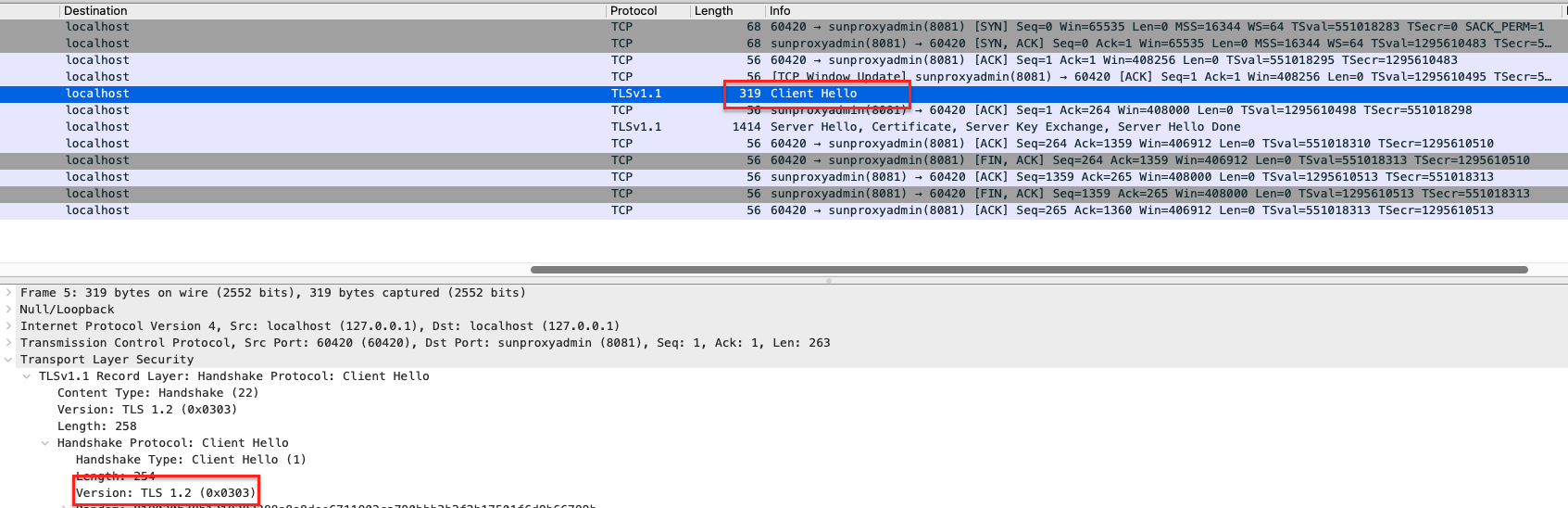
- The Client and Server should use the same SSL/TLS protocol. Check SSL debug logs it shows TLS Protocol in the Client Hello :
javax.net.ssl|FINE|58|http.listener.10 SelectorRunner|2022-03-30 14:08:56.718 CDT|Logger.java:765|Consuming ClientHello handshake message (
"ClientHello": {
  "client version"      : "TLSv1.2",
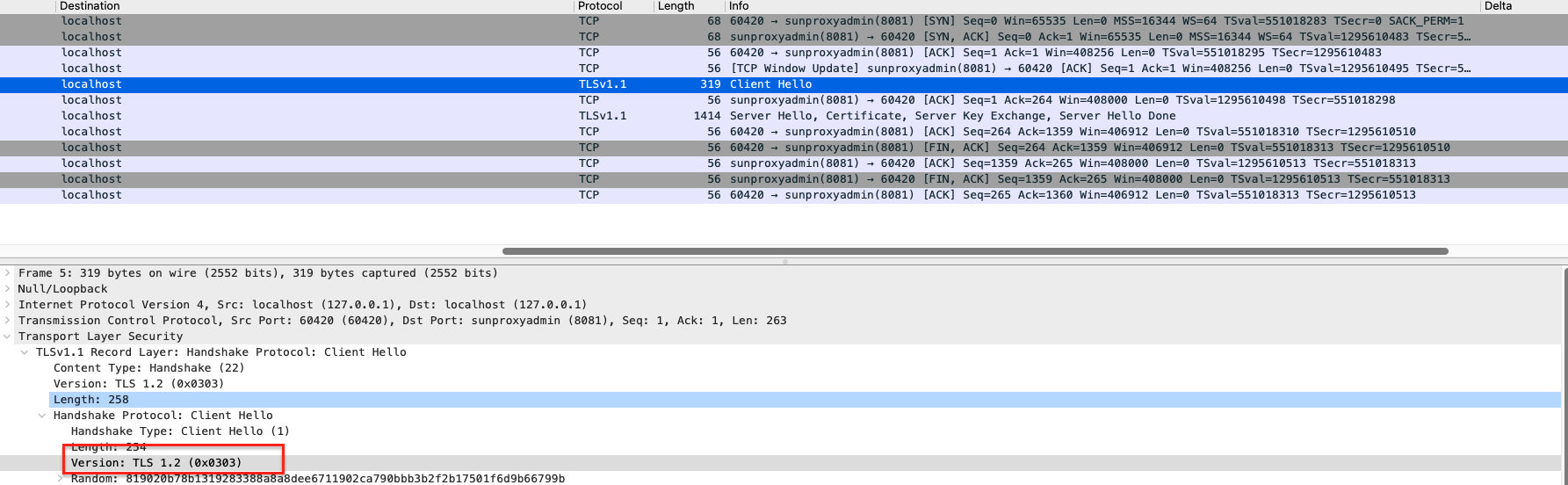
- Either after the client hello server can send a server hello with its supported protocol and then the connection is closed as there is a mismatch in the protocol.
- The Server immediately closes the connection because of a mismatch in the protocol
- The same can be checked from tcpdump as well Client TLS protocol:
- Server TLS protocol :
- Please use namp command as mentioned in Troubleshooting Tools for Analysing HTTPS/SSL Servers to check the TLS protocol on a particular host and port
No Common ciphers
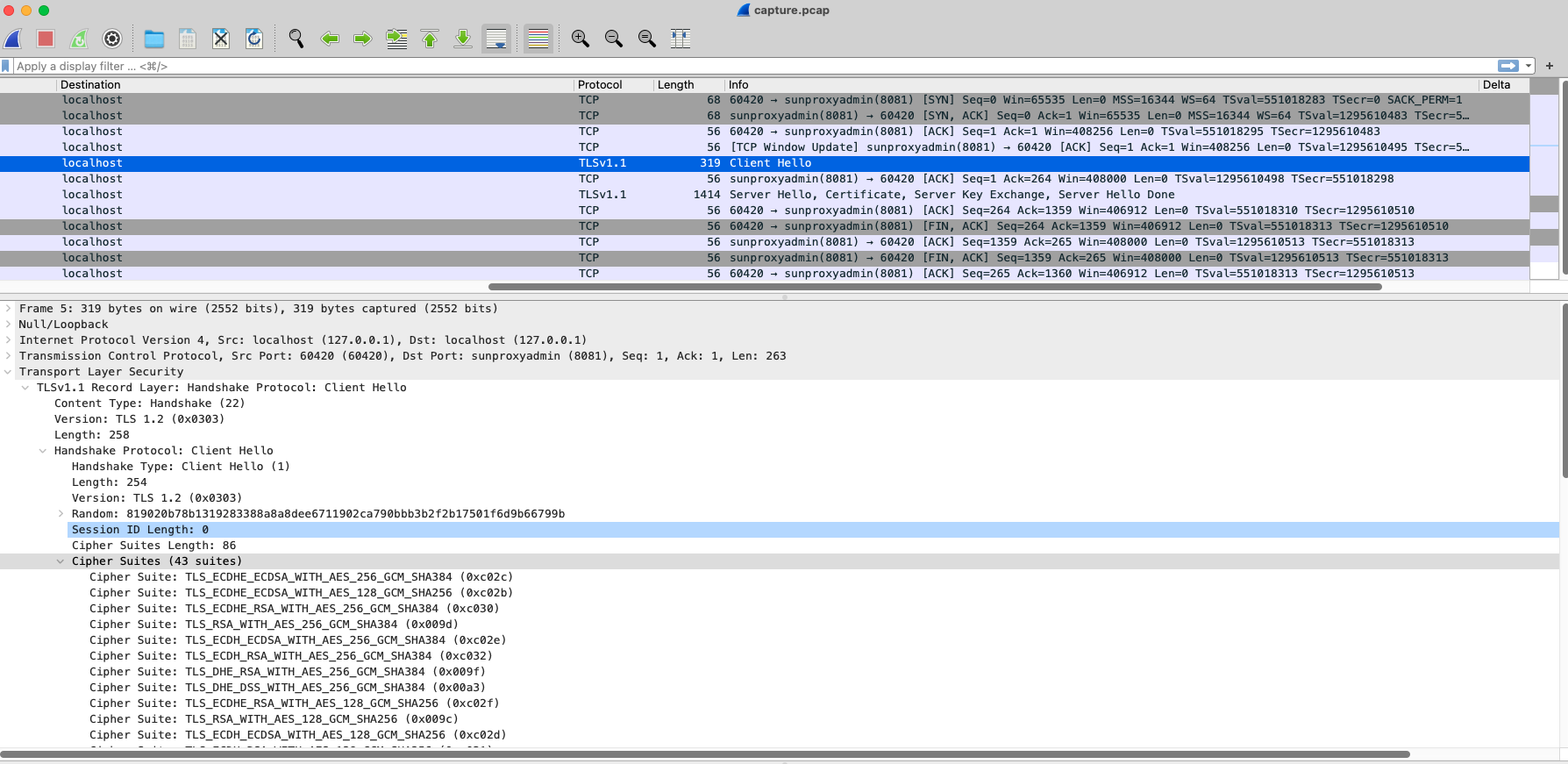
- There are no common ciphers to communicate between client and server.
- Mule log shows the cipher as below :
"ClientHello": {
  "client version"      : "TLSv1.2",
  "random"              : "54 A0 8C 33 F8 0F 1D 8D 93 EB 58 01 BB 43 50 4B 86 82 A2 D5 E1 54 9A 50 FF 96 AA 6C 57 8C 72 48",
  "session id"          : "",
  "cipher suites"       : "[TLS_ECDHE_RSA_WITH_AES_256_GCM_SHA384(0xC030), TLS_ECDHE_ECDSA_WITH_AES_256_GCM_SHA384(0xC02C), TLS_ECDHE_RSA_WITH_AES_256_CBC_SHA384(0xC028), TLS_ECDHE_ECDSA_WITH_AES_256_CBC_SHA384(0xC024), TLS_ECDHE_RSA_WITH_AES_256_CBC_SHA(0xC014), TLS_ECDHE_ECDSA_WITH_AES_256_CBC_SHA(0xC00A), TLS_DHE_RSA_WITH_AES_256_GCM_SHA384(0x009F),
TLS_DHE_RSA_WITH_AES_256_CBC_SHA256(0x006B), TLS_DHE_RSA_WITH_AES_256_CBC_SHA(0x0039), UNKNOWN-CIPHER-SUITE(0xCCA9)(0xCCA9), UNKNOWN-CIPHER-SUITE(0xCCA8)(0xCCA8), UNKNOWN-CIPHER-SUITE(0xCCAA)(0xCCAA), UNKNOWN-CIPHER-SUITE(0xFF85)(0xFF85), TLS_DHE_RSA_WITH_CAMELLIA_256_CBC_SHA256(0x00C4), TLS_DHE_RSA_WITH_CAMELLIA_256_CBC_SHA(0x0088), UNKNOWN-CIPHER-SUITE(0x0081)(0x0081), TLS_RSA_WITH_AES_256_GCM_SHA384(0x009D),
TLS_RSA_WITH_AES_256_CBC_SHA256(0x003D), TLS_RSA_WITH_AES_256_CBC_SHA(0x0035), TLS_RSA_WITH_CAMELLIA_256_CBC_SHA256(0x00C0), TLS_RSA_WITH_CAMELLIA_256_CBC_SHA(0x0084), TLS_ECDHE_RSA_WITH_AES_128_GCM_SHA256(0xC02F), TLS_ECDHE_ECDSA_WITH_AES_128_GCM_SHA256(0xC02B),
TLS_ECDHE_RSA_WITH_AES_128_CBC_SHA256(0xC027), TLS_ECDHE_ECDSA_WITH_AES_128_CBC_SHA256(0xC023), TLS_ECDHE_RSA_WITH_AES_128_CBC_SHA(0xC013), TLS_ECDHE_ECDSA_WITH_AES_128_CBC_SHA(0xC009), TLS_DHE_RSA_WITH_AES_128_GCM_SHA256(0x009E), TLS_DHE_RSA_WITH_AES_128_CBC_SHA256(0x0067), TLS_DHE_RSA_WITH_AES_128_CBC_SHA(0x0033),
TLS_DHE_RSA_WITH_CAMELLIA_128_CBC_SHA256(0x00BE), TLS_DHE_RSA_WITH_CAMELLIA_128_CBC_SHA(0x0045), TLS_RSA_WITH_AES_128_GCM_SHA256(0x009C), TLS_RSA_WITH_AES_128_CBC_SHA256(0x003C), TLS_RSA_WITH_AES_128_CBC_SHA(0x002F),
TLS_RSA_WITH_CAMELLIA_128_CBC_SHA256(0x00BA), TLS_RSA_WITH_CAMELLIA_128_CBC_SHA(0x0041), TLS_ECDHE_RSA_WITH_RC4_128_SHA(0xC011), TLS_ECDHE_ECDSA_WITH_RC4_128_SHA(0xC007), SSL_RSA_WITH_RC4_128_SHA(0x0005), SSL_RSA_WITH_RC4_128_MD5(0x0004),
TLS_ECDHE_RSA_WITH_3DES_EDE_CBC_SHA(0xC012), TLS_ECDHE_ECDSA_WITH_3DES_EDE_CBC_SHA(0xC008), SSL_DHE_RSA_WITH_3DES_EDE_CBC_SHA(0x0016), SSL_RSA_WITH_3DES_EDE_CBC_SHA(0x000A), TLS_EMPTY_RENEGOTIATION_INFO_SCSV(0x00FF)]",
- The same can be checked from tcpdump as well Client TLS protocol:
- You can use namp command as well to show the supported ciphers on the particular host and port
Unable to verify the certificate
- Client verifies the certificate returned from the server as per the truststore configuration
- When Mule is a client (for example HTTP Request) TLS configuration can be used to define a truststore
- If default TLS is used certificate is verified in Javas Default Trusstore
- Please refer to the Knowledge article : HTTPS call fails with "SunCertPathBuilderException: unable to find valid certification path to requested target" or "General SSLEngine problem"
- If the default truststore is used and is failing with this error that means the CA chain is not present in the Java's default truststore
- If the trustore is defined and still its still failing check the Truststore with command : keytool -list -keystore trusttsore.jks
- Check the certificate returned from the endpoint : openssl s_client -connect [HOST]:[PORT]
- Complete certificate chain (intermediate certs and leaf cert) should be present in the Truststore
- In case of mutual authentication both sides should have proper Truststore defined
Nummer des Knowledge-Artikels
001115656
Konnten Sie Ihr Problem mithilfe dieses Artikels lösen?
Geben Sie uns Feedback, damit wir uns verbessern können.
