Valitse organisaatio
How to configure pagination in the Netsuite connector Mule 4
Julkaisupäivä: Mar 2, 2024
Tehtävä
GOAL
To configure pagination in the Mule 4 Netsuite connector. This is equivalent to configuring "searchMoreWithId" in Netsuite.Please make sure you are using the latest connector version by referring to the Netsuite connector Release Notes.
Vaiheet
- Use the "Search" operation in the Netsuite connector.
- Go to the "Search preferences" section and provide the "Page size" value to a number as per your requirement. Ex: If you need to fetch 500 records on 1 page then provide the Page Size as 500.
- After that, you need to mention the "Transform message" component and consume the payload so the connector can load the next set of records accordingly. Please note, it is mandatory to provide the Transform message component after the Search operation for the pagination to work.
- Refer to the Netsuite connector documentation for more information on the configuration.
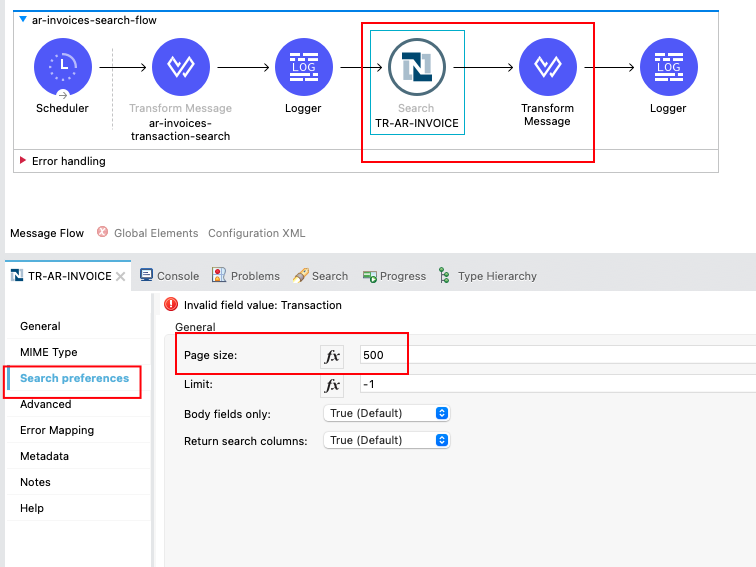
Please use the Mule configuration file (netsuite-search-pagination-demo.xml) in a project and provide your Netsuite configuration.
Also, please do enable DEBUG logging by adding the below lines in your log4j2.xml to test in the Anyoint Studio.
<AsyncLogger name="org.mule.service.http.impl.service.HttpMessageLogger" level="DEBUG"/>
<AsyncLogger name="org.mulesoft.connector.netsuite" level="DEBUG"/>
<AsyncLogger name="org.mule.module.netsuite.extension.internal.connection.provider.soap.JavaWSDispatche" level="DEBUG"/>
For example, if you have 1500 records to search and you need each page to contain 500 records then in the debug logs, you can see that the first XML response shows 500 records, and at the end of the XML response, the tag "searchMoreWithId" is automatically added as shown below. After reading the payload through the Transform message component, the connector will continue to search for the next set of records. Finally, the last XML response will show the "searchMoreWithId" tag as empty.
Below is a sample when
<searchMoreWithId xmlns="urn:messages_2021_1.platform.webservices.netsuite.com">
<searchId>WEBSERVICES_TSTDRV1372796_03282022734850437893602181_4ba41dd</searchId>
<pageIndex>2</pageIndex>
</searchMoreWithId>
Lisäresurssit
Knowledge-artikkelin numero
001115661
Ratkaisiko tämä artikkeli ongelmasi?
Anna palautetta, jotta voimme kehittyä!
