Vælg en organisation
Investigating HTTP 401 errors when fetching dependencies in Maven
Udgivelsesdato: Jul 18, 2025
Opgave
GOAL
Investigate and resolve HTTP 401 errors seen in Maven when trying to fetch Application Dependencies from remote Repositories which require authentication for access. Such as the following example:
[INFO] ------------------------------------------------------------------------
[INFO] BUILD FAILURE
[INFO] ------------------------------------------------------------------------
[INFO] Total time:  2.309 s
[INFO] Finished at: 2022-03-21T10:02:30Z
[INFO] ------------------------------------------------------------------------
[ERROR] Failed to execute goal on project example-http-401-errors: Could not resolve dependencies for project com.mycompany:example-http-401-errors:mule-application:1.0.0-SNAPSHOT: Failed to collect dependencies at com.mulesoft.anypoint:mule-http-proxy-extension:jar:mule-plugin:1.1.3: Failed to read artifact descriptor for com.mulesoft.anypoint:mule-http-proxy-extension:jar:mule-plugin:1.1.3: Could not transfer artifact com.mulesoft.anypoint:mule-http-proxy-extension:pom:1.1.3 from/to MuleRepository (https://repository.mulesoft.org/nexus-ee/content/repositories/releases-ee/): authentication failed for https://repository.mulesoft.org/nexus-ee/content/repositories/releases-ee/com/mulesoft/anypoint/mule-http-proxy-extension/1.1.3/mule-http-proxy-extension-1.1.3.pom, status: 401 Unauthorized -> [Help 1]
PLEASE NOTE: HTTP 401 errors will only be seen for Repositories which require Authentication to access resources. Generally speaking this will be one of the two following MuleSoft Repositories:
The MuleSoft Enterprise Repository:
<repository>
	<id>MuleRepository</id>
	<name>MuleRepository</name>
	<url>https://repository.mulesoft.org/nexus-ee/content/repositories/releases-ee/</url>
	<layout>default</layout>
	<releases>
		<enabled>true</enabled>
	</releases>
	<snapshots>
		<enabled>true</enabled>
	</snapshots>
</repository>
For more information see how to configure MuleSoft Repositories in the Documentation here: https://docs.mulesoft.com/mule-runtime/4.4/maven-reference#configure-mule-repositories
Your private Exchange Repository:
<repository>
	<id>Repository</id>
	<name>Corporate Repository</name>
	<url>https://maven.anypoint.mulesoft.com/api/v3/organizations/<ORGANIZATION_ID>/maven</url>
	<layout>default</layout>
</repository>
Where <ORGANIZATION_ID> is your Anypoint Organization ID as per this Article: How to know my Organization ID (Org ID) on the Anypoint Platform refer to the following documentation for details on publishing and consuming assets with Maven and Exchange: https://docs.mulesoft.com/exchange/to-publish-assets-maven and the following Knowledge Base Article for additional tips: Correct usage of Exchange with Maven
In more unusual and edge case scenarios you might see a different Repository show as the source of the error, such as the example in this Article: Mule App Maven Plugin Dependency - Forbidden Issue if so then confirm if the repository is hosted internally to your Organization, and if not raise a Support Case for assistance, otherwise confirm with your internal IT team the correct configuration needed to access the internal Repository.
Trin
The best way to identify and resolve the cause of these errors is to run the Maven command with some additional DEBUG output enabled via the Maven Command Line Options (for a full listing of available options see here: https://maven.apache.org/ref/3.8.1/maven-embedder/cli.html) in this case we will use the -e and -X options added either directly to the command line where Maven is being run, for example:
mvn clean package -e -X
Or alternatively if you are running the build in Anypoint Studio then you can enable these additional flags within the "Base Command Line for builds" setting found in: Preferences > Anypoint Studio > Maven
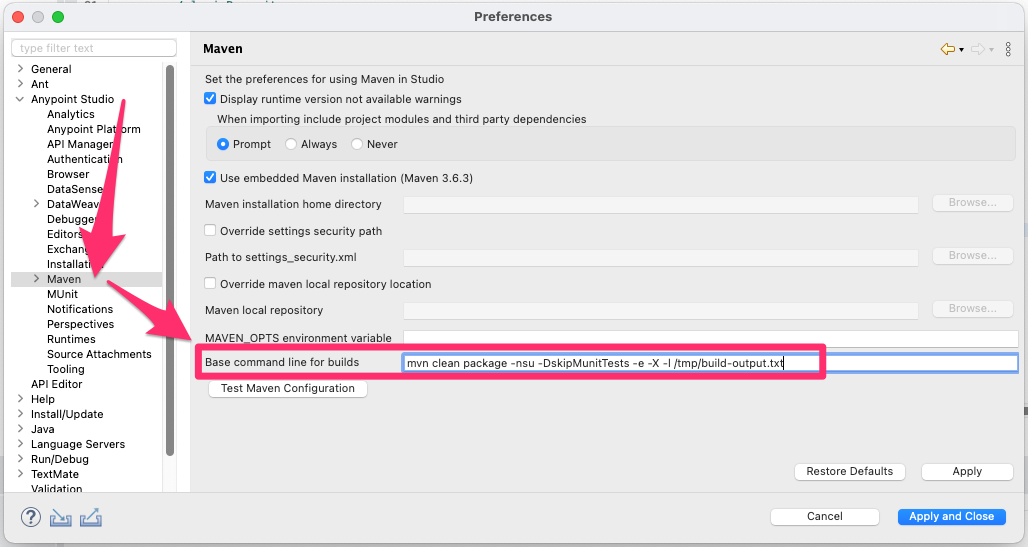
As per the screen-shot above it would be recommended to also add the -l or --log-file flag to output the build information to a text file when building in Anypoint Studio to make capturing this detail easier.
Once you have captured this information to a text file you can review this for known causes of this issue:
Malformed settings.xml
Most often this will fail a build immediately when the settings.xml file is initially parsed by Maven without causing a HTTP 401 error, though in certain circumstances Maven may progress past validation of an incorrect settings.xml with only a Warning level error message like the following:
[DEBUG] Reading user settings from /Users/<username>/.m2/settings.xml
[WARNING]
[WARNING] Some problems were encountered while building the effective settings
[WARNING] Unrecognised tag: 'servers' (position: START_TAG seen ...<servers>\n\t<servers>... @13:11)  @ /Users/<username>/.m2/settings.xml, line 13, column 11
[WARNING]
...
[INFO] ------------------------------------------------------------------------
[INFO] BUILD FAILURE
[INFO] ------------------------------------------------------------------------
[INFO] Total time:  2.035 s
[INFO] Finished at: 2022-03-21T10:44:07Z
[INFO] ------------------------------------------------------------------------
[ERROR] Failed to execute goal on project example-http-401-errors: Could not resolve dependencies for project com.mycompany:example-http-401-errors:mule-application:1.0.0-SNAPSHOT: Failed to collect dependencies at com.mulesoft.anypoint:mule-http-proxy-extension:jar:mule-plugin:1.1.3: Failed to read artifact descriptor for com.mulesoft.anypoint:mule-http-proxy-extension:jar:mule-plugin:1.1.3: Could not transfer artifact com.mulesoft.anypoint:mule-http-proxy-extension:pom:1.1.3 from/to MuleRepository (https://repository.mulesoft.org/nexus-ee/content/repositories/releases-ee/): authentication failed for https://repository.mulesoft.org/nexus-ee/content/repositories/releases-ee/com/mulesoft/anypoint/mule-http-proxy-extension/1.1.3/mule-http-proxy-extension-1.1.3.pom, status: 401 Unauthorized -> [Help 1]
org.apache.maven.lifecycle.LifecycleExecutionException: Failed to execute goal on project example-http-401-errors: Could not resolve dependencies for project com.mycompany:example-http-401-errors:mule-application:1.0.0-SNAPSHOT: Failed to collect dependencies at com.mulesoft.anypoint:mule-http-proxy-extension:jar:mule-plugin:1.1.3
If you see an error similar to the one above review your settings.xml to make sure there are not any duplicated tags or sections, in the example above there are two overlapping instances of the <servers> tag causing the credentials within for the MuleSoft Enterprise Repository to not be found.
Incorrect credentials
The debug output we have enabled will show the HTTP requests Maven is making to fetch the requested Dependencies. Maven does not use Pre-emptive Authentication when making requests to Repositories, so it will not send across any credentials unless challenged by the Repository Server, as such for any repository that does require authentication it is expected the first request will fail with a HTTP 401 response:[DEBUG] http-outgoing-0 >> GET /nexus-ee/content/repositories/releases-ee/com/mulesoft/anypoint/mule-http-proxy-extension/1.1.3/mule-http-proxy-extension-1.1.3.pom HTTP/1.1 [DEBUG] http-outgoing-0 >> Cache-control: no-cache [DEBUG] http-outgoing-0 >> Pragma: no-cache [DEBUG] http-outgoing-0 >> User-Agent: Apache-Maven/3.8.5 (Java 1.8.0_322; Mac OS X 12.2.1) [DEBUG] http-outgoing-0 >> Host: repository.mulesoft.org [DEBUG] http-outgoing-0 >> Connection: Keep-Alive [DEBUG] http-outgoing-0 >> Accept-Encoding: gzip,deflate [DEBUG] http-outgoing-0 >> "GET /nexus-ee/content/repositories/releases-ee/com/mulesoft/anypoint/mule-http-proxy-extension/1.1.3/mule-http-proxy-extension-1.1.3.pom HTTP/1.1[\r][\n]" [DEBUG] http-outgoing-0 >> "Cache-control: no-cache[\r][\n]" [DEBUG] http-outgoing-0 >> "Pragma: no-cache[\r][\n]" [DEBUG] http-outgoing-0 >> "User-Agent: Apache-Maven/3.8.5 (Java 1.8.0_322; Mac OS X 12.2.1)[\r][\n]" [DEBUG] http-outgoing-0 >> "Host: repository.mulesoft.org[\r][\n]" [DEBUG] http-outgoing-0 >> "Connection: Keep-Alive[\r][\n]" [DEBUG] http-outgoing-0 >> "Accept-Encoding: gzip,deflate[\r][\n]" [DEBUG] http-outgoing-0 >> "[\r][\n]" [DEBUG] http-outgoing-0 << "HTTP/1.1 401 Unauthorized[\r][\n]" [DEBUG] http-outgoing-0 << "Server: nginx/1.18.0[\r][\n]" [DEBUG] http-outgoing-0 << "Date: Mon, 21 Mar 2022 10:34:34 GMT[\r][\n]" [DEBUG] http-outgoing-0 << "Transfer-Encoding: chunked[\r][\n]" [DEBUG] http-outgoing-0 << "Connection: keep-alive[\r][\n]" [DEBUG] http-outgoing-0 << "X-Frame-Options: SAMEORIGIN[\r][\n]" [DEBUG] http-outgoing-0 << "X-Content-Type-Options: nosniff[\r][\n]" [DEBUG] http-outgoing-0 << "WWW-Authenticate: BASIC realm="Sonatype Nexus Repository Manager"[\r][\n]" [DEBUG] http-outgoing-0 << "[\r][\n]" [DEBUG] http-outgoing-0 << HTTP/1.1 401 Unauthorized [DEBUG] http-outgoing-0 << Server: nginx/1.18.0 [DEBUG] http-outgoing-0 << Date: Mon, 21 Mar 2022 10:34:34 GMT [DEBUG] http-outgoing-0 << Transfer-Encoding: chunked [DEBUG] http-outgoing-0 << Connection: keep-alive [DEBUG] http-outgoing-0 << X-Frame-Options: SAMEORIGIN [DEBUG] http-outgoing-0 << X-Content-Type-Options: nosniff [DEBUG] http-outgoing-0 << WWW-Authenticate: BASIC realm="Sonatype Nexus Repository Manager" [DEBUG] Connection can be kept alive indefinitely [DEBUG] Authentication required [DEBUG] repository.mulesoft.org:443 requested authenticationMaven will then retry the request with the Credentials configured in settings.xml if it is able to find these credentials you will see a message like:
[DEBUG] Authentication schemes in the order of preference: [Negotiate, Kerberos, NTLM, CredSSP, Digest, Basic]
[DEBUG] Challenge for Negotiate authentication scheme not available
[DEBUG] Challenge for Kerberos authentication scheme not available
[DEBUG] Challenge for NTLM authentication scheme not available
[DEBUG] Challenge for CredSSP authentication scheme not available
[DEBUG] Challenge for Digest authentication scheme not available
[DEBUG] Selected authentication options: [BASIC [complete=true]]
If the next request then fails also with a HTTP 401 error, then this would suggest the Credentials are incorrect:
[DEBUG] http-outgoing-0 >> GET /nexus-ee/content/repositories/releases-ee/com/mulesoft/anypoint/mule-http-proxy-extension/1.1.3/mule-http-proxy-extension-1.1.3.pom HTTP/1.1
[DEBUG] http-outgoing-0 >> Cache-control: no-cache
[DEBUG] http-outgoing-0 >> Pragma: no-cache
[DEBUG] http-outgoing-0 >> User-Agent: Apache-Maven/3.8.5 (Java 1.8.0_322; Mac OS X 12.2.1)
[DEBUG] http-outgoing-0 >> Host: repository.mulesoft.org
[DEBUG] http-outgoing-0 >> Connection: Keep-Alive
[DEBUG] http-outgoing-0 >> Accept-Encoding: gzip,deflate
[DEBUG] http-outgoing-0 >> Authorization: Basic xxxxxxxxxxx
[DEBUG] http-outgoing-0 >> "GET /nexus-ee/content/repositories/releases-ee/com/mulesoft/anypoint/mule-http-proxy-extension/1.1.3/mule-http-proxy-extension-1.1.3.pom HTTP/1.1[\r][\n]"
[DEBUG] http-outgoing-0 >> "Cache-control: no-cache[\r][\n]"
[DEBUG] http-outgoing-0 >> "Pragma: no-cache[\r][\n]"
[DEBUG] http-outgoing-0 >> "User-Agent: Apache-Maven/3.8.5 (Java 1.8.0_322; Mac OS X 12.2.1)[\r][\n]"
[DEBUG] http-outgoing-0 >> "Host: repository.mulesoft.org[\r][\n]"
[DEBUG] http-outgoing-0 >> "Connection: Keep-Alive[\r][\n]"
[DEBUG] http-outgoing-0 >> "Accept-Encoding: gzip,deflate[\r][\n]"
[DEBUG] http-outgoing-0 >> "Authorization: Basic xxxxxxxxxxxxx[\r][\n]"
[DEBUG] http-outgoing-0 >> "[\r][\n]"
[DEBUG] http-outgoing-0 << "HTTP/1.1 401 Unauthorized[\r][\n]"
[DEBUG] http-outgoing-0 << "Server: nginx/1.18.0[\r][\n]"
[DEBUG] http-outgoing-0 << "Date: Mon, 21 Mar 2022 10:34:35 GMT[\r][\n]"
[DEBUG] http-outgoing-0 << "Transfer-Encoding: chunked[\r][\n]"
[DEBUG] http-outgoing-0 << "Connection: keep-alive[\r][\n]"
[DEBUG] http-outgoing-0 << "X-Frame-Options: SAMEORIGIN[\r][\n]"
[DEBUG] http-outgoing-0 << "X-Content-Type-Options: nosniff[\r][\n]"
[DEBUG] http-outgoing-0 << "WWW-Authenticate: BASIC realm="Sonatype Nexus Repository Manager"[\r][\n]"
[DEBUG] http-outgoing-0 << "[\r][\n]"
[DEBUG] http-outgoing-0 << HTTP/1.1 401 Unauthorized
[DEBUG] http-outgoing-0 << Server: nginx/1.18.0
[DEBUG] http-outgoing-0 << Date: Mon, 21 Mar 2022 10:34:35 GMT
[DEBUG] http-outgoing-0 << Transfer-Encoding: chunked
[DEBUG] http-outgoing-0 << Connection: keep-alive
[DEBUG] http-outgoing-0 << X-Frame-Options: SAMEORIGIN
[DEBUG] http-outgoing-0 << X-Content-Type-Options: nosniff
[DEBUG] http-outgoing-0 << WWW-Authenticate: BASIC realm="Sonatype Nexus Repository Manager"
[DEBUG] Connection can be kept alive indefinitely
[DEBUG] Authentication required
[DEBUG] repository.mulesoft.org:443 requested authentication
[DEBUG] Authorization challenge processed
[DEBUG] Authentication failed
As can be seen above Maven passes in the Credentials via the "Authorisation: Basic" header value, and the Repository again responds with a HTTP 401, confirming the credentials supplied are incorrect.
You can validate your MuleSoft Enterprise Repository credentials by accessing the Repository base URL in a browser and providing the credentials from your settings.xml when prompted: https://repository.mulesoft.org/nexus/content/repositories/releases-ee/ if you are unable to locate the correct credentials for your Organization then please raise a case with the Support team.
Credentials not found
If Maven cannot find the required credentials in your settings.xml you will only see a single outgoing request to the Repository in the logs files, and no message regarding an Authentication Scheme being selected and the socket to the Repository will be closed:[DEBUG] Challenge for Negotiate authentication scheme not available
[DEBUG] Challenge for Kerberos authentication scheme not available
[DEBUG] Challenge for NTLM authentication scheme not available
[DEBUG] Challenge for CredSSP authentication scheme not available
[DEBUG] Challenge for Digest authentication scheme not available
[DEBUG] http-outgoing-0 << "0[\r][\n]"
[DEBUG] http-outgoing-0 << "[\r][\n]"
[DEBUG] Connection [id: 0][route: {s}->https://repository.mulesoft.org:443] can be kept alive indefinitely
[DEBUG] http-outgoing-0: set socket timeout to 0
[DEBUG] Connection released: [id: 0][route: {s}->https://repository.mulesoft.org:443][total available: 1; route allocated: 1 of 20; total allocated: 1 of 40]
This would suggest either the credentials for the configured repository are missing from settings.xml, or that the <id> value configured for the repository in the <servers> section of settings.xml does not match with the <id> value configured for the <repository> in either the pom.xml or settings.xml depending on where this was added.Ensure that the credentials are present within the <servers> section of your settings.xml:
<servers>
	<server>
		<id>MuleRepository</id>
		<username>example.username</username>
		<password>example.password</password>
	</server>
</servers>
and that the <id> value configured here exactly matches the <id> value within the <repositories> section of either settings.xml or pom.xml:
<repository>
	<id>MuleRepository</id>
	<name>MuleRepository</name>
	<url>https://repository.mulesoft.org/nexus-ee/content/repositories/releases-ee/</url>
	<layout>default</layout>
	<releases>
		<enabled>true</enabled>
	</releases>
	<snapshots>
		<enabled>true</enabled>
	</snapshots>
</repository>
otherwise these credentials will not be found and associated to the Repository when Maven executes.
If you see issues which fall outside of those described above or are unable to resolve these build relates issues yourself with the information above then please submit a Support case so we may provide further advice, ensuring that you attach the following information:
- Confirm the full Maven command being run.
- Provide the full output of the Maven command with the -e and -X options included as a text file.
- Attach the settings.xml file being used.
- Export and attach the Application in question.
Vidensartikelnummer
001115672
Løste denne artikel dit problem?
Giv os besked, så vi kan forbedre os!
