Välj en organisation
How to create custom error responses for multiple data validation errors
Publiceringsdatum: Mar 2, 2024
Steg
DESCRIPTION
In the scenario you have a RAML API Specification which requires a specific data format, there are some cases where, if multiple data validation errors are thrown from APIKit based on your API Specification, they will all be contained within a single string under #[error.description].As an example, let's say you have the following RAML based API Specification with a data type defined as dateValidation:
#%RAML 1.0
title: multi-validation

types:
  dateValidation:
    type: object
    properties:
      information:
        type: array
        items:
          properties:
            date1:
              type: date-only


/testing:
  post:
    body:
      application/json:
        type: dateValidation
    responses:
      200:
        body:
          application/json:
            example: {"test":"response"}
In the above RAML spec, we can see the dateValidation type requires the date1 field to be of type date-only
If you were to send an invalid value for date1 using the mocking service, you will get a response like so:
Input payload:
{
  "information": [
    {
      "date1": "20193-10-10"
    }
  ]
}
Response from Mocking Service:
{
  "code": "REQUEST_VALIDATION_ERROR",
  "message": "Invalid schema for content type application/json. Errors: /information/0/date1 [20193-10-10] is not a valid date. Expected [yyyy-MM-dd]. "
}
Looks fine, right? Well now, what if we were to send two information objects, each with an invalid date1 value? This will show something like:
Input Payload:
{
  "information": [
    {
      "date1": "20193-10-10"
    },
    {
      "date1": "20192-10-10"
    }
  ]
}
Response from Mocking Service:
{
  "code": "REQUEST_VALIDATION_ERROR",
  "message": "Invalid schema for content type application/json. Errors: /information/1/date1 [20192-10-10] is not a valid date. Expected [yyyy-MM-dd]. /information/0/date1 [20193-10-10] is not a valid date. Expected [yyyy-MM-dd]. "
}
As you can see, it shows both validation errors, but only shows in a single message which isn't always ideal.
The goal of this KB is to show you how you can split this error response message to more cleanly show the issue when you implement this API Specification in Anypoint Studio. The expected output at the end of this KB will be something like:
[{
  "code": "REQUEST_VALIDATION_ERROR",
  "message": "/information/1/date1 [20192-10-10] is not a valid date.
 },
 {
  "code": "REQUEST_VALIDATION_ERROR",
  "message": "/information/0/date1 [20193-10-10] is not a valid date."
 }]
STEPS TO FOLLOW
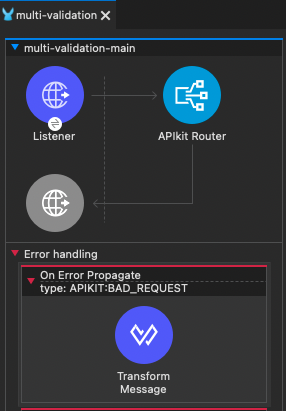
After importing this API Specification into Anypoint Studio and scaffolding the flows, you should have a setup something like this:
%dw 2.0
output application/json
---
{message: "Bad request"}
This is the component that will be triggered when a data validation error is thrown in your Mule application. The APIKit router will validate your request payload against your RAML specification, and if it fails data validation, it will throw an APIKIT:BAD_REQUEST and route to this error handler.To get the default behavior similar to what is seen in the mocking service, you could update the Dataweave script to look like so:
%dw 2.0
output application/json
---
{
	"code":"REQUEST_VALIDATION_ERROR",
	"message":error.description
}
In the above script, error.description contains the information with the validation error message which is seen in the mocking service.
If you want to split this dynamically whether there is 1, 2, 3, or any number of validation errors, you can use the following script:
%dw 2.0
output application/json

var splitload = error.description splitBy("\n")
---
[
  splitload map (value, key) -> {
      "code": "REQUEST_VALIDATION_ERROR",
      "message": value
  }
]
Here, we are setting the splitload variable as an array containing each validation error message. What can be seen is each error is actually separated on a new line, so using splitBy("\n") basically will create an array split by the new line character which ensures each validation error is stored as a separate entry in the array.
Then, the splitload variable is being mapped dynamically and returning an array of objects where each object is its own validation error message.
Now, the error response will return a 400: Bad Request status with an error response payload something like:
[{
  "code": "REQUEST_VALIDATION_ERROR",
  "message": "/information/1/date1 [20192-10-10] is not a valid date.
 },
 {
  "code": "REQUEST_VALIDATION_ERROR",
  "message": "/information/0/date1 [20193-10-10] is not a valid date."
 }]
Knowledge-artikelnummer
001115709
Löste denna artikel ditt problem?
Berätta för oss vad vi kan förbättra!
