Seleziona un'organizzazione
How to determine if a cluster is having communication issues through an API call?
Data pubblicazione: Mar 2, 2024
Operazione
<< DEPRECATED ON AUGUST 2022. PLEASE CHECK Get error "Communication issues detected" in Runtime Manager in your cluster configuration >>
GOAL
Sometimes user has situations where a cluster is unable to communicate and appears as Yellow on the list of servers/clusters.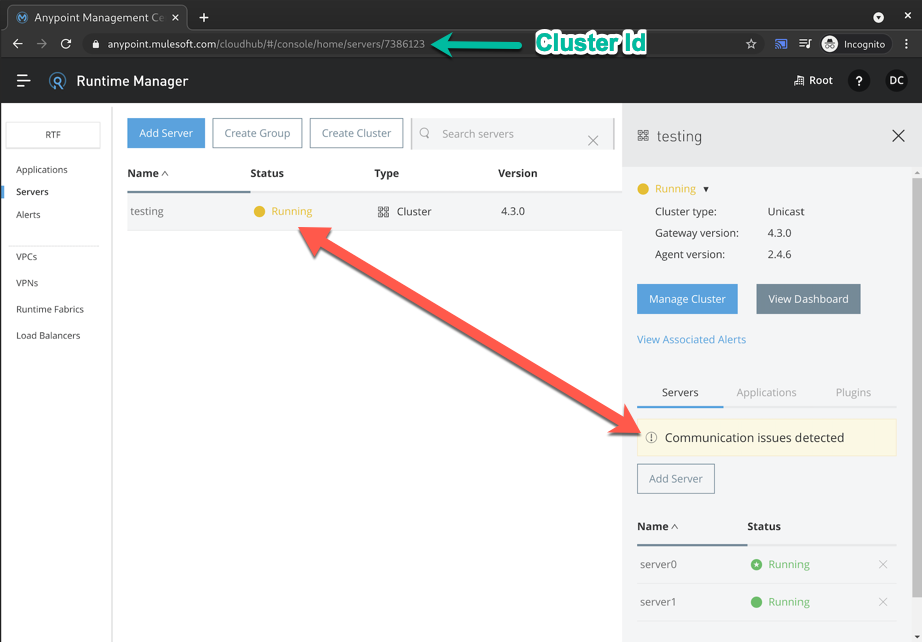
The runtimes appear as green on the side panel meaning that each runtime's agent is able to communicate to Anypoint Platform.
The yellow indicator means that there are connectivity issues between these two nodes.
Fasi
{
  "data": [
    {
      "id": 7386123,
      "timeCreated": 1620242761270,
      "timeUpdated": 1620330306952,
      "name": "testing",
      "type": "CLUSTER",
      "status": "RUNNING",
      "multicastEnabled": false,
      "primaryNodeId": 7386090,
      "servers": [...],
      "visibilityMap": {
        "mapNodes": [
          {
            "serverId": 7386097,
            "visibleNodeIds": [
              7386097
            ],
            "unknownNodeIps": []
          },
          {
            "serverId": 7386090,
            "visibleNodeIds": [
              7386090
            ],
            "unknownNodeIps": []
          }
        ]
      }
    }
  ]
}
In this case, cluster with ID 7386123, has each node that is only able to see itself. Server Node with ID 7386097 can only see itself, and Server Node with ID 7386090 can only see itself.
A healthy output would be each node listed inside visibleNodeIds, like this:
{
  "data": [
    {
      "id": 7386123,
      "timeCreated": 1620242761270,
      "timeUpdated": 1620330306952,
      "name": "testing",
      "type": "CLUSTER",
      "status": "RUNNING",
      "multicastEnabled": false,
      "primaryNodeId": 7386090,
      "servers": [...],
      "visibilityMap": {
        "mapNodes": [
          {
            "serverId": 7386097,
            "visibleNodeIds": [
              7386097,
              7386090
            ],
            "unknownNodeIps": []
          },
          {
            "serverId": 7386090,
            "visibleNodeIds": [
              7386090,
              7386097
            ],
            "unknownNodeIps": []
          }
        ]
      }
    }
  ]
}
In case of facing this issue in a Unicast clusters you can check this article Unicast Cluster shows "Communication Issues Detected"
Numero articolo Knowledge
001115815
Questo articolo ha risolto il problema?
Facci sapere, così possiamo migliorare!
