組織を選択
How to reset secrets for client applications when using external client management
公開日: Aug 12, 2025
タスク
GOAL
Anypoint platform embraces OpenID Connect Dynamic Client Registration, and hence client modification or deletion is not supported, although OKTA or another IDP might do so independently. Nevertheless, we instead provide and support hooks for someone to implement API calls that are particular to their IDP.
There's a PUT/DELETE documentation that explains that this request cannot go directly to the IDP but needs to be intercepted by an app under your control that has the logic to perform the put operation.
Basically, the interceptor app sits between Anypoint and your IDP. So when you go to Exchange request access to create an application, update or reset credentials for existing client application it talks to your application which in turn makes the respective calls to the IDP.
You would like to know how this interceptor application should be built and configured in order to be able to reset client secrets or delete client applications from the Anypoint Platform when external client management is configured.
Vote for Idea : https://ideas.salesforce.com/s/idea/a0B8W00000OU02FUAT/support-client-deletion-update-secret-reset-for-oidc-dcr-client-provider-confi
ステップ
Please note below is just a sample using Okta. You need to customize it based on your IDP.
- You'll need to create an application that implements the PUT and DELETE endpoints for your identity provider, but also FORWARDS the GET and POST operations. I'm here attaching an example with a Mule application.
For this particular sample application in sample.properties file replace the ${okta.host} and ${okta.path} for yours.
For instance, if you currently have the following configured for Client Registration URL: https://mydomain.okta.com/oauth2/v1/clients, the ${okta.host} should be mydomain.okta.com and ${okta.path} /oauth2/v1/clients
Note: Anypoint Platform might send the client_secret in the payload and that's could be unsupported by the IDP. In those cases you can remove it using the following DW expression:
For instance, if you currently have the following configured for Client Registration URL: https://mydomain.okta.com/oauth2/v1/clients, the ${okta.host} should be mydomain.okta.com and ${okta.path} /oauth2/v1/clients
Note: Anypoint Platform might send the client_secret in the payload and that's could be unsupported by the IDP. In those cases you can remove it using the following DW expression:
%dw 2.0
output application/json
---
payload filterObject ((value, key) -> (key as String != "client_secret"))  ++ "application_type": "web"
2. Once you have your application you need to deploy it and provide an endpoint that's publicly available for Anypoint to reach it. You can see the different endpoints in your app log
Starting flow: get:\v1\clients:okta-sample-config
INFO  2020-12-03 23:34:48,644 [WrapperListener_start_runner] [processor: ; event: ] org.mule.runtime.core.internal.construct.FlowConstructLifecycleManager: Starting flow: post:\v1\clients:okta-sample-config
INFO  2020-12-03 23:34:48,658 [WrapperListener_start_runner] [processor: ; event: ] org.mule.runtime.core.internal.construct.FlowConstructLifecycleManager: Starting flow: put:\v1\clients\(ID):okta-sample-config
INFO  2020-12-03 23:34:48,669 [WrapperListener_start_runner] [processor: ; event: ] org.mule.runtime.core.internal.construct.FlowConstructLifecycleManager: Starting flow: delete:\v1\clients\(ID):okta-sample-config
INFO  2020-12-03 23:34:48,676 [WrapperListener_start_runner] [processor: ; event: ] org.mule.runtime.core.internal.construct.FlowConstructLifecycleManager: Starting flow: get:\v1\clients\(ID):okta-sample-config
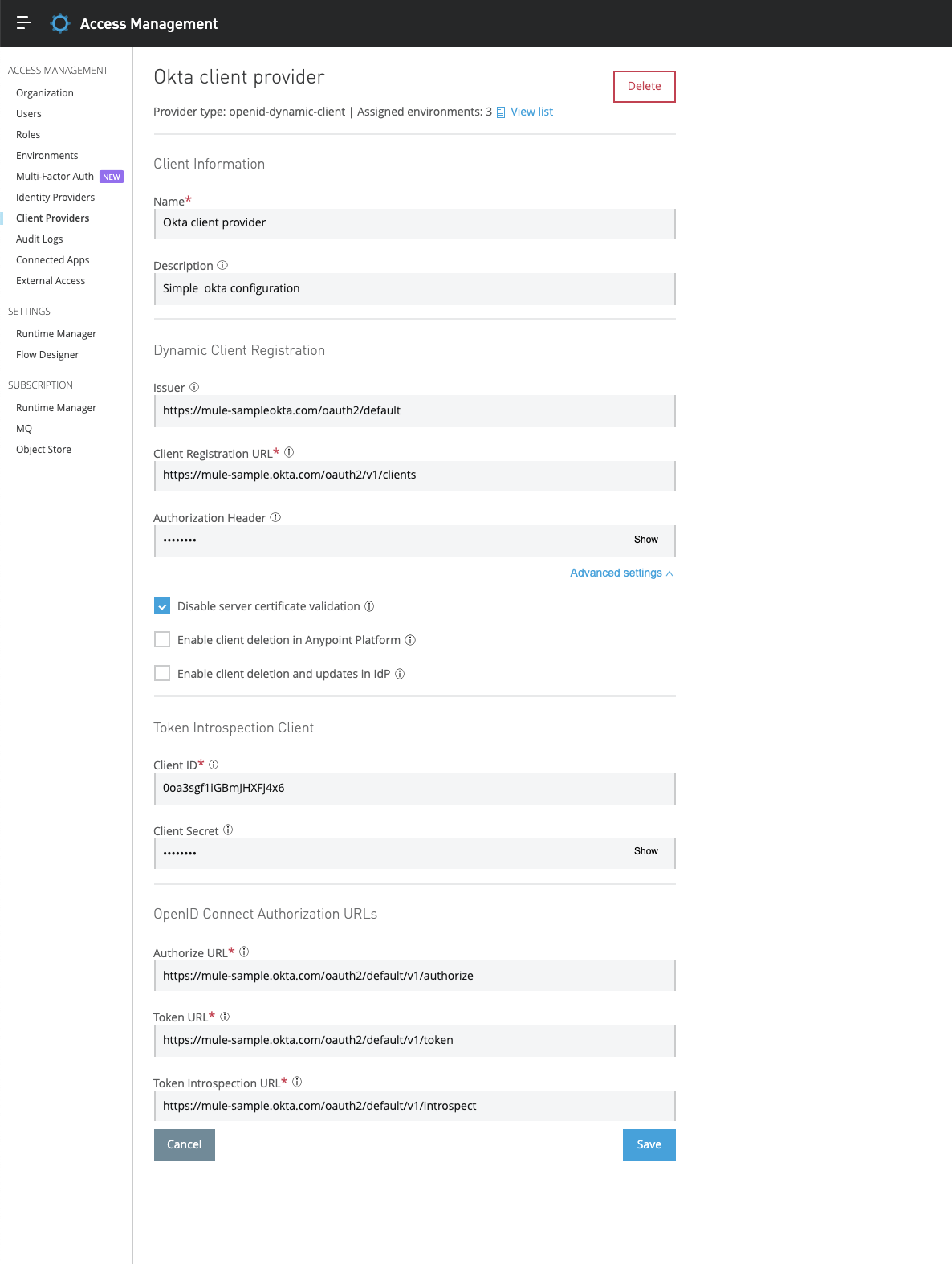
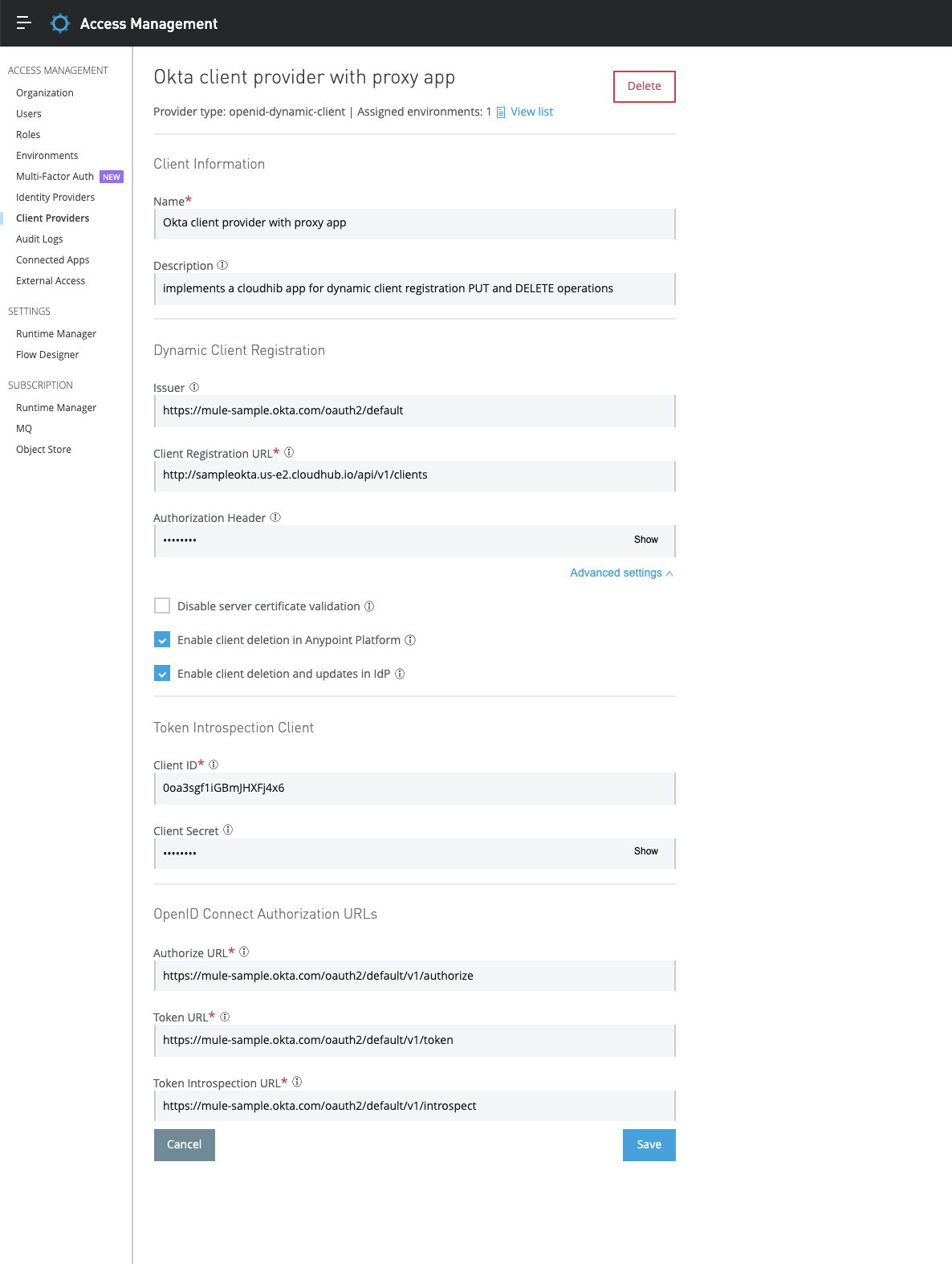
In the client-provider configuration (pictures below)
- The client registration URL should point to your application endpoint > http://sample-okta-inter-app.us-w1.cloudhub.io/api/v1/clients.
- The issuer can be your app. (Note grant types are fetched from issuer/.well-known on create and edit of client provider and stored in DB and this is what is appearing in Exchange Portal when doing request access)
- All other values are from your authorization server at Okta.
- the Enable client deletion in Anypoint Platform and Enable client deletion and updates in IDP checkboxes should be checked
Simple OKTA client-provider configuration:
Okta client-provider configuration with the proxy application:
3. If everything is ok you should be able to perform the following actions from Anypoint Exchange and reflect them in your IDP (make sure your API is configured to use the new client-provider)
- create client applications (POST)
- request access to API from Exchange creates an application
- once the application is created it shows on the application menu on the left in Exchange for this api where you can edit, reset client secret and delete
2. modify client applications for example name (PUT)
3. reset the client secret for client applications (PUT)
- go to the application in step 1 created and top right corner and choose option reset credentials
4. remove client applications (DELETE)
4. Okta API Postman call for dynamic client registration for dynamic client registration
Note, as an enhancement request, there is a similar Idea Post Support client deletion, update, secret reset for OIDC DCR client provider configuration so you can vote for the Idea.
Disclaimers:
We encourage reaching out to our professional services team for best practice and sizing of the interceptor application.
Please consider the sample application provided as a prototype and that further development and tuning should be done in order to implement it successfully.
This example is provided as a reference for your own usage and is not to be considered a MuleSoft product. This example should be considered as a custom solution. The custom solution is not a Supported MuleSoft product.
This article involves products and technologies which do not form part of the MuleSoft product set. Technical assistance for such products is limited to this article.
This solution provides a suggestion that should be considered in conjunction with your specific use-case and requirements and does not represent a complete solution for all circumstances.
ナレッジ記事番号
001115835
この記事で問題は解決されましたか?
ご意見をお待ちしております。
