Vælg en organisation
How to Apply "JWT Validation" Policy and "OAuth 2.0 Access Token Enforcement Using Mule OAuth Provider" Policy for an API Instance.
Udgivelsesdato: Mar 2, 2024
Opgave
GOAL
To explain how to apply "JWT validation" policy and "OAuth 2.0 access token enforcement using Mule OAuth provider" policy for an API Instance.
UseCase - You have implemented OAuth Provider module and have a requirement to pass JWT token generated from another system to the API.
Trin
Pre-requisites:
1) Assume the API Instance is already created in API Manager
2) Assume the JWT token can be generated/retrieved using an external provider
OAuth 2.0 access token enforcement using Mule OAuth provider policy uses below to parse the token.
#[attributes.headers['authorization']]
JWT validation policy also uses below to parse the token.
attributes.headers.authorizationNow it is not possible to pass 2 different authorization token in the same request.
How can this be achieved?
JWT validation policy has a field "JWT Origin" where you can specify Custom Expression instead of the default HTTP Bearer Authentication Header
- If you set it to HTTP Bearer Authentication Header, the JWT will be expected as Bearer, as below:
#[attributes.headers.authorization]
- If you set this field to Custom Expression, a DataWeave Expression, example as below, must return the JWT
#[attributes.headers['jwt_token']]
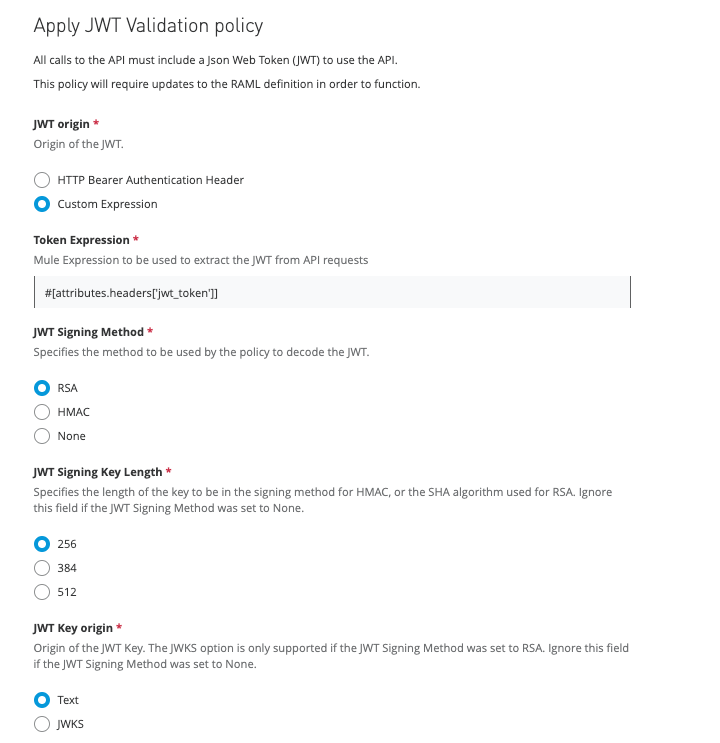
This way both the "JWT validation" policy and "OAuth 2.0 access token enforcement using Mule OAuth provider" policy can be applied for an API Instance.
Please do note the order of the policy. Refer to the docs here.
- If the order of "OAuth 2.0 access token enforcement using Mule OAuth provider" executes before the "JWT" policy then if the "OAuth 2.0 access token enforcement using Mule OAuth provider" policy fails then the request is failed and returned without validating JWT policy
Vidensartikelnummer
001115858
Løste denne artikel dit problem?
Giv os besked, så vi kan forbedre os!
