Valitse organisaatio
RTF Application Memory Is Not Coming Down After a Load Test
Julkaisupäivä: Sep 30, 2024
Tehtävä
QUESTION
"The question is about the memory usage of his application increased as it's being used, however, the memory usage is not coming down after the application is no longer processing anything (idle). I've uploaded the graph captured by the developer showing the increase and remain the same after idle."
Vaiheet
Explained:
An app memory goes up during the load test but not going down immediately after the test. The memory status is checked in Ops Center How to check the memory usage of an application replica in RTF (Runtime Fabric)
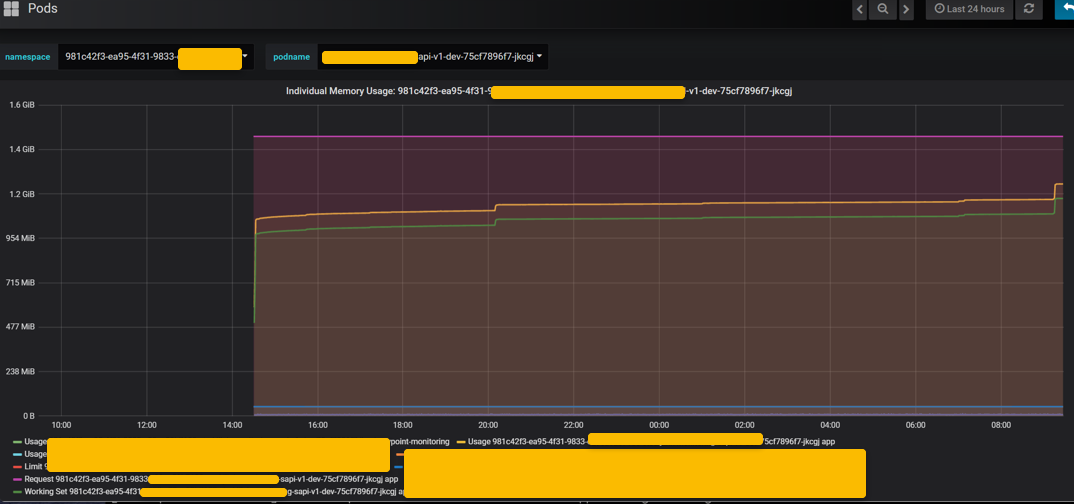
ANSWER
The memory goes up under high load. A GC (Garbage Collection) kicks in when necessary and claim back fragmented memory. However, the way how GC claim back memory and the frequency of GC varies.
Per this StackOverflow thread, https://stackoverflow.com/questions/12599044/what-the-frequency-of-the-garbage-collection-in-java,
"
It is not possible to give a definite answer to this. It really depends on a lot of factors, including the platform (JVM version, settings, etc), the application, and the workload.
At one extreme, it is possible for an application to never trigger a garbage collector. It might simply sit there doing nothing, or it might perform an extremely long computation in which no objects are created after the JVM initialization and application startup.
At the other extreme, it is theoretically possible for one garbage collection end and another one to start within a few nanoseconds. For example, this could happen if your application is in the last stages of dying from a full heap, or if it is allocating pathologically large arrays.
"
JVM takes care of GC so we don't need to worry about it. It makes sense of keeping the memory high for a while. Next time the app experiencing a high load just don't need to claim more memory. And the memory usage is way below the memory request so the app memory is still in good status.
ADDITIONAL INFORMATION
Refer to How to Force a Full JVM Garbage Collection for Applications in RTF for a forced GC
Knowledge-artikkelin numero
001115878
Ratkaisiko tämä artikkeli ongelmasi?
Anna palautetta, jotta voimme kehittyä!
