Выбрать организацию
How to Retrieve Console Logs from Chrome Developer Tools to Troubleshoot Javascript or UI Issues
Дата публикации: Aug 6, 2025
Задача
GOAL
Retrieve more developer debug information when loading a page (Anypoint Platform in this case) from a web browser. Possible issues:
- unable to load certain items on a page
- odd UI behavior that cannot be explained through a HAR file (more information: How to retrieve HTTP archive files (HAR))
Действия
The procedure to retrieve console logs is based on Google Chrome browser. Other browsers do provide the means to do this in a similar way.
1) In Google Chrome open the Developer Tools (Settings -> More Tools -> Developer Tools)
2) Click on "Console" tab.
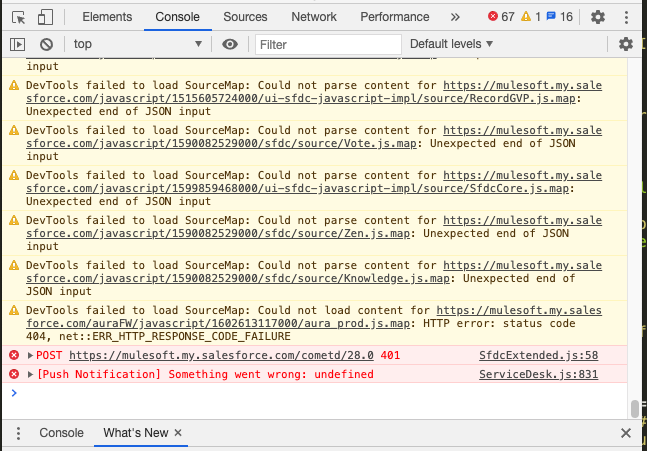
3) You may see some entries like this:
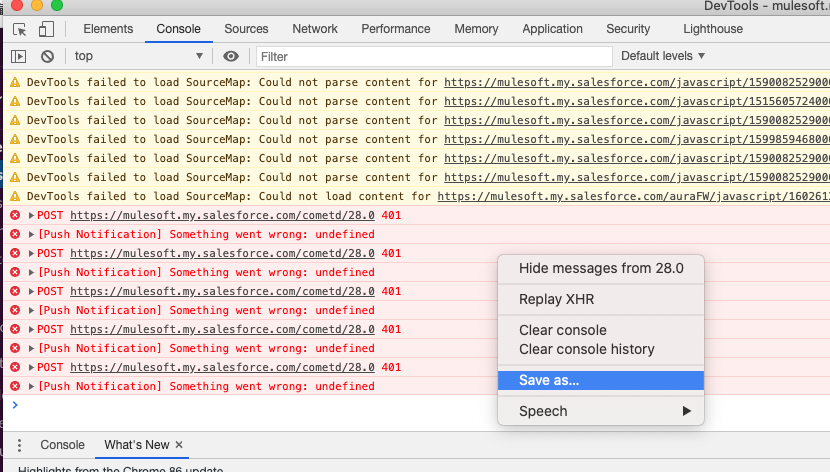
4) Right-click on any entry and choose "Save as" and select a filename on your local:
5) Finally, please upload that file to the case and our team will take a look at it.
Номер статьи базы знаний
001115920
Эта статья решила вашу проблему?
Оставьте свой отзыв, чтобы мы могли стать лучше!
