組織を選択
How to Test Cross-Origin Resource Sharing (CORS) And CORS Preflight Request with cURL
公開日: Jul 28, 2025
ステップ
QUESTION
Browsers (like Chrome) same-origin policy block reading a resource from a different origin by default. This mechanism stops a malicious site from "stealing" other sites' data, but it also prevents legitimate uses. When you want to get a public resource from a different origin, the resource-providing server needs to tell the browser "This origin where the request is coming from can access my resource". The browser remembers that and allows cross-origin resource sharing.Step 1 (Optional): If a web app needs a complex HTTP request, the browser sends a preflight request
Step 2: client (browser) request #
When the browser is making a cross-origin request, the browser adds an Origin header with the current origin (scheme, host, and port).
Step 3 server response #
On the server side, when a server sees this header, and wants to allow access, it needs to add an Access-Control-Allow-Origin header to the response specifying the requesting origin (or * to allow any origin.)
Step 4: browser receives response #
When the browser sees this response with an appropriate Access-Control-Allow-Origin header, the browser allows the response data to be shared with the client site.
Step #1 is optional. This step is only required if the request is a complex request. The CORS specification defines a complex request as
- A request that uses methods other than GET, POST, or HEAD
- A request that includes headers other than Accept, Accept-Language or Content-Language
- A request that has a Content-Type header other than application/x-www-form-urlencoded, multipart/form-data, or text/plain
(Reference to https://web.dev/cross-origin-resource-sharing/)
The question is how to simulate the CORS request and CORS preflight?
ANSWER
There's an application is running in Studio and paired up with an API in API manager. You can run the application anywhere in CloudHub, On-premise or RTF as long as it's paired up with the API which should show "Active" in API manager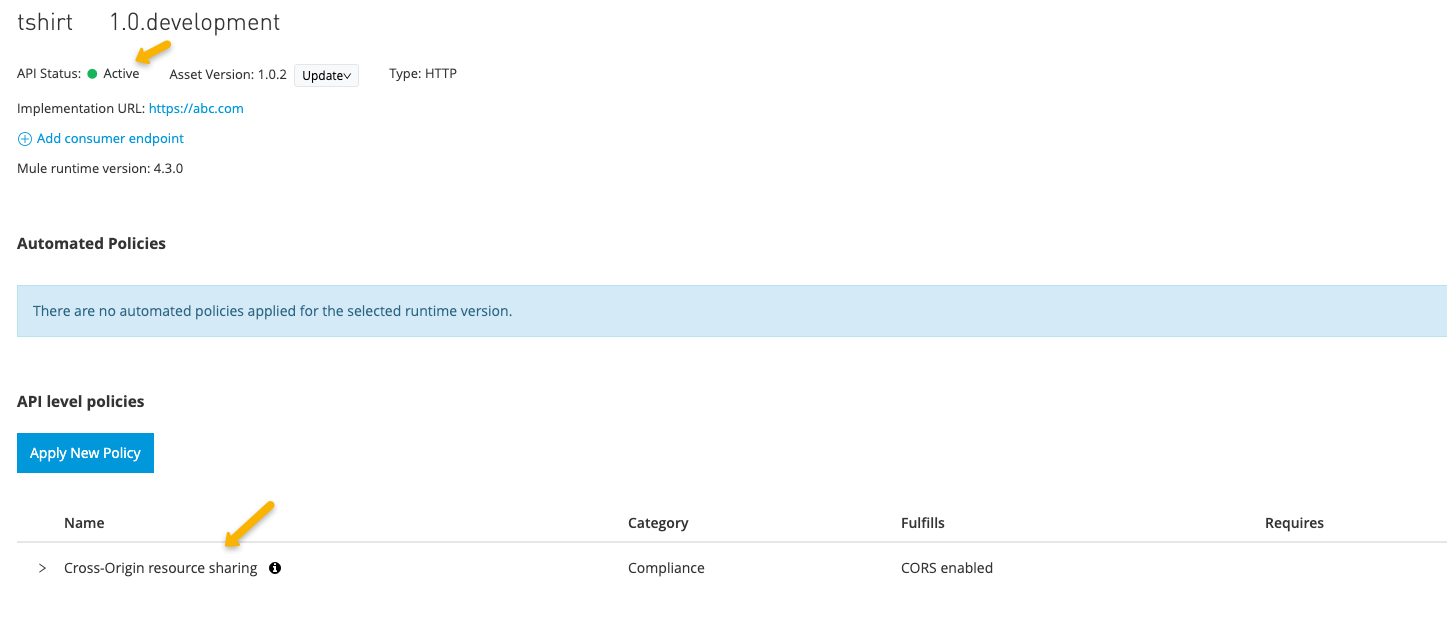
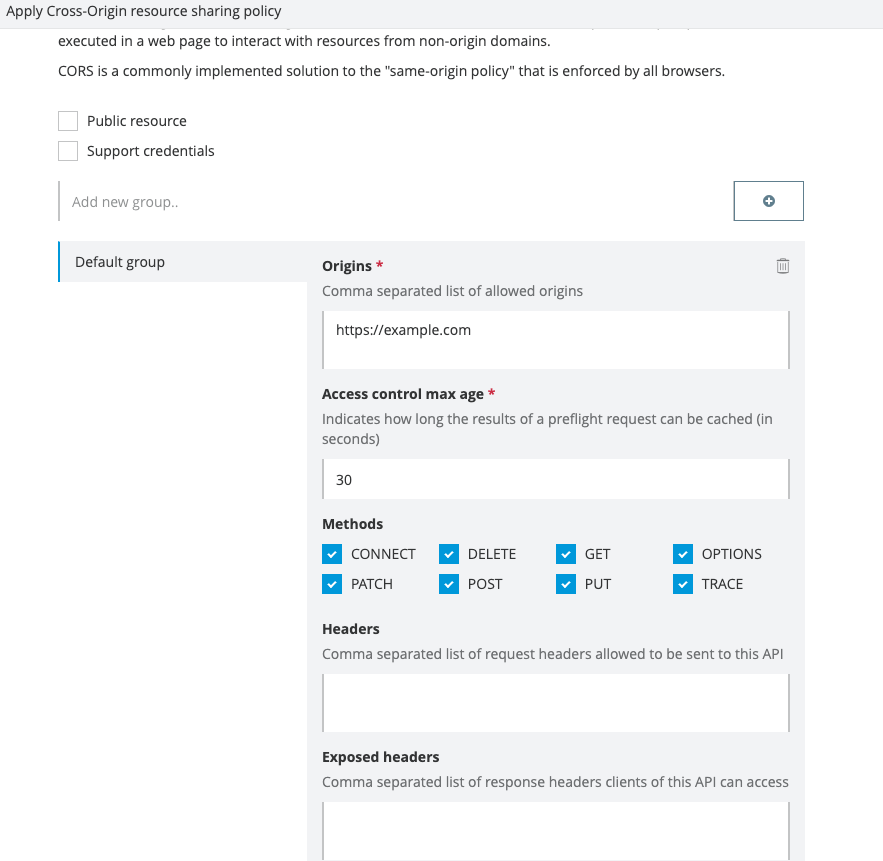
The API has enabled the CORS policy (screenshot below)
1. To simulate a CORS preflight test with cURL
The response has the "access-control-allow-origin", "access-control-max-age" and "access-control-allow-methods" headers
$ curl -v  --request OPTIONS 'localhost:8081/test' --header 'Origin: https://example.com' --header 'Access-Control-Request-Method: GET'

*   Trying 127.0.0.1...
* TCP_NODELAY set
* Connected to localhost (127.0.0.1) port 8081 (#0)
> OPTIONS /test HTTP/1.1
> Host: localhost:8081
> User-Agent: curl/7.64.1
> Accept: */*
> Origin: https://example.com
> Access-Control-Request-Method: GET
>
< HTTP/1.1 200 OK
< access-control-allow-methods: CONNECT, DELETE, GET, OPTIONS, PATCH, POST, PUT, TRACE
< access-control-max-age: 30
< access-control-allow-origin: https://example.com
< Transfer-Encoding: chunked
< Date: Thu, 24 Sep 2020 23:37:39 GMT
<
* Connection #0 to host localhost left intact
* Closing connection 0
2. To simulate a CORS request with cURL
The response has the "access-control-allow-origin" headercurl -v --request GET 'localhost:8081/test' --header 'Origin: https://example.com'
Note: Unnecessary use of -X or --request, GET is already inferred.
* Trying 127.0.0.1...
* TCP_NODELAY set
* Connected to localhost (127.0.0.1) port 8081 (#0)
> GET /test HTTP/1.1
> Host: localhost:8081
> User-Agent: curl/7.64.1
> Accept: */*
> Origin: https://example.com
>
< HTTP/1.1 200 OK
< access-control-allow-origin: https://example.com
< Content-Type: application/json; charset=UTF-8
< Content-Length: 21
< Date: Thu, 24 Sep 2020 23:40:29 GMT
<
{
"payload": "Ok"
* Connection #0 to host localhost left intact
}* Closing connection 0
ADDITIONAL INFORMATION
If Send the CORS request with a wrong "Origin" Header, the response is still 200 but doesn't have the "access-control-allow-origin" header
curl -v  --request GET 'localhost:8081/test' --header 'Origin: https://wrong.example.com'
Note: Unnecessary use of -X or --request, GET is already inferred.
*   Trying 127.0.0.1...
* TCP_NODELAY set
* Connected to localhost (127.0.0.1) port 8081 (#0)
> GET /test HTTP/1.1
> Host: localhost:8081
> User-Agent: curl/7.64.1
> Accept: */*
> Origin: https://wrong.example.com
>
< HTTP/1.1 200 OK
< Transfer-Encoding: chunked
< Date: Thu, 24 Sep 2020 23:41:07 GMT
<
* Connection #0 to host localhost left intact
* Closing connection 0
The same happens in a preflight CORS request
curl -v  --request OPTIONS 'localhost:8081/test' --header 'Origin: https://wrong.example.com' --header 'Access-Control-Request-Method: GET'
*   Trying 127.0.0.1...
* TCP_NODELAY set
* Connected to localhost (127.0.0.1) port 8081 (#0)
> OPTIONS /test HTTP/1.1
> Host: localhost:8081
> User-Agent: curl/7.64.1
> Accept: */*
> Origin: https://example1.com
> Access-Control-Request-Method: GET
>
< HTTP/1.1 200 OK
< Transfer-Encoding: chunked
< Date: Thu, 24 Sep 2020 23:44:15 GMT
<
* Connection #0 to host localhost left intact
* Closing connection 0
If miss the "Access-Control-Request-Method" header in a preflight request, it has the same response as with a wrong "Origin" header
curl -v  --request OPTIONS 'localhost:8081/test' --header 'Origin: https://example1.com'
*   Trying 127.0.0.1...
* TCP_NODELAY set
* Connected to localhost (127.0.0.1) port 8081 (#0)
> OPTIONS /test HTTP/1.1
> Host: localhost:8081
> User-Agent: curl/7.64.1
> Accept: */*
> Origin: https://example1.com
>
< HTTP/1.1 200 OK
< Transfer-Encoding: chunked
< Date: Thu, 24 Sep 2020 23:51:58 GMT
<
* Connection #0 to host localhost left intact
* Closing connection 0
If a preflight request doesn't have the header "Access-Control-Allow-Origin" in the response, the browser will report the error "Response to preflight request doesn't pass access control check: No 'Access-Control-Allow-Origin' header is present on the requested resource".
ナレッジ記事番号
001115964
この記事で問題は解決されましたか?
ご意見をお待ちしております。
